AI agent for catering managers
Hotel Wedding and Banquet Order Reconciliation Agent
Keep kitchen, setup and billing aligned with the latest event order and bill what was agreed.
What it does
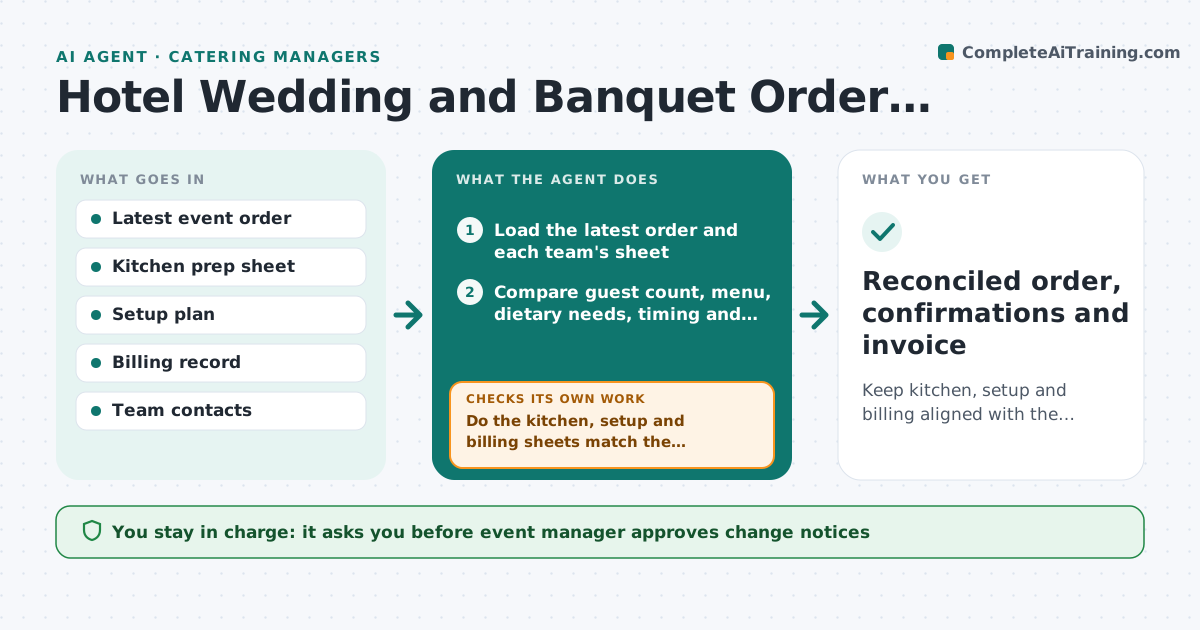
Banquet event orders change many times before a wedding, and kitchen, setup and billing often work from different versions. The agent compares the latest event order with the kitchen prep sheet, the room setup plan and the billing, and flags differences such as guest count, menu changes, dietary needs and room layout. It notifies each team of what changed and tracks their confirmations. If a team has not confirmed, it chases and re-checks. After the event it compares the final order with the invoice. The event manager approves the final order and the invoice. Edge case: guest count rose from 120 to 135 but the kitchen prep still shows 120, so the agent flags it and asks for confirmation.
How it works
Follow the arrows from top to bottom. The orange dashed arrow is the loop: when a check fails, the agent goes back and tries again.
Read the steps as a list
- Event order changed
- Load the latest order and each team's sheet
- Compare guest count, menu, dietary needs, timing and layout
- Do the kitchen, setup and billing sheets match the order?If not: List each difference with the line and the team. Back to step 3.
- Draft change notices for each team
- Event manager approves the noticesThe agent waits here for your OK.
- Send the notices and track confirmations
- Has every team confirmed the change?If not: Chase the team and escalate to the event manager if still open after one day. Back to step 4.
- After the event, compare the final order with the invoice
- Event manager approves the final order and the invoiceThe agent waits here for your OK.
- Reconciled order, confirmations and invoice
How it decides
It treats the latest approved event order as the source. Any difference in a team's sheet is flagged with the exact line. A change is complete only when the team confirms.
- Latest approved order is the source of truth
- Guest count changes within 7 days need kitchen confirmation
- Dietary changes always notify the kitchen
- Invoice lines must match the order lines
Make it yours
Every agent is a starting point. You choose these settings for your own situation.
- Source of truth (default latest approved order)
- Notice lead time
- Teams notified
- Chase delay (default 1 day)
What keeps you in control
It always asks you first
- Event manager approves change notices
- Event manager approves the final order and the invoice
Hard limits
- Never changes a team's sheet itself
- Never sends an invoice without approval
It stops when
- Done: all teams confirmed and invoice matches
- Stop: the event is cancelled, so open items close
Set it up
We guide you through the set-up, step by step
Members get the full set-up guide for this agent. No technical skills needed: you copy, paste and upload.
- One set of instructions to paste into your AI, with the clicks for ChatGPT, Claude, Microsoft 365 Copilot, Gemini and Grok
- The agent then walks you through connecting your own data, one source at a time
- A downloadable copy with the flow chart, the rules and the full guide