AI agent for help desk technicians
How-To Ticket Training Gap Agent
Fewer how-to tickets through training aimed at the topics and teams that generate them
What it does
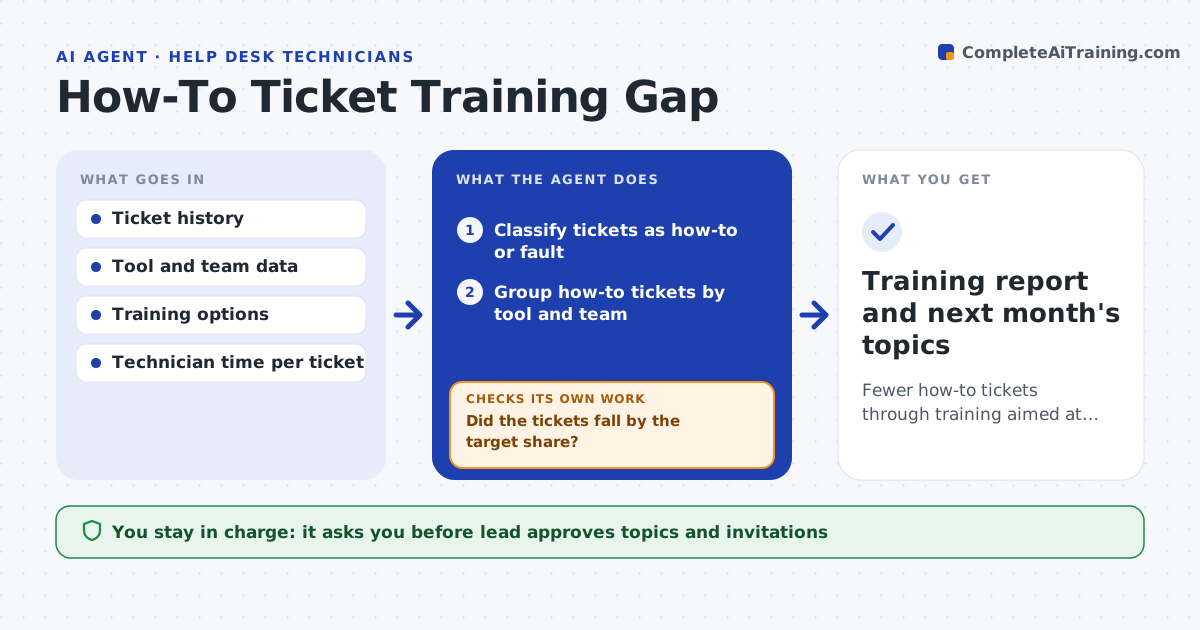
A large share of tickets are how-to questions that training could prevent. This agent separates how-to tickets from faults, groups them by tool and team, and ranks the topics by volume and cost in technician time. It drafts a short training plan for the top topics, with the audience and format. After the training, it checks whether tickets on those topics fall. If they do not, it looks at why, such as the wrong audience, and changes the plan. The lead approves the training topics and the invitations. Edge case: one team asks the same spreadsheet question each month, so the agent proposes a short team session in place of a company-wide course.
How it works
Follow the arrows from top to bottom. The orange dashed arrow is the loop: when a check fails, the agent goes back and tries again.
Read the steps as a list
- Monthly ticket review
- Classify tickets as how-to or fault
- Group how-to tickets by tool and team
- Rank topics by volume and technician time
- Draft a training plan with audience and format
- Lead approves the topics and invitationsThe agent waits here for your OK.
- After the training, count new tickets on those topics
- Did the tickets fall by the target share?If not: look at the audience and format, change the plan and propose a new session. Back to step 3.
- Record the result and update the ranking
- Training report and next month's topics
How it decides
A topic is chosen when it is frequent and costly. A training counts as working when related tickets drop by a set share in the next period.
- Rank by volume times technician time
- Choose a team session when one team has most tickets
- Count a drop only against the same period length
- Retire a topic when tickets stay low
Make it yours
Every agent is a starting point. You choose these settings for your own situation.
- Target drop in tickets (default: 40%)
- Time window for comparison
- Training formats allowed
- Number of topics each month (default: 3)
What keeps you in control
It always asks you first
- Lead approves topics and invitations
Hard limits
- Never sends invitations itself
- Never uses ticket text outside the IT team
It stops when
- Done: targeted topics fall and the report is saved
- Stop: ticket data does not separate how-to from fault
Set it up
We guide you through the set-up, step by step
Members get the full set-up guide for this agent. No technical skills needed: you copy, paste and upload.
- One set of instructions to paste into your AI, with the clicks for ChatGPT, Claude, Microsoft 365 Copilot, Gemini and Grok
- The agent then walks you through connecting your own data, one source at a time
- A downloadable copy with the flow chart, the rules and the full guide