AI agent for hr information system (hris) specialists
HR Data Import Reconciliation Agent
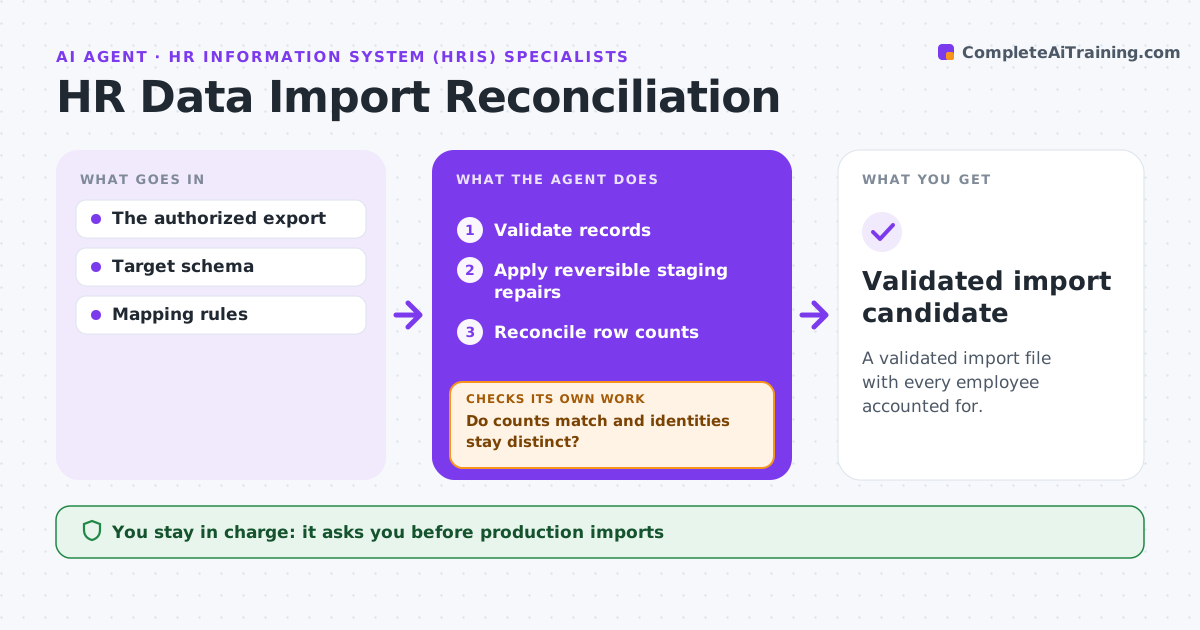
A validated import file with every employee accounted for.
What it does
HR system migrations fail when the export contains invalid employee IDs, broken dates or records that do not match each other. This agent validates every record in the HR export against the target system's schema. It applies only reversible repairs in a staging copy, and only where the schema clearly defines the fix, such as date formats or code mappings. It then reconciles row counts between source and staging, so no employee is lost or duplicated. When two records look like the same person but conflict, it keeps them separate and lists them for review instead of merging. The HR systems admin approves the final import. Edge case: two records share an employee ID but have different birth dates, so the agent flags both and leaves the merge decision to a person.
How it works
Follow the arrows from top to bottom. The orange dashed arrow is the loop: when a check fails, the agent goes back and tries again.
Read the steps as a list
- Export prepared
- Validate records
- Apply reversible staging repairs
- Reconcile row counts
- Do counts match and identities stay distinct?If not: investigate before handoff. Back to step 3.
- HR systems admin approves the importThe agent waits here for your OK.
- Validated import candidate
How it decides
It normalizes from schema evidence, never merges conflicting identities, and investigates count gaps.
- Repair only when the schema defines the correct value.
- Never merge records that conflict on identity fields.
- Row counts must match the source exactly before handoff.
- Every repair is logged so it can be reversed.
Make it yours
Every agent is a starting point. You choose these settings for your own situation.
- Target system schema and field rules
- Which repairs may be applied automatically (default formats and code mappings only)
- Identity fields used to detect duplicates (default ID, name, birth date)
- Who approves the import (default HR systems admin)
What keeps you in control
It always asks you first
- Production imports
- Employee record changes
Hard limits
- Staging only.
It stops when
- Done: validated.
Set it up
We guide you through the set-up, step by step
Members get the full set-up guide for this agent. No technical skills needed: you copy, paste and upload.
- One set of instructions to paste into your AI, with the clicks for ChatGPT, Claude, Microsoft 365 Copilot, Gemini and Grok
- The agent then walks you through connecting your own data, one source at a time
- A downloadable copy with the flow chart, the rules and the full guide