AI agent for ai engineers
Hyperparameter Search Supervisor Agent
A better model configuration found efficiently, with every trial logged
What it does
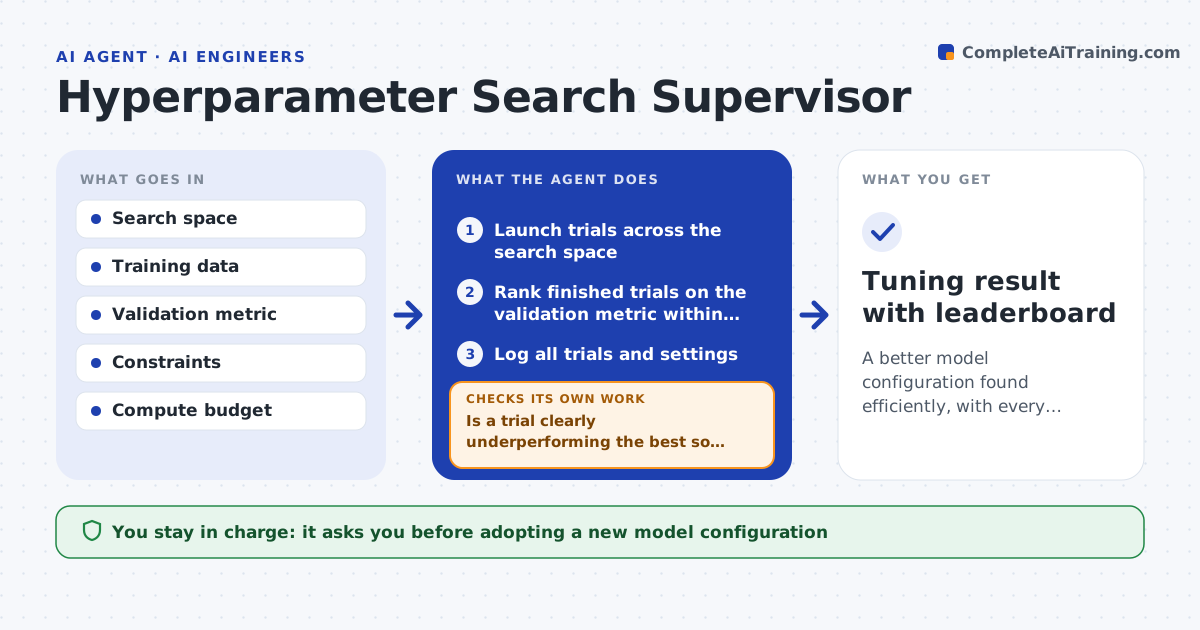
Tuning a model means trying many settings, and bad trials can burn hours of compute while results end up hard to reproduce. This agent runs a search over the hyperparameters you define, launching trials and watching each one's early metrics. It stops trials that clearly trail the best so far, freeing compute for promising ones. It compares finished trials on the validation metric and keeps a leaderboard. Before naming a winner, it checks hard constraints such as latency or fairness limits. Then it checks whether the gain over the baseline is larger than normal run-to-run noise. If not, it reports that tuning did not help instead of promoting noise. It logs every trial's settings and results. You approve adopting a new configuration. Edge case: the top validation score that breaks a constraint is not chosen.
How it works
Follow the arrows from top to bottom. The orange dashed arrow is the loop: when a check fails, the agent goes back and tries again.
Read the steps as a list
- Tuning requested
- Launch trials across the search space
- Is a trial clearly underperforming the best so far?If not: let promising trials continue. Back to step 2.
- Rank finished trials on the validation metric within constraints
- Does the best trial clearly beat the baseline?If not: report that tuning did not improve the model. Back to step 2.
- Log all trials and settings
- Engineer approves adopting the configurationThe agent waits here for your OK.
- Tuning result with leaderboard
How it decides
It stops trials trailing the best early, ranks by the validation metric within constraints, and adopts a new config only if it clearly beats the baseline.
- Stop trials trailing the best early
- Reject configs that break a constraint
- Adopt only a clear improvement over baseline
Make it yours
Every agent is a starting point. You choose these settings for your own situation.
- Search space
- Validation metric and constraints
- Early-stop rule
- Compute budget
What keeps you in control
It always asks you first
- Adopting a new model configuration
Hard limits
- Never adopts a config without approval
- Respects constraints over raw score
It stops when
- Done: best config found or none beats baseline
- Stop: the validation metric is undefined
Set it up
We guide you through the set-up, step by step
Members get the full set-up guide for this agent. No technical skills needed: you copy, paste and upload.
- One set of instructions to paste into your AI, with the clicks for ChatGPT, Claude, Microsoft 365 Copilot, Gemini and Grok
- The agent then walks you through connecting your own data, one source at a time
- A downloadable copy with the flow chart, the rules and the full guide