AI agent for radiographers
Image Reject Analysis Agent
Lower reject rates and patient dose
What it does
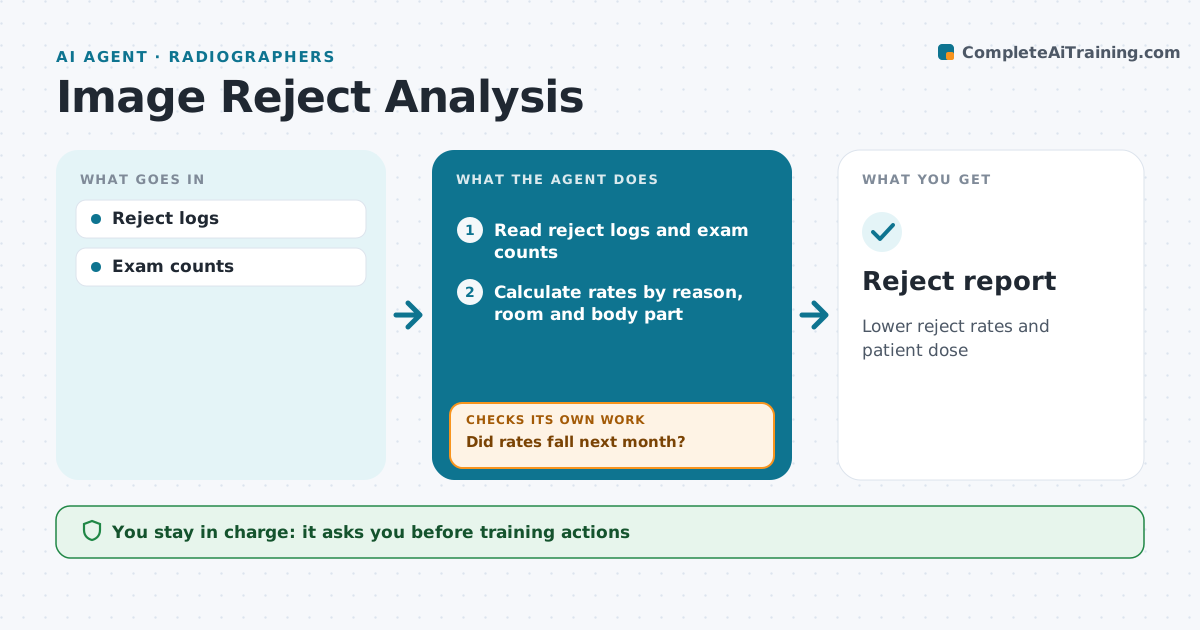
Each rejected or repeated X-ray gives the patient extra dose and costs room time. This agent reads reject logs from each room and groups rejects by reason, such as positioning, motion, exposure or artifact, and by body part, room and shift. It calculates reject rates and compares them with the target and last month. When a rate is high, it finds the main cause and drafts a short teaching note or an equipment check request. The imaging lead approves any action. The next month it checks whether the rate fell. If it did not, it tries the next likely cause or escalates to the imaging lead. Edge case: rejects labeled test or QC are removed before calculating, so they do not inflate the rate.
How it works
Follow the arrows from top to bottom. The orange dashed arrow is the loop: when a check fails, the agent goes back and tries again.
Read the steps as a list
- Month ends
- Read reject logs and exam counts
- Calculate rates by reason, room and body part
- Draft actions for high rates
- Imaging lead approves actionsThe agent waits here for your OK.
- Did rates fall next month?If not: try the next cause or escalate. Back to step 3.
- Reject report
How it decides
Rates above target by room or body part are investigated by top reason.
- Target under 8% overall
- QC images excluded
- Equipment causes go to physics
Make it yours
Every agent is a starting point. You choose these settings for your own situation.
- Target rate
- Grouping
- Report format
- Recipients
What keeps you in control
It always asks you first
- Training actions
- Equipment checks
Hard limits
- No blame of individuals in reports
It stops when
- Done: report issued
- Stop: logs missing, ask PACS admin
Set it up
We guide you through the set-up, step by step
Members get the full set-up guide for this agent. No technical skills needed: you copy, paste and upload.
- One set of instructions to paste into your AI, with the clicks for ChatGPT, Claude, Microsoft 365 Copilot, Gemini and Grok
- The agent then walks you through connecting your own data, one source at a time
- A downloadable copy with the flow chart, the rules and the full guide