AI agent for radiographers
Exam No-Show and Prep Failure Rescheduling Agent
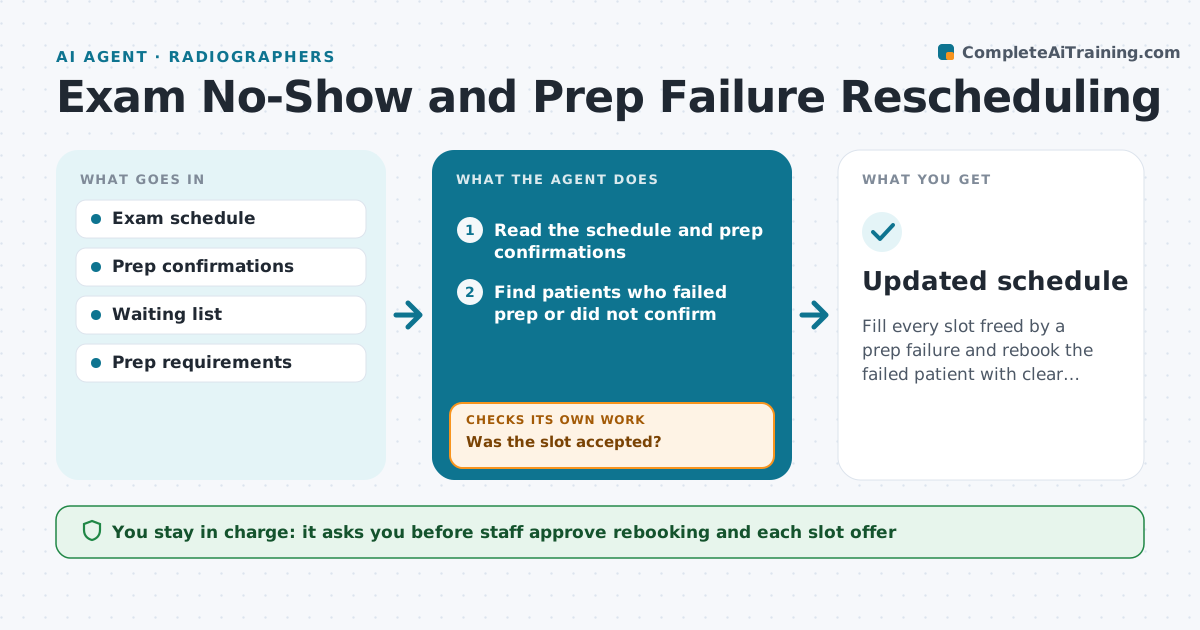
Fill every slot freed by a prep failure and rebook the failed patient with clear instructions.
What it does
When a patient arrives without following prep, such as fasting or a full bladder, the slot is wasted. This agent works the day before and the morning of exams. It checks prep confirmations and flags patients who did not confirm or who report a failure. It drafts new prep instructions, rebooks them and offers the freed slot to a waiting list in priority order until it is filled. Staff approve each rebooking and each offer. If a waiting patient declines or cannot come in time, the agent offers the slot to the next patient. Edge case: the freed slot needs a prep, such as fasting, that the next patient cannot have done, so the agent skips them.
How it works
Follow the arrows from top to bottom. The orange dashed arrow is the loop: when a check fails, the agent goes back and tries again.
Read the steps as a list
- Day before or morning of exams
- Read the schedule and prep confirmations
- Find patients who failed prep or did not confirm
- Draft new prep instructions and a new slot
- Staff approve the rebookingThe agent waits here for your OK.
- Send instructions and rebook
- List waiting patients whose prep matches the freed slot
- Offer the slot in priority order
- Was the slot accepted?If not: offer the next patient on the list. Back to step 8.
- Is the slot filled before the exam time?If not: leave the slot open and tell the scheduler. Back to step 7.
- Updated schedule
How it decides
A slot is offered only to waiting patients whose prep matches the exam. Unconfirmed preps are chased first.
- Offer only patients who meet the prep
- Order the waiting list by urgency, then wait time
- Chase unconfirmed preps 4 hours before the slot
- Stop offers 30 minutes before the exam
Make it yours
Every agent is a starting point. You choose these settings for your own situation.
- Offer time limit (default 30 minutes before the exam)
- Waiting list priority rules
- Chase time (default 4 hours)
- Prep rules per exam
What keeps you in control
It always asks you first
- Staff approve rebooking and each slot offer
Hard limits
- Never offer a slot without the matching prep
- Never share another patient's information
It stops when
- Done: slot filled or closed
- Stop: no matching patients on the list
Set it up
We guide you through the set-up, step by step
Members get the full set-up guide for this agent. No technical skills needed: you copy, paste and upload.
- One set of instructions to paste into your AI, with the clicks for ChatGPT, Claude, Microsoft 365 Copilot, Gemini and Grok
- The agent then walks you through connecting your own data, one source at a time
- A downloadable copy with the flow chart, the rules and the full guide