AI agent for historians
Image Rights Tracking Agent
Have a licensed, documented image for every figure before layout begins.
What it does
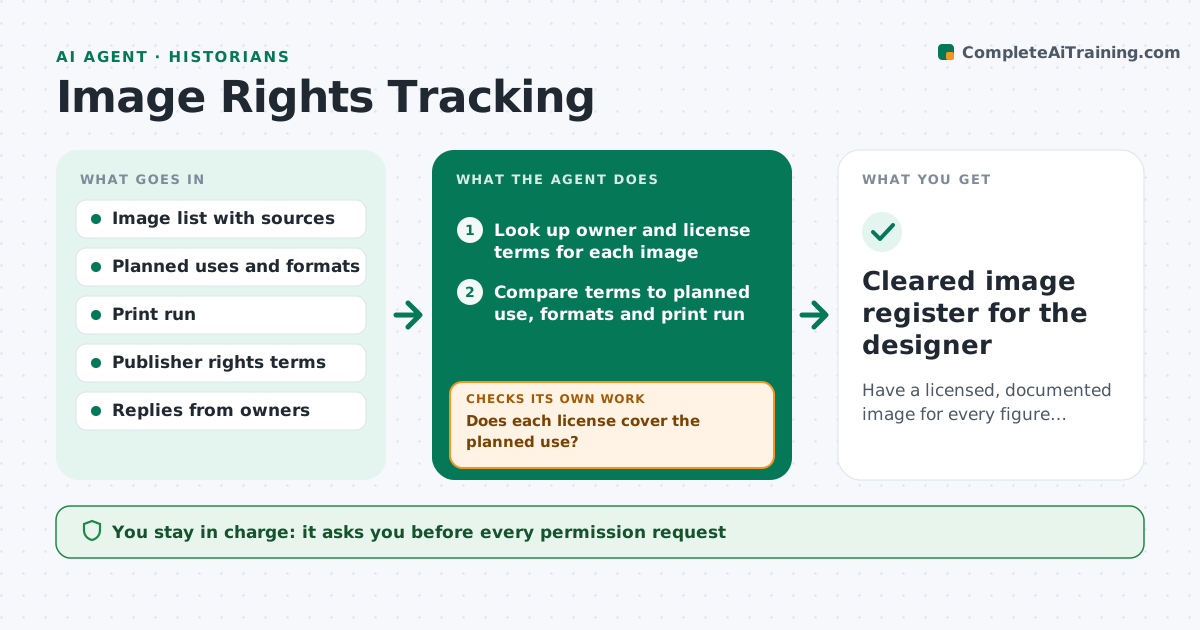
A book may use fifty images, each with a different owner, license, fee and use limit. Too often the gaps appear when the designer starts layout. This agent keeps a register of every image with its source, owner, license, territory, print run and use, and compares it with the manuscript's image list. It drafts permission requests for each owner and checks the inbox and notes each week for replies. It rechecks that each license covers the planned use, such as print plus ebook and the print run. Before layout it lists images still unlicensed and proposes substitutes from public domain or openly licensed collections. It never sends requests or agrees to fees. The author approves all of that. Edge case: a license covering print only is flagged for the ebook.
How it works
Follow the arrows from top to bottom. The orange dashed arrow is the loop: when a check fails, the agent goes back and tries again.
Read the steps as a list
- Image list created or weekly run
- Look up owner and license terms for each image
- Compare terms to planned use, formats and print run
- Draft permission requests for uncleared images
- Author approves requests and any feeThe agent waits here for your OK.
- Check replies and update the register
- Does each license cover the planned use?If not: draft an extension request or flag the image for a substitute. Back to step 3.
- Are all images cleared 3 weeks before layout?If not: search public domain and open collections for substitutes and check their licenses. Back to step 6.
- Author approves substitutesThe agent waits here for your OK.
- Cleared image register for the designer
How it decides
It marks an image cleared only when a written license covers format, territory, print run and term. It proposes a substitute only when the original is unlicensed 3 weeks before layout.
- Treat a missing written license as uncleared
- Flag any license that excludes ebook, foreign or audio use
- Offer substitutes only for images uncleared at the 3 week mark
- Flag fees above the budget line for the author's decision
Make it yours
Every agent is a starting point. You choose these settings for your own situation.
- Planned formats and territories
- Print run and term for licenses
- Fee limit before asking (default $150)
- Weeks before layout to propose substitutes (default 3)
- Preferred open collections
What keeps you in control
It always asks you first
- Every permission request
- Every fee
- Chosen substitutes
Hard limits
- Never send a request or accept a fee
- Keep a copy of every license in the register
It stops when
- Done: every image cleared or replaced
- Stop: key image is unavailable at any price
Set it up
We guide you through the set-up, step by step
Members get the full set-up guide for this agent. No technical skills needed: you copy, paste and upload.
- One set of instructions to paste into your AI, with the clicks for ChatGPT, Claude, Microsoft 365 Copilot, Gemini and Grok
- The agent then walks you through connecting your own data, one source at a time
- A downloadable copy with the flow chart, the rules and the full guide