AI agent for immigration consultants
Immigration Biometrics and Appointment Tracker Agent
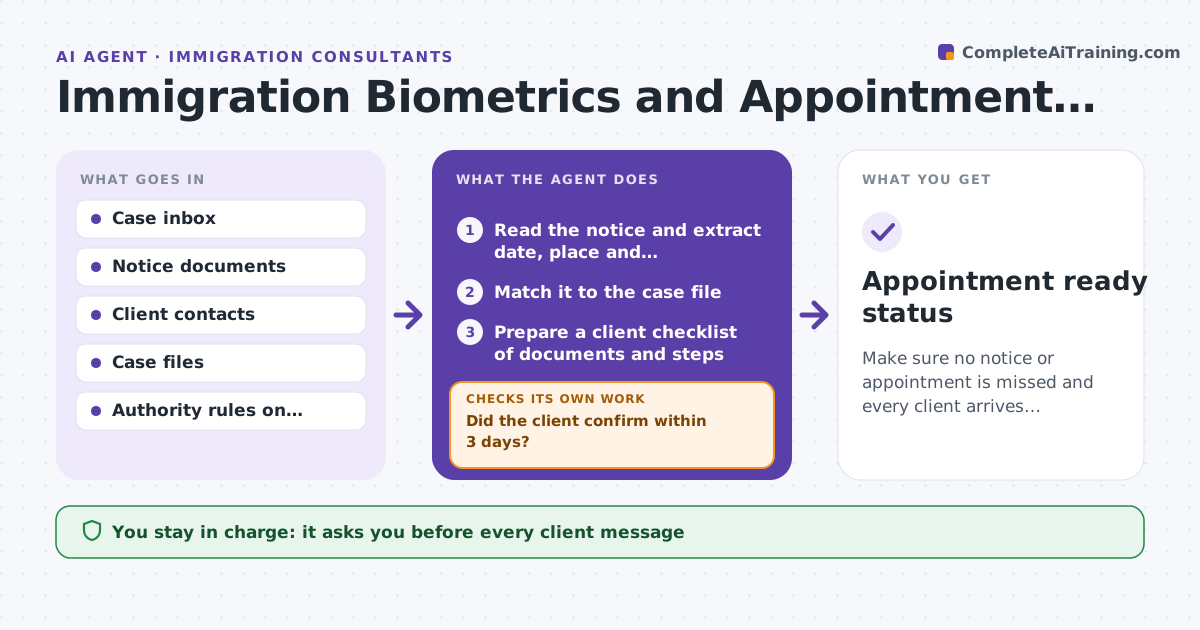
Make sure no notice or appointment is missed and every client arrives prepared.
What it does
Immigration cases generate notices: biometrics appointments, interview dates, requests for more evidence. They arrive by mail or an online inbox, and a missed date can end a case. This agent reads notices from the case inbox, extracts dates, locations and what the client must bring, and prepares a client checklist. It tracks the client's confirmations, reminds them at set times, and reschedules where the notice allows it. It flags any notice that arrives with less time than the response deadline allows. The consultant approves every message. Edge case: if a client confirms that they cannot attend, the agent drafts a reschedule request with the required proof, for the consultant to review.
How it works
Follow the arrows from top to bottom. The orange dashed arrow is the loop: when a check fails, the agent goes back and tries again.
Read the steps as a list
- A notice arrives in the case inbox
- Read the notice and extract date, place and requirements
- Match it to the case file
- Prepare a client checklist of documents and steps
- Consultant approves the message to the clientThe agent waits here for your OK.
- Send and track the client's confirmation
- Did the client confirm within 3 days?If not: Send a reminder and then call the client at 7 days before. Back to step 6.
- Draft a reschedule request if the client cannot attend
- Is the appointment confirmed with all required documents ready?If not: List the missing items and chase the client. Back to step 4.
- Appointment ready status
How it decides
Extracts dates and requirements from each notice, ranks cases by days to deadline, and escalates when a client has not confirmed 7 days before.
- Notice with under 10 days to the date is urgent
- No confirmation by 7 days before triggers a call
- Reschedule needs proof and a consultant decision
- All dates are entered in the case calendar
Make it yours
Every agent is a starting point. You choose these settings for your own situation.
- Reminder timing (default 3 and 7 days)
- Notice types tracked
- Client language
- Checklist templates
- Who is the backup consultant
What keeps you in control
It always asks you first
- Every client message
- Any reschedule request
- Any filing in response to a notice
Hard limits
- Never file anything with the authority
- Never send a message without approval
It stops when
- Done: appointment attended and documented
- Stop: case withdrawn
- Stop: notice appears invalid, consultant reviews
Set it up
We guide you through the set-up, step by step
Members get the full set-up guide for this agent. No technical skills needed: you copy, paste and upload.
- One set of instructions to paste into your AI, with the clicks for ChatGPT, Claude, Microsoft 365 Copilot, Gemini and Grok
- The agent then walks you through connecting your own data, one source at a time
- A downloadable copy with the flow chart, the rules and the full guide