AI agent for compensation analysts
Incentive Payout Calculation Agent
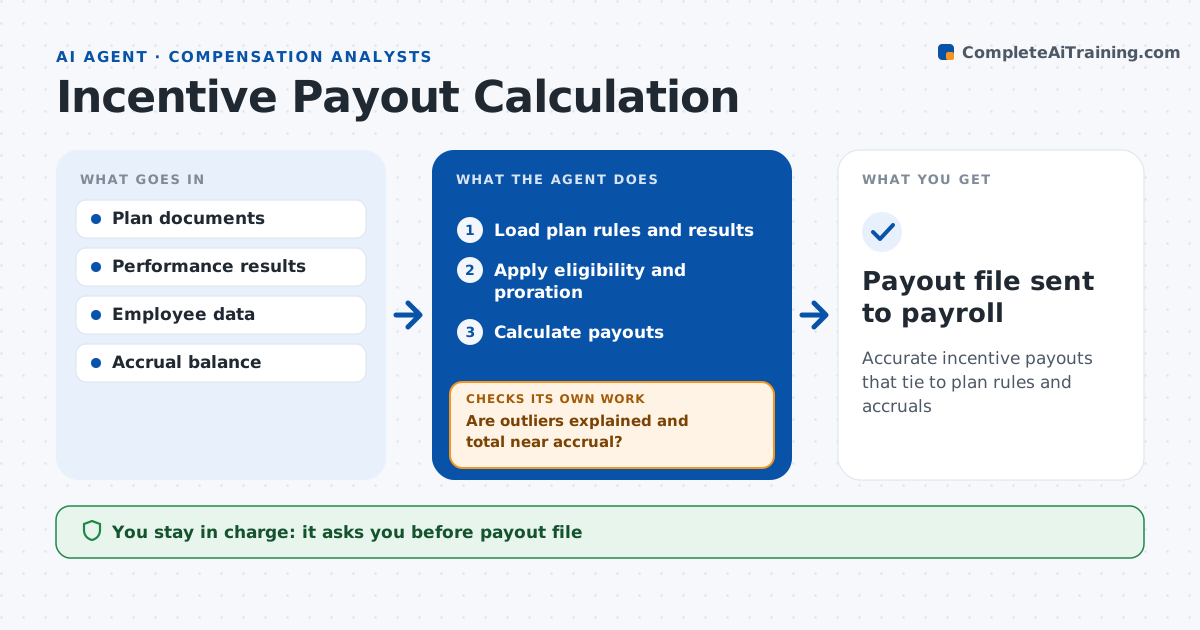
Accurate incentive payouts that tie to plan rules and accruals
What it does
Incentive payouts are high-stakes for staff, and one wrong input can overpay by thousands. At the end of each period, this agent calculates payouts. It reads plan rules, pulls results such as sales, targets and company scores, and applies eligibility rules like start dates and leave. It calculates each payout and compares it to targets and past payouts. It looks for outliers, such as payouts above caps or people with results but no plan, and reconciles the total to the accrual in the books. When something fails, it traces the input and recalculates. The analyst approves the payout file before it goes to payroll. Edge case: an employee transferred between plans mid-quarter, so the agent prorates by days in each plan.
How it works
Follow the arrows from top to bottom. The orange dashed arrow is the loop: when a check fails, the agent goes back and tries again.
Read the steps as a list
- Incentive period closes
- Load plan rules and results
- Apply eligibility and proration
- Calculate payouts
- Are outliers explained and total near accrual?If not: trace the input data and recalculate the affected payouts. Back to step 3.
- Analyst approves payout fileThe agent waits here for your OK.
- Payout file sent to payroll
How it decides
It applies plan formulas, caps and eligibility rules, and flags payouts far from target or history.
- Payout above plan cap: limit to cap
- Total differs from accrual by over 5%: explain to finance
- Mid-period plan change: prorate by days
Make it yours
Every agent is a starting point. You choose these settings for your own situation.
- Plans in scope
- Outlier threshold
- Proration method
- Accrual tolerance
What keeps you in control
It always asks you first
- Payout file
- Plan exceptions
Hard limits
- Never changes plan rules
- Never sends payouts without approval
It stops when
- Done: payouts approved
- Stop: results not final
Set it up
We guide you through the set-up, step by step
Members get the full set-up guide for this agent. No technical skills needed: you copy, paste and upload.
- One set of instructions to paste into your AI, with the clicks for ChatGPT, Claude, Microsoft 365 Copilot, Gemini and Grok
- The agent then walks you through connecting your own data, one source at a time
- A downloadable copy with the flow chart, the rules and the full guide