AI agent for machine learning engineers
Inference Cost and Latency Review Agent
Cut serving cost and tail latency without lowering model quality
What it does
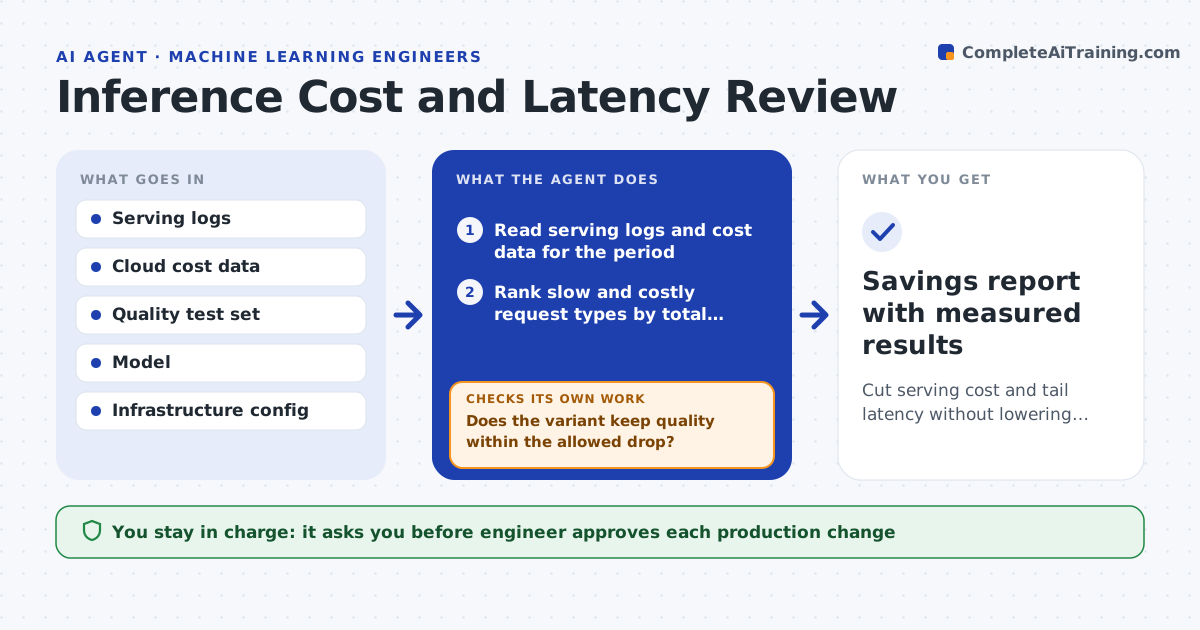
The serving bill and the slow tail creep up, and the team cannot say why. This agent reads the serving logs for a period and finds the requests that are slow or costly: large inputs, cold starts, retries, or traffic to an oversized model. It ranks causes by money and by effect on the slowest requests. For each cause it proposes a change such as batching, caching repeated calls, shortening inputs or routing easy requests to a smaller model. It tests each change on a copy of recent traffic and runs the quality checks. It measures cost, latency and quality, and reverts any change that hurts quality. The engineer approves production changes. Edge case: caching saves 30% but returns stale answers for fast-changing inputs, so the agent limits the cache time.
How it works
Follow the arrows from top to bottom. The orange dashed arrow is the loop: when a check fails, the agent goes back and tries again.
Read the steps as a list
- Cost or latency alert, or monthly review
- Read serving logs and cost data for the period
- Rank slow and costly request types by total impact
- Propose changes such as batching, caching, shorter inputs or a smaller model
- Replay recent traffic with each change in a test setup
- Run the quality test set on each variant
- Does the variant keep quality within the allowed drop?If not: revert that change and try a milder version or a different option. Back to step 4.
- Engineer approves the production changeThe agent waits here for your OK.
- Roll out and measure cost and p95 latency
- Did the live numbers match the test within 10%?If not: roll back and recheck the traffic sample. Back to step 4.
- Savings report with measured results
How it decides
It selects changes by estimated savings and keeps one only when the quality test stays within the allowed drop.
- Consider a change only when it saves at least 5% of cost or 15% of p95 latency
- Allow a quality drop of at most 0.5 points on the test set
- Limit cache lifetime for inputs that change within the hour
- Route to a smaller model only when it matches quality on that request class
Make it yours
Every agent is a starting point. You choose these settings for your own situation.
- Quality drop allowed (default 0.5 points)
- Latency metric to target (default p95)
- Minimum saving worth a change (default 5%)
- Cache lifetime cap (default 5 minutes)
What keeps you in control
It always asks you first
- Engineer approves each production change
- Product owner approves any visible quality change
Hard limits
- Never deploy a change that fails the quality test
- Never run replay tests on live customer data outside the approved environment
It stops when
- Done: live savings are measured and the report is saved
- Stop: no change meets the quality bar, so the agent lists options for a larger redesign
Set it up
We guide you through the set-up, step by step
Members get the full set-up guide for this agent. No technical skills needed: you copy, paste and upload.
- One set of instructions to paste into your AI, with the clicks for ChatGPT, Claude, Microsoft 365 Copilot, Gemini and Grok
- The agent then walks you through connecting your own data, one source at a time
- A downloadable copy with the flow chart, the rules and the full guide