AI agent for innovation strategists
Innovation Workshop Output Follow-Up Agent
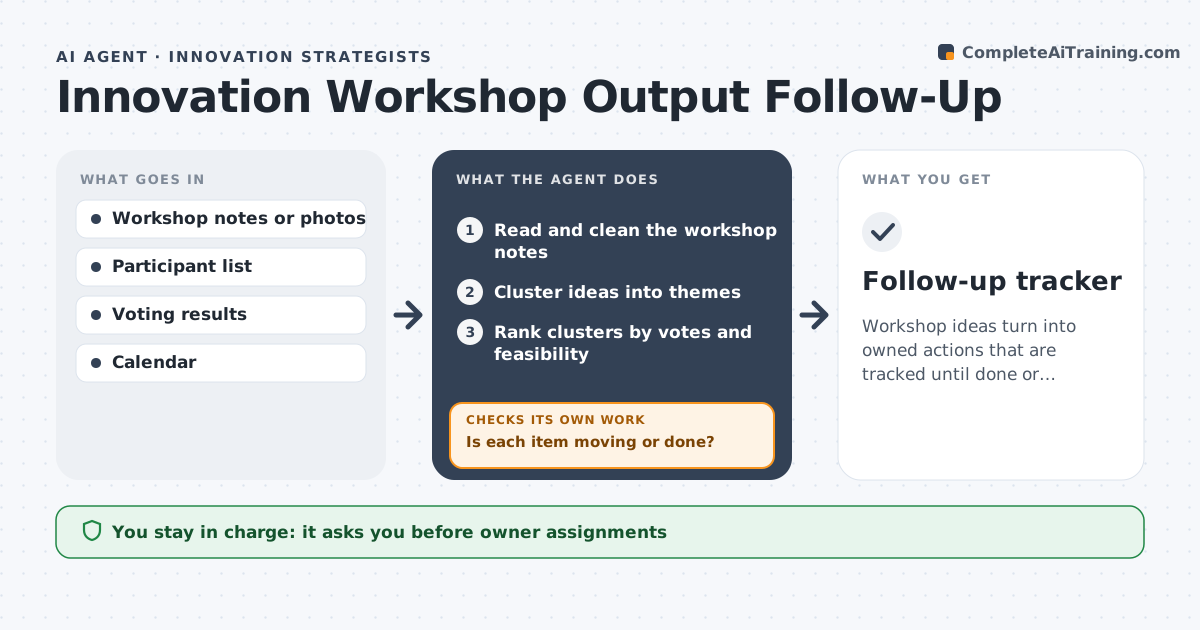
Workshop ideas turn into owned actions that are tracked until done or dropped.
What it does
A day-long workshop produces 200 sticky notes and by Friday no one remembers what was decided. This agent cleans and clusters the workshop outputs and assigns owners to the top ideas. It schedules check-ins, tracks progress and flags stalled items. It first removes duplicates and groups notes by theme, ranks the themes by votes and how easy they are to start, and writes a one-line first step for each of the top ideas. At every check-in it asks owners for a short status, records it, and marks anything that has not moved since the last check-in. Dropped ideas are logged with a reason, so nothing disappears silently. Edge case: two ideas are really the same, so the agent merges them. The strategist approves owner assignments and messages.
How it works
Follow the arrows from top to bottom. The orange dashed arrow is the loop: when a check fails, the agent goes back and tries again.
Read the steps as a list
- Workshop output arrives
- Read and clean the workshop notes
- Cluster ideas into themes
- Rank clusters by votes and feasibility
- Propose owners and first steps for the top ideas
- Strategist approves owners and messagesThe agent waits here for your OK.
- Send assignments and schedule check-ins
- Check progress at each check-in
- Is each item moving or done?If not: nudge the owner or ask the strategist to decide. Back to step 8.
- Follow-up tracker
How it decides
It clusters similar ideas, ranks by votes and feasibility, and assigns an owner who volunteered or is closest to the topic.
- Top ideas are limited to 5.
- Every idea has one owner and a next step.
- Flag an idea stalled after 2 check-ins.
- Merge duplicates before ranking.
Make it yours
Every agent is a starting point. You choose these settings for your own situation.
- Number of top ideas
- Check-in interval
- Ranking criteria
- Stall rule
- Tracker format
What keeps you in control
It always asks you first
- Owner assignments
- All messages
Hard limits
- Do not assign owners without approval.
- Do not send messages on its own.
It stops when
- Done: ideas are completed or closed
- Stop: no one owns an idea after two attempts
Set it up
We guide you through the set-up, step by step
Members get the full set-up guide for this agent. No technical skills needed: you copy, paste and upload.
- One set of instructions to paste into your AI, with the clicks for ChatGPT, Claude, Microsoft 365 Copilot, Gemini and Grok
- The agent then walks you through connecting your own data, one source at a time
- A downloadable copy with the flow chart, the rules and the full guide