AI agent for field service technicians
Instrument Calibration Record Agent
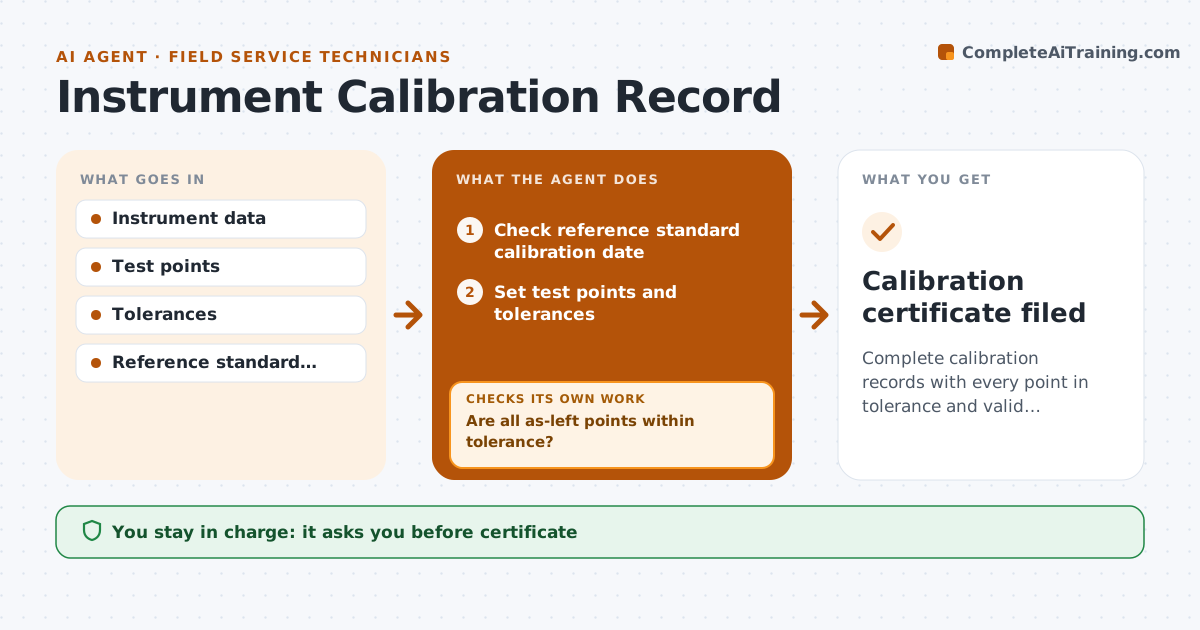
Complete calibration records with every point in tolerance and valid standards
What it does
Calibrating instruments like pressure transmitters, scales or analyzers means recording as-found and as-left readings at each test point and comparing them with tolerance, and paper records invite mistakes. When a calibration job opens, this agent first checks that the reference standard is within its own calibration date. An expired standard stops the job. It sets up five test points by default with their tolerances. As the technician enters readings, it calculates errors. If any as-left point is out of tolerance, it suggests an adjustment and asks for new readings, looping until every point passes. If the instrument was out of tolerance as found, it drafts a notice for the customer's quality team, because product made with it may be affected. The technician approves the certificate. Edge case: an instrument that cannot be adjusted into tolerance is tagged out of service.
How it works
Follow the arrows from top to bottom. The orange dashed arrow is the loop: when a check fails, the agent goes back and tries again.
Read the steps as a list
- Calibration job opened
- Check reference standard calibration date
- Set test points and tolerances
- Record as-found and as-left readings
- Are all as-left points within tolerance?If not: suggest an adjustment and take new readings. Back to step 4.
- Draft certificate and as-found notice if needed
- Technician approves the certificateThe agent waits here for your OK.
- Calibration certificate filed
How it decides
Each test point passes when as-left error is within tolerance; any as-found failure triggers a customer notice.
- Expired reference standards stop the job
- As-found failures need a customer notice
- Five-point checks by default
Make it yours
Every agent is a starting point. You choose these settings for your own situation.
- Test point count
- Tolerance sources
- Certificate template
- Notice recipients
What keeps you in control
It always asks you first
- Certificate
- Customer notice
Hard limits
- Never issues certificates without approval
- Never edits past records
It stops when
- Done: certificate approved
- Stop: instrument cannot be adjusted into tolerance, recommend replacement
Set it up
We guide you through the set-up, step by step
Members get the full set-up guide for this agent. No technical skills needed: you copy, paste and upload.
- One set of instructions to paste into your AI, with the clicks for ChatGPT, Claude, Microsoft 365 Copilot, Gemini and Grok
- The agent then walks you through connecting your own data, one source at a time
- A downloadable copy with the flow chart, the rules and the full guide