AI agent for dental hygienists
Insurance Benefit Maximum Agent
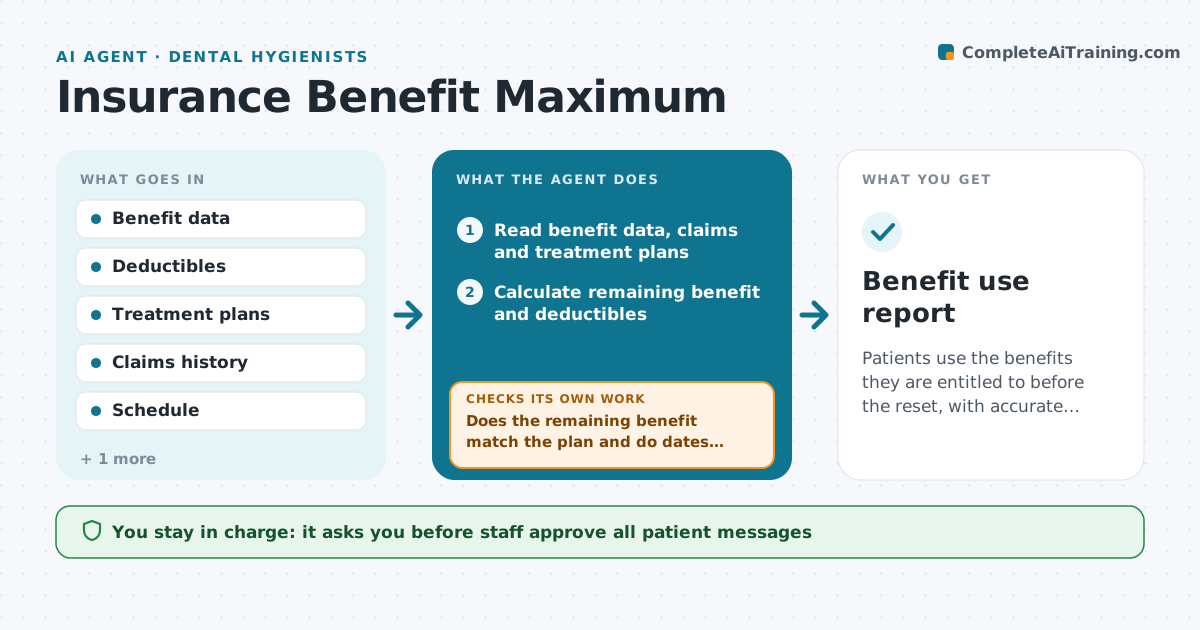
Patients use the benefits they are entitled to before the reset, with accurate cost estimates.
What it does
Dental benefits reset on a set date, and patients with unused benefit and pending treatment lose money when they wait. The agent reads each patient's benefit data and finds those with a large unused amount and treatment planned but not done. It builds a schedule that uses the remaining benefit before the reset, balancing urgency, patient costs and chair time. It drafts a message to each patient explaining the amount left and offering dates. After each visit, it recalculates the remaining benefit with the latest claims and updates the plan. If a claim reduces what is left, it revises the schedule. Staff approve every message. Edge case: a deductible not yet met changes the math, so the agent includes it in the estimate.
How it works
Follow the arrows from top to bottom. The orange dashed arrow is the loop: when a check fails, the agent goes back and tries again.
Read the steps as a list
- Monthly run before the reset
- Read benefit data, claims and treatment plans
- Calculate remaining benefit and deductibles
- Find patients with benefit left and pending treatment
- Build a schedule that fits chair time and the reset date
- Draft patient messages with the estimate
- Staff approve the messages and scheduleThe agent waits here for your OK.
- Send messages and book visits
- Update claims after each visit
- Does the remaining benefit match the plan and do dates still fit?If not: Recalculate, adjust the plan and redraft messages for those affected. Back to step 3.
- Benefit use report
How it decides
It estimates benefit left after expected claims and ranks patients by amount left and treatment urgency.
- Benefit over $300 with planned treatment goes on the list
- Urgent treatment is scheduled first
- Include the deductible in estimates
- Do not offer treatment the dentist has not planned
Make it yours
Every agent is a starting point. You choose these settings for your own situation.
- Reset date
- Minimum benefit to include (default $300)
- Contact schedule
- Estimate wording
- Schedule rules
What keeps you in control
It always asks you first
- Staff approve all patient messages
- Dentist approves any change to the treatment plan
Hard limits
- Never promise coverage, only give estimates
- Never send messages without approval
- Never share benefit data with others
It stops when
- Done: benefits used or patients declined before the reset
- Stop: the reset date passes
Set it up
We guide you through the set-up, step by step
Members get the full set-up guide for this agent. No technical skills needed: you copy, paste and upload.
- One set of instructions to paste into your AI, with the clicks for ChatGPT, Claude, Microsoft 365 Copilot, Gemini and Grok
- The agent then walks you through connecting your own data, one source at a time
- A downloadable copy with the flow chart, the rules and the full guide