AI agent for medical billers
Insurance Eligibility Verification Agent
Coverage confirmed for every scheduled visit
What it does
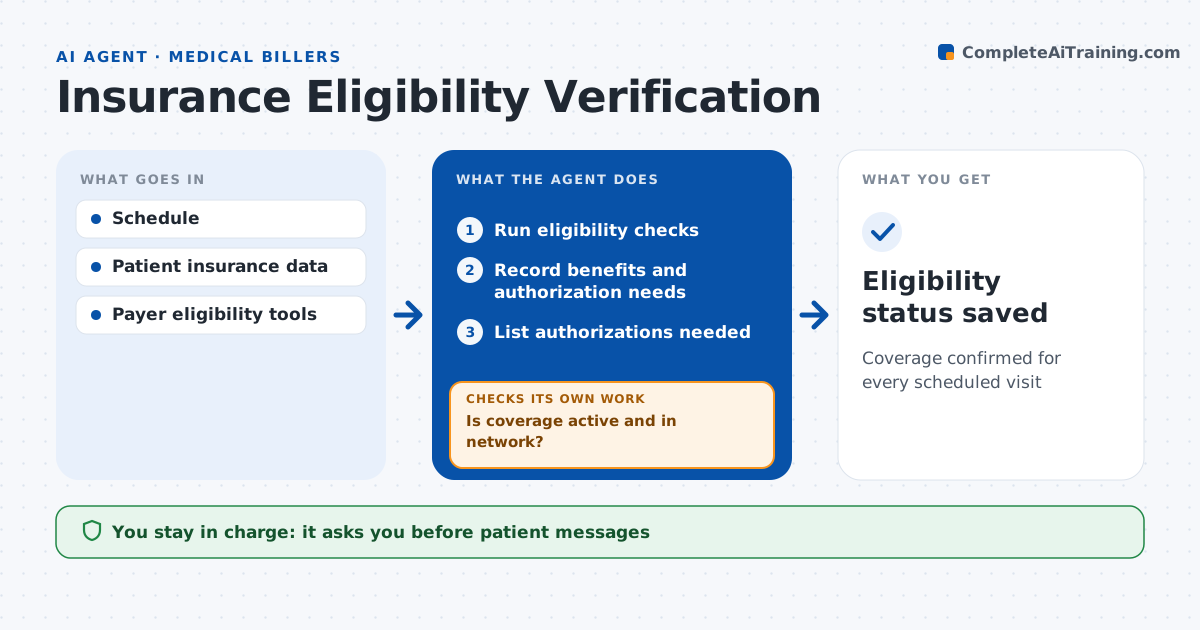
Coverage problems found at check-in lead to denied claims or awkward conversations at the front desk. Two days before appointments, this agent checks each patient's insurance with the payer, confirming the plan, copay, deductible status and network. It also checks whether the service needs prior authorization. When coverage is inactive or details have changed, it flags the patient and drafts a message asking for updated insurance. Out-of-network results go to the front desk. After the patient updates, it reruns the check until coverage is confirmed or the issue is handed off. Services needing authorization go to the authorization team. The biller approves every patient message and any rescheduling. Edge case: a patient's plan changed on the first of the month, so the agent finds the new payer in the eligibility response instead of reporting coverage as lost.
How it works
Follow the arrows from top to bottom. The orange dashed arrow is the loop: when a check fails, the agent goes back and tries again.
Read the steps as a list
- Schedule for two days out
- Run eligibility checks
- Record benefits and authorization needs
- Is coverage active and in network?If not: draft a message for updated insurance and recheck. Back to step 2.
- List authorizations needed
- Biller approves patient messagesThe agent waits here for your OK.
- Eligibility status saved
How it decides
It flags any visit with inactive coverage, out-of-network status or needed authorization.
- Inactive coverage: contact patient
- Out of network: tell front desk
- Authorization needed: send to team
Make it yours
Every agent is a starting point. You choose these settings for your own situation.
- Days before visit
- Message templates
- Authorization rules
- Who gets alerts
What keeps you in control
It always asks you first
- Patient messages
- Rescheduling
Hard limits
- Never shares health details outside the system
- Never cancels appointments
It stops when
- Done: all visits checked
- Stop: payer system down
Set it up
We guide you through the set-up, step by step
Members get the full set-up guide for this agent. No technical skills needed: you copy, paste and upload.
- One set of instructions to paste into your AI, with the clicks for ChatGPT, Claude, Microsoft 365 Copilot, Gemini and Grok
- The agent then walks you through connecting your own data, one source at a time
- A downloadable copy with the flow chart, the rules and the full guide