AI agent for product marketing managers
Internal Launch Briefing Loop Agent
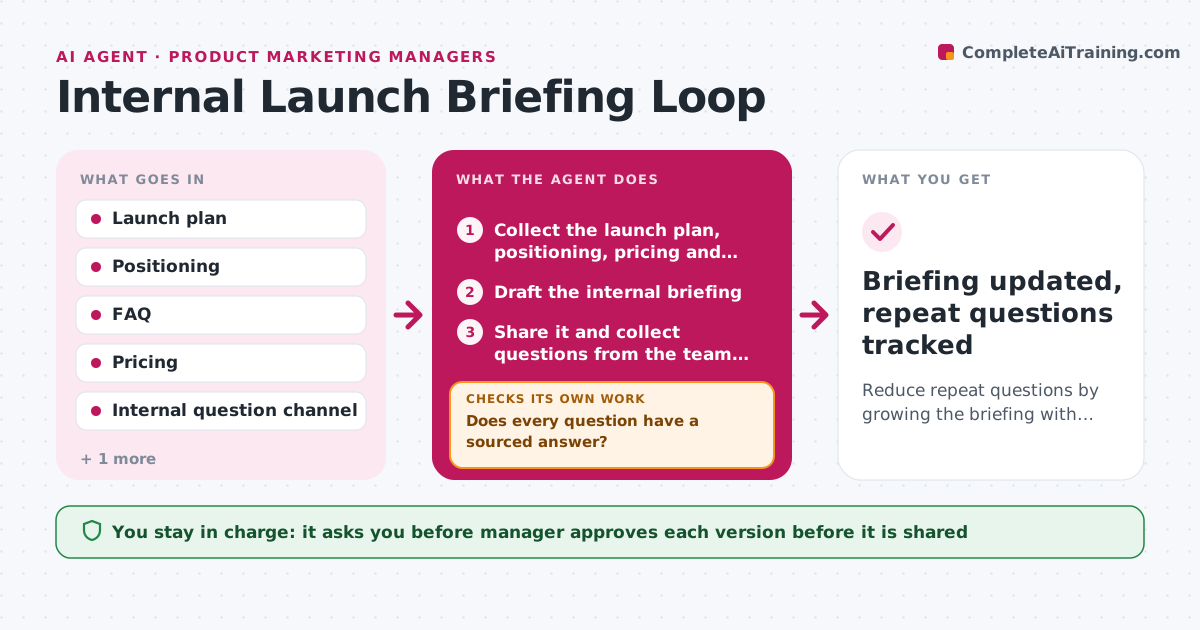
Reduce repeat questions by growing the briefing with every answered question until it covers what teams ask.
What it does
After a launch briefing, sales and support send the same fifty questions into a channel, and the product marketer answers each one by hand. The agent builds an internal briefing from the launch plan, positioning and FAQs, with dates, audience, pricing, talk track and what not to say. It then collects the questions from sales, support and customer success. It answers each one from the source documents and cites where the answer comes from. If a question has no source answer, it sends it to the right owner, such as product, legal or finance, and waits for the reply. It adds each new answer to the briefing and tells the asker. It checks whether the same question keeps recurring. The manager approves each new version before it is shared. Edge case: two owners give different answers. The agent shows both to the manager.
How it works
Follow the arrows from top to bottom. The orange dashed arrow is the loop: when a check fails, the agent goes back and tries again.
Read the steps as a list
- Launch briefing needed
- Collect the launch plan, positioning, pricing and FAQs
- Draft the internal briefing
- Manager approves the first versionThe agent waits here for your OK.
- Share it and collect questions from the team channels
- Answer each question from the source documents with a citation
- Does every question have a sourced answer?If not: send the question to the owner and wait for a reply. Back to step 6.
- Add new answers to the briefing and group repeated questions
- Manager approves the new versionThe agent waits here for your OK.
- Share the update and notify the people who asked
- Briefing updated, repeat questions tracked
How it decides
A question is answered only from a source document. Unanswered or conflicting questions go to an owner, not guessed.
- Answer only from documents, never from memory
- Send unanswered questions to the owner within 2 hours
- Add a question to the briefing if it was asked 3 times
- Show conflicting answers to the manager
Make it yours
Every agent is a starting point. You choose these settings for your own situation.
- Channels monitored
- Owner for each topic
- Repeat threshold (default 3)
- Sharing channel
- Briefing format
What keeps you in control
It always asks you first
- Manager approves each version before it is shared
- Manager approves any answer on pricing or legal terms
Hard limits
- Never share unapproved answers
- Do not make commitments about pricing or dates
It stops when
- Done: two weeks after launch with no new questions
- Stop: launch is postponed, pause updates and tell the teams
Set it up
We guide you through the set-up, step by step
Members get the full set-up guide for this agent. No technical skills needed: you copy, paste and upload.
- One set of instructions to paste into your AI, with the clicks for ChatGPT, Claude, Microsoft 365 Copilot, Gemini and Grok
- The agent then walks you through connecting your own data, one source at a time
- A downloadable copy with the flow chart, the rules and the full guide