AI agent for product marketing managers
Product Pricing Page Consistency Agent
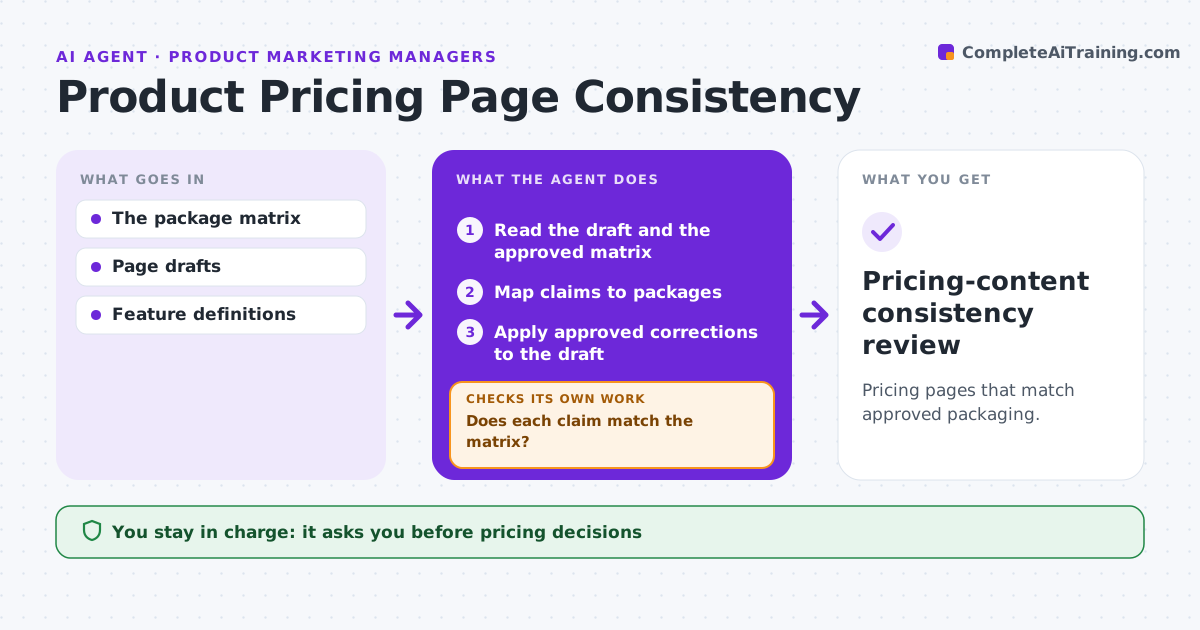
Pricing pages that match approved packaging.
What it does
Pricing page drafts often contradict the approved package matrix, such as listing a feature in the wrong plan. When a pricing page is drafted or packaging changes, this agent maps every pricing claim, feature and limit on the page to its package in the approved matrix. Where a claim contradicts the matrix, it drafts a correction. Where the matrix does not define an item at all, it asks the product owner instead of guessing. After corrections, it rechecks the whole page, including footnotes and comparison tables. Commercialization approves publishing and owns all pricing decisions. Edge case: the draft lists single sign-on in Pro while the matrix puts it in Enterprise.
How it works
Follow the arrows from top to bottom. The orange dashed arrow is the loop: when a check fails, the agent goes back and tries again.
Read the steps as a list
- Pricing draft or packaging change
- Read the draft and the approved matrix
- Map claims to packages
- Does each claim match the matrix?If not: draft a correction or ask the owner. Back to step 3.
- Apply approved corrections to the draft
- Does the full page, including footnotes, match the matrix?If not: fix the remaining lines. Back to step 5.
- Commercialization approves publishingThe agent waits here for your OK.
- Pricing-content consistency review
How it decides
The matrix is authoritative; undefined items go to the owner.
- The package matrix decides every conflict.
- Undefined items go to the product owner.
- No pricing decisions by the agent.
Make it yours
Every agent is a starting point. You choose these settings for your own situation.
- Approved package matrix source
- Page elements to check (tables, footnotes, FAQs)
- Product owner for undefined items
- Who approves publishing
What keeps you in control
It always asks you first
- Pricing decisions
- Publication
Hard limits
- No pricing decisions.
It stops when
- Done: consistent.
Set it up
We guide you through the set-up, step by step
Members get the full set-up guide for this agent. No technical skills needed: you copy, paste and upload.
- One set of instructions to paste into your AI, with the clicks for ChatGPT, Claude, Microsoft 365 Copilot, Gemini and Grok
- The agent then walks you through connecting your own data, one source at a time
- A downloadable copy with the flow chart, the rules and the full guide