AI agent for head of human resources
Internal Mobility Readiness Agent
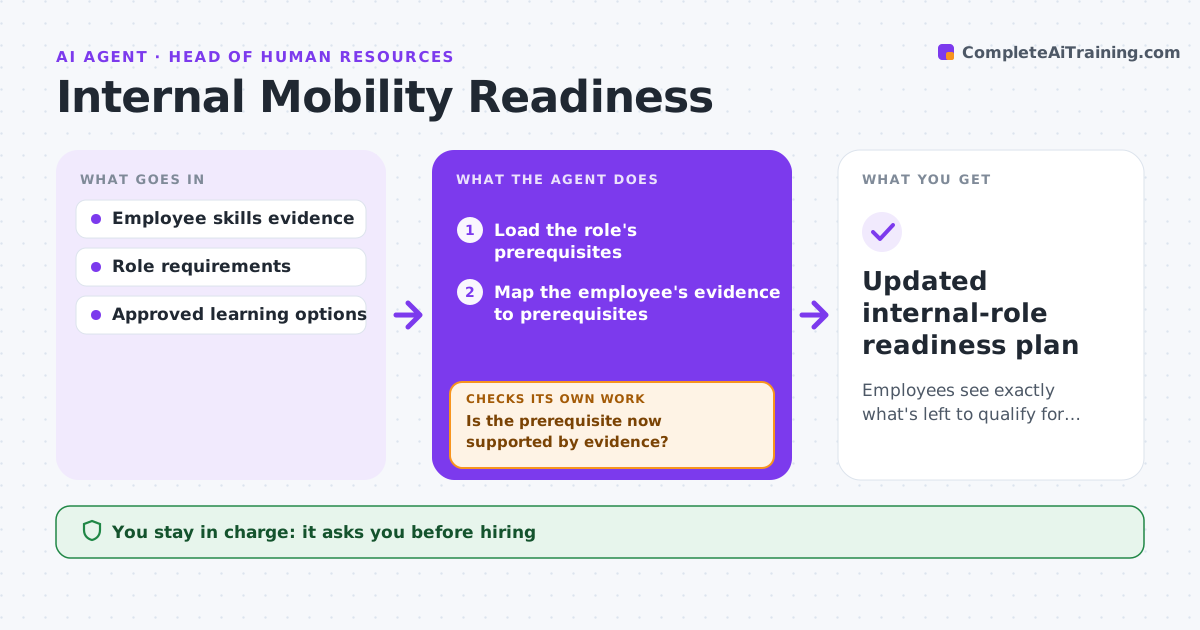
Employees see exactly what's left to qualify for a chosen role.
What it does
Employees interested in another internal role often cannot see which concrete prerequisites they still need. When an employee selects a role, this agent maps the employee's own evidence, such as completed courses, certificates and project records, to the role requirements. It builds a private development plan, starting with the biggest documented gap. When the employee completes learning, it reads the completion evidence and checks whether the prerequisite is now supported. Claimed skills without evidence are flagged, not counted. If evidence is still missing, it recommends another approved practice step. The plan stays private to the employee unless they choose to share it. Hiring, ranking and performance judgments stay with managers. Edge case: a certificate has expired, so it no longer counts.
How it works
Follow the arrows from top to bottom. The orange dashed arrow is the loop: when a check fails, the agent goes back and tries again.
Read the steps as a list
- Employee selects a role
- Load the role's prerequisites
- Map the employee's evidence to prerequisites
- Build a private plan for the biggest gap
- Read completion evidence
- Is the prerequisite now supported by evidence?If not: recommend another approved practice step. Back to step 4.
- Employee chooses whether to share the planThe agent waits here for your OK.
- Updated internal-role readiness plan
How it decides
It chooses the next activity for the biggest documented gap and updates when evidence arrives.
- Next activity targets the biggest documented gap.
- Supported means evidence, not claims.
- Expired certificates do not count.
- The plan is shared only if the employee chooses.
Make it yours
Every agent is a starting point. You choose these settings for your own situation.
- Role requirement framework to use
- Evidence types accepted (course records, certificates, project sign-offs)
- Approved learning activities per gap
- Whether the employee shares the plan with their manager
- Update frequency (default weekly)
What keeps you in control
It always asks you first
- Hiring
- Ranking
- Performance judgments
- Sharing the plan
Hard limits
- The plan stays private to the employee.
It stops when
- Done: all prerequisites met.
Set it up
We guide you through the set-up, step by step
Members get the full set-up guide for this agent. No technical skills needed: you copy, paste and upload.
- One set of instructions to paste into your AI, with the clicks for ChatGPT, Claude, Microsoft 365 Copilot, Gemini and Grok
- The agent then walks you through connecting your own data, one source at a time
- A downloadable copy with the flow chart, the rules and the full guide