AI agent for internal communications managers
Intranet Failed Search Agent
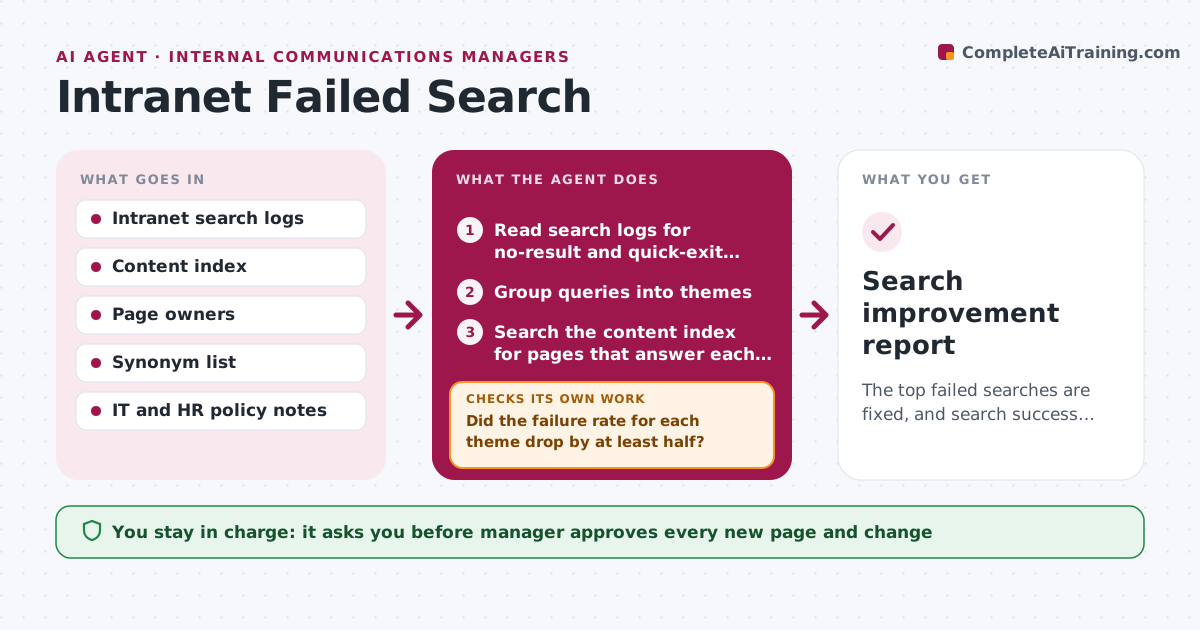
The top failed searches are fixed, and search success improves, week by week.
What it does
Employees type 'parental leave form' into the intranet and leave without a result, then email HR. This agent reads the search logs each week for queries with no results or quick exits, and groups them into themes. For each theme, it checks whether the content exists, whether it is misnamed or buried, or whether it is missing. It then drafts a fix: a new page, a synonym or a title change. After you publish, it checks whether searches improved over the next two weeks, and if not, it tries another fix. You approve new content. Edge case: queries for 'wifi password' are routed to IT and not written into a public page.
How it works
Follow the arrows from top to bottom. The orange dashed arrow is the loop: when a check fails, the agent goes back and tries again.
Read the steps as a list
- Weekly Tuesday run
- Read search logs for no-result and quick-exit queries
- Group queries into themes
- Search the content index for pages that answer each theme
- Decide the fix: synonym, title change or new page
- Draft the synonym, title or new page text
- Manager approves new content and changesThe agent waits here for your OK.
- Wait two weeks and read the logs again for those themes
- Did the failure rate for each theme drop by at least half?If not: Try another fix, such as a different title or a link from the home page. Back to step 4.
- Search improvement report
How it decides
It ranks themes by number of failed searches and unique users, and chooses the cheapest fix that would make the content findable.
- Rank themes by unique users and failed searches
- Use a synonym when the page exists
- Write a new page only when none exists
- Reroute sensitive queries to the right owner
Make it yours
Every agent is a starting point. You choose these settings for your own situation.
- Failure threshold per theme
- Review period (default 2 weeks)
- Route for sensitive queries
- Report recipients
What keeps you in control
It always asks you first
- Manager approves every new page and change
Hard limits
- Never publish or edit pages itself
- Never expose personal search data
It stops when
- Done: top themes improved
- Stop: search logs are unavailable
Set it up
We guide you through the set-up, step by step
Members get the full set-up guide for this agent. No technical skills needed: you copy, paste and upload.
- One set of instructions to paste into your AI, with the clicks for ChatGPT, Claude, Microsoft 365 Copilot, Gemini and Grok
- The agent then walks you through connecting your own data, one source at a time
- A downloadable copy with the flow chart, the rules and the full guide