AI agent for real estate brokers
Investment Property Screening Agent
Send investors a short list of properties that meet their numbers
What it does
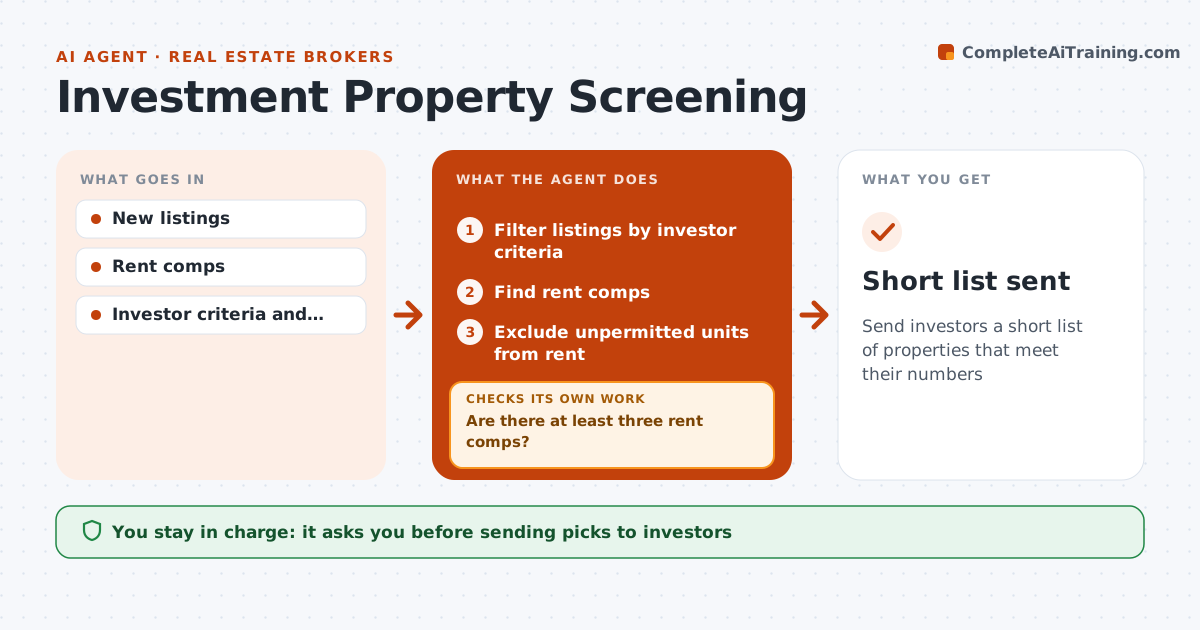
Investor clients want brokers to find properties that meet their return targets, and screening every new listing by hand is slow. Each day this agent filters new listings by each investor's criteria and estimates rent from nearby rental comps. It requires at least three rent comps; if fewer exist, it widens the search area or marks rent as uncertain. Unpermitted units are flagged and their rent is not counted. It calculates cash flow, cap rate and cash-on-cash return using the investor's loan and expense assumptions. It then checks each property against the investor's targets and keeps only those that pass. The broker reviews the short list before anything goes to the investor. Edge case: a property with an unpermitted unit is flagged and only the legal units count toward rent.
How it works
Follow the arrows from top to bottom. The orange dashed arrow is the loop: when a check fails, the agent goes back and tries again.
Read the steps as a list
- New listings posted
- Filter listings by investor criteria
- Find rent comps
- Are there at least three rent comps?If not: widen the search area or mark rent as uncertain. Back to step 3.
- Exclude unpermitted units from rent
- Calculate cash flow, cap rate and cash-on-cash
- Does the property meet the investor's targets?If not: drop it from the short list. Back to step 6.
- Broker reviews before sending to the investorThe agent waits here for your OK.
- Short list sent
How it decides
A property passes when cap rate and cash-on-cash return meet the investor's targets using verified rent.
- Unpermitted units not counted
- Three rent comps required
- Targets set by investor
Make it yours
Every agent is a starting point. You choose these settings for your own situation.
- Investor criteria
- Expense assumptions
- Rent comp radius
What keeps you in control
It always asks you first
- Sending picks to investors
Hard limits
- Numbers are estimates
- Never gives investment advice
It stops when
- Done: short list sent
- Stop: no matching listings
Set it up
We guide you through the set-up, step by step
Members get the full set-up guide for this agent. No technical skills needed: you copy, paste and upload.
- One set of instructions to paste into your AI, with the clicks for ChatGPT, Claude, Microsoft 365 Copilot, Gemini and Grok
- The agent then walks you through connecting your own data, one source at a time
- A downloadable copy with the flow chart, the rules and the full guide