AI agent for microbiologists
Isolate Relatedness Agent
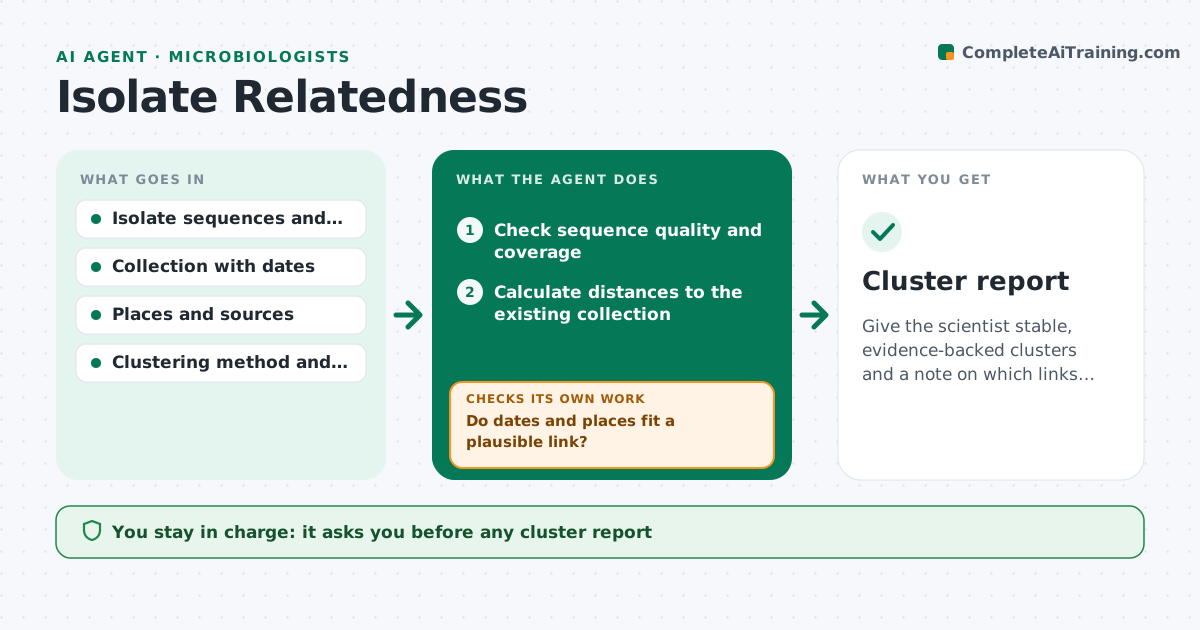
Give the scientist stable, evidence-backed clusters and a note on which links are uncertain.
What it does
When a new bacterial isolate arrives, someone has to decide whether it belongs to a known cluster, and results change with the threshold used. This agent compares the new sequences with the existing collection using the lab's method, such as allele differences or SNP distance. It groups isolates into clusters and checks each cluster against dates, places and sources to see whether the epidemiology fits. It then reruns the clustering with stricter and looser thresholds and records how stable each cluster is. Isolates that join or leave with small changes are flagged as borderline. It drafts a summary for each cluster with its evidence. It never reports an outbreak. The scientist approves what is reported. Edge case: poor quality sequence is excluded from clustering and listed.
How it works
Follow the arrows from top to bottom. The orange dashed arrow is the loop: when a check fails, the agent goes back and tries again.
Read the steps as a list
- New isolate sequences ready
- Check sequence quality and coverage
- Calculate distances to the existing collection
- Cluster at the standard threshold
- Compare each cluster with dates, places and sources
- Do dates and places fit a plausible link?If not: flag the cluster as genetic-only and ask for epidemiological data. Back to step 4.
- Rerun clustering with stricter and looser thresholds
- Is cluster membership stable across thresholds?If not: mark borderline isolates and test with another method. Back to step 7.
- Write the cluster summary with evidence and uncertainty
- Scientist approves what is reportedThe agent waits here for your OK.
- Cluster report
How it decides
It calls a cluster stable when its membership stays the same across the threshold range. It marks isolates borderline when they move between clusters inside the range.
- Exclude sequences below the quality cutoff and list them
- Call a cluster stable if membership holds at plus or minus 2 SNPs
- Flag a genetic-only link when no date or place connects the isolates
- Use a second method for borderline isolates
Make it yours
Every agent is a starting point. You choose these settings for your own situation.
- Distance threshold (default 3 SNPs)
- Stability range (default plus or minus 2)
- Quality cutoffs
- Metadata fields used
- Report format
What keeps you in control
It always asks you first
- Any cluster report
- Any notification to public health
Hard limits
- Never report an outbreak or notify anyone
- Always state the threshold used
It stops when
- Done: clusters reviewed and approved
- Stop: too few good sequences to cluster
Set it up
We guide you through the set-up, step by step
Members get the full set-up guide for this agent. No technical skills needed: you copy, paste and upload.
- One set of instructions to paste into your AI, with the clicks for ChatGPT, Claude, Microsoft 365 Copilot, Gemini and Grok
- The agent then walks you through connecting your own data, one source at a time
- A downloadable copy with the flow chart, the rules and the full guide