AI agent for global head of its
IT Vendor SLA Scorecard Agent
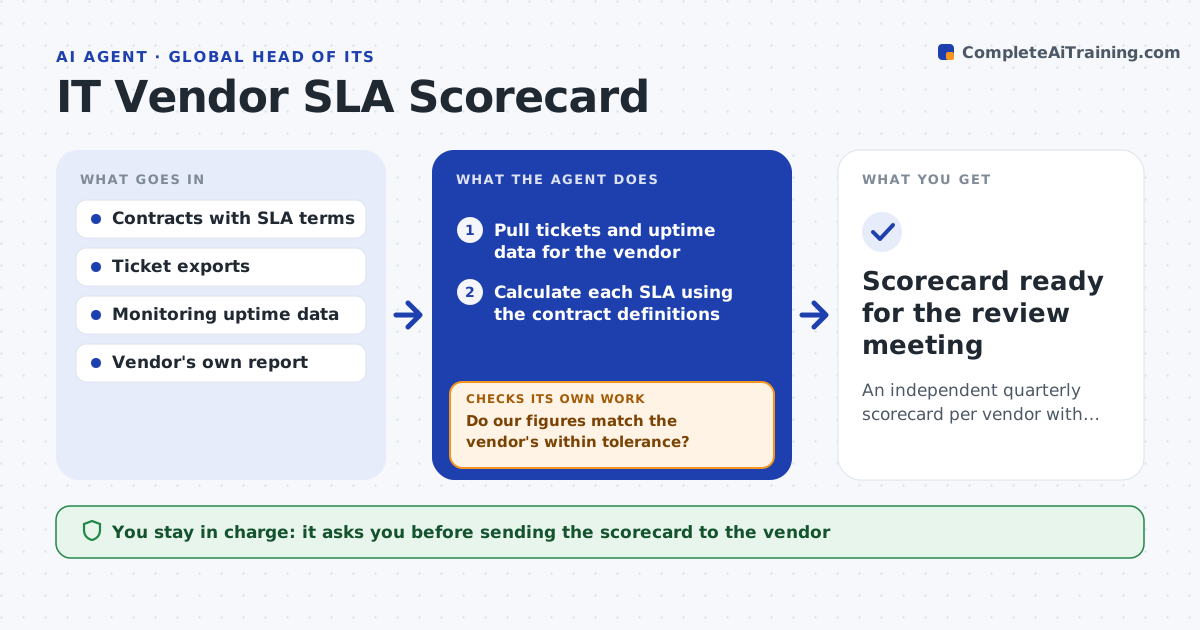
An independent quarterly scorecard per vendor with any service credits calculated
What it does
Quarterly vendor reviews often rely on the numbers the supplier brings, so missed service levels go unchallenged. This agent builds your own scorecard first. It pulls tickets, outages and response times for each vendor from your ticketing and monitoring tools, calculates each service level the way the contract defines it and compares the result with the vendor's reported figures. Where the numbers differ by more than your tolerance, it goes back to the raw tickets to find which ones were counted differently and lists them. It then works out any service credits owed under the contract terms and checks the math against the credit cap. You approve the scorecard and decide whether to claim credits or raise the gap in the review meeting. Edge case: tickets paused while waiting for your own team are excluded only if the contract explicitly allows it.
How it works
Follow the arrows from top to bottom. The orange dashed arrow is the loop: when a check fails, the agent goes back and tries again.
Read the steps as a list
- Quarterly review is two weeks away
- Pull tickets and uptime data for the vendor
- Calculate each SLA using the contract definitions
- Load the vendor's own report
- Do our figures match the vendor's within tolerance?If not: compare ticket by ticket, list the ones counted differently and recalculate. Back to step 3.
- Work out service credits owed
- IT leader approves scorecard and credit claimThe agent waits here for your OK.
- Scorecard ready for the review meeting
How it decides
Each SLA is measured exactly as the contract defines it. A mismatch with the vendor report above tolerance triggers a ticket-level comparison.
- Use the contract's definition of business hours and severity
- Exclude paused time only when the contract permits it
- Flag a vendor that misses the same SLA two quarters running
Make it yours
Every agent is a starting point. You choose these settings for your own situation.
- Vendors and SLAs in scope
- Tolerance for mismatch with vendor reports (default 2 points)
- Review schedule
- Scorecard layout
What keeps you in control
It always asks you first
- Sending the scorecard to the vendor
- Claiming service credits
Hard limits
- Never sends claims to vendors without approval
- Uses only your own data and the contract
It stops when
- Done: scorecard and credit calculation ready
- Stop: contract SLA terms are missing or ambiguous
Set it up
We guide you through the set-up, step by step
Members get the full set-up guide for this agent. No technical skills needed: you copy, paste and upload.
- One set of instructions to paste into your AI, with the clicks for ChatGPT, Claude, Microsoft 365 Copilot, Gemini and Grok
- The agent then walks you through connecting your own data, one source at a time
- A downloadable copy with the flow chart, the rules and the full guide