AI agent for compensation analysts
Job Architecture Title Cleanup Agent
Reduce titles to a clean family and level structure with pay spreads checked
What it does
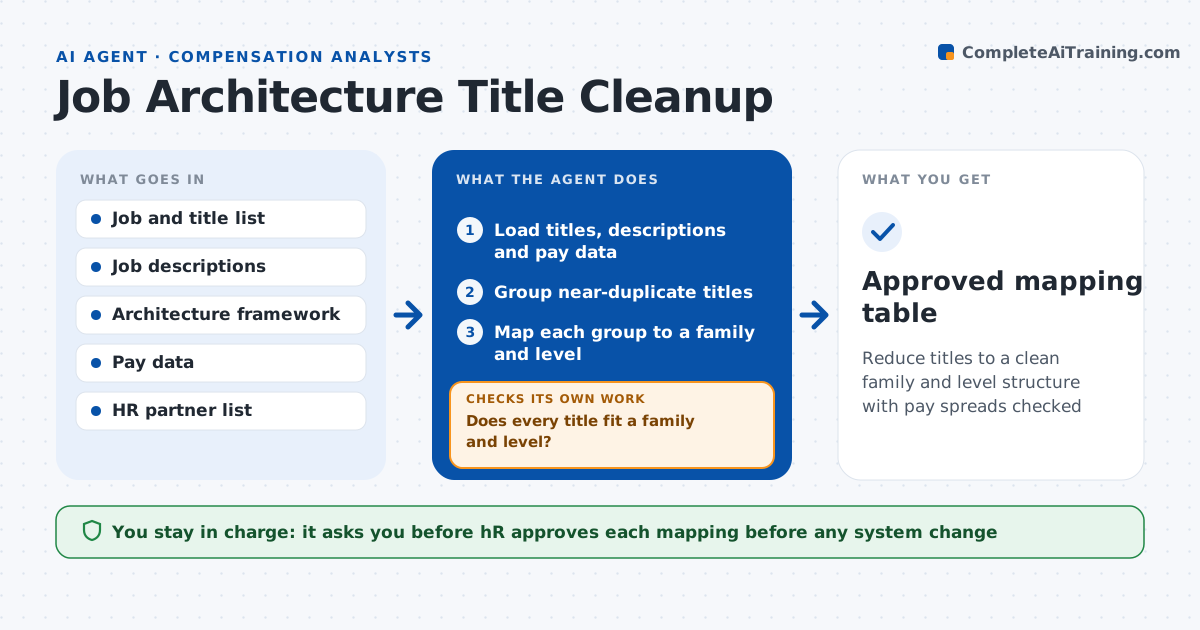
Over ten years the company has collected 1,200 titles, many of them near-duplicates like Sr. Analyst, Senior Analyst and Analyst III. This agent reads the job list and groups near-duplicate titles. It maps each group to a job family and level using the architecture rules and the job descriptions. It then checks the pay spread within each mapped title, flagging groups where pay differs too much, and titles that do not fit any family or level. For those it asks the HR business partner for clarity and remaps with the answer. It builds a mapping table with before and after counts. HR approves each mapping before any system changes. Edge case: a title used for different jobs in different teams is split rather than merged.
How it works
Follow the arrows from top to bottom. The orange dashed arrow is the loop: when a check fails, the agent goes back and tries again.
Read the steps as a list
- Cleanup cycle begins
- Load titles, descriptions and pay data
- Group near-duplicate titles
- Map each group to a family and level
- Does every title fit a family and level?If not: Ask the HR partner and remap using their answer. Back to step 3.
- Check pay spread within each mapped title
- Is the pay spread within 40 percent?If not: Flag the group for review and split it if duties differ. Back to step 4.
- Build the mapping table with before and after counts
- HR approves each mapping before systems changeThe agent waits here for your OK.
- Approved mapping table
How it decides
It merges titles with matching duties and level, and flags groups where the pay range spread exceeds 40 percent.
- Merge titles only when duties and level match
- Split titles used for different jobs
- Flag pay spread over 40 percent
- Never map across job families without HR review
Make it yours
Every agent is a starting point. You choose these settings for your own situation.
- Pay spread limit (default 40 percent)
- Architecture framework (default the company's family and level scheme)
- Review owners (default HR business partners)
- Cleanup cycle (default annual)
What keeps you in control
It always asks you first
- HR approves each mapping before any system change
Hard limits
- Never change titles or pay in any system
- Never merge on title text alone
- Keep before and after records
It stops when
- Done: Mapping approved and ready for system updates
- Stop: Architecture framework is missing, so hand to HR
Set it up
We guide you through the set-up, step by step
Members get the full set-up guide for this agent. No technical skills needed: you copy, paste and upload.
- One set of instructions to paste into your AI, with the clicks for ChatGPT, Claude, Microsoft 365 Copilot, Gemini and Grok
- The agent then walks you through connecting your own data, one source at a time
- A downloadable copy with the flow chart, the rules and the full guide