AI agent for court reporters
Jurisdiction Format Compliance Agent
A transcript that meets the target court's current format rules before filing.
What it does
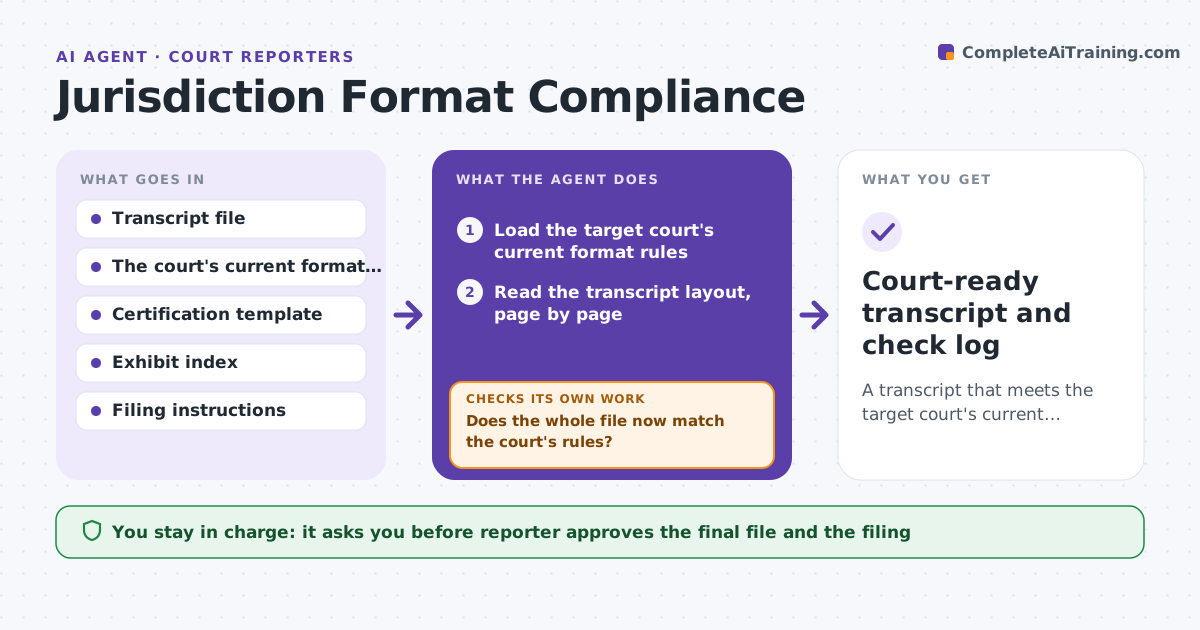
Every court has its own transcript rules: line counts per page, margins, certification wording, exhibit index style and file type. A transcript that is right for one court gets bounced by another. This agent reads the court's current format rules and checks the transcript for page layout, lines per page, characters per line, certification wording and file type. It lists each mismatch with the page where it occurs. After the reporter applies fixes, it rechecks the whole file, because a layout change can push lines onto new pages and break page references. It never files anything. Edge case: the court updated its certification wording last quarter, so the agent compares the transcript's certificate to the new text rather than the old template.
How it works
Follow the arrows from top to bottom. The orange dashed arrow is the loop: when a check fails, the agent goes back and tries again.
Read the steps as a list
- Transcript is ready for filing
- Load the target court's current format rules
- Read the transcript layout, page by page
- Compare lines per page, margins, headers and exhibit index to the rules
- Compare the certification wording and file type
- List every mismatch with its page
- Reporter applies the fixes in the transcript softwareThe agent waits here for your OK.
- Reread the full file after the changes
- Does the whole file now match the court's rules?If not: list new mismatches, including page shifts, and return them to the reporter. Back to step 6.
- Court-ready transcript and check log
How it decides
It treats any deviation from the court's stated line count, margin, wording or file type as a failure. It checks wording word for word against the court's current text.
- Fail any page not matching the court's lines per page
- Fail certification wording that differs from the current court text
- Fail the wrong file type or naming
- Recheck page references after every layout change
Make it yours
Every agent is a starting point. You choose these settings for your own situation.
- Courts and their rule sources
- Lines per page by court
- Certification text by court
- File naming pattern
- Checks to run
What keeps you in control
It always asks you first
- Reporter approves the final file and the filing
Hard limits
- Never file a transcript itself
- Never change certified text
It stops when
- Done: no mismatches on the full recheck
- Stop: the court's rules cannot be found or conflict
Set it up
We guide you through the set-up, step by step
Members get the full set-up guide for this agent. No technical skills needed: you copy, paste and upload.
- One set of instructions to paste into your AI, with the clicks for ChatGPT, Claude, Microsoft 365 Copilot, Gemini and Grok
- The agent then walks you through connecting your own data, one source at a time
- A downloadable copy with the flow chart, the rules and the full guide