AI agent for executive vice presidents
Key Account Health Review Agent
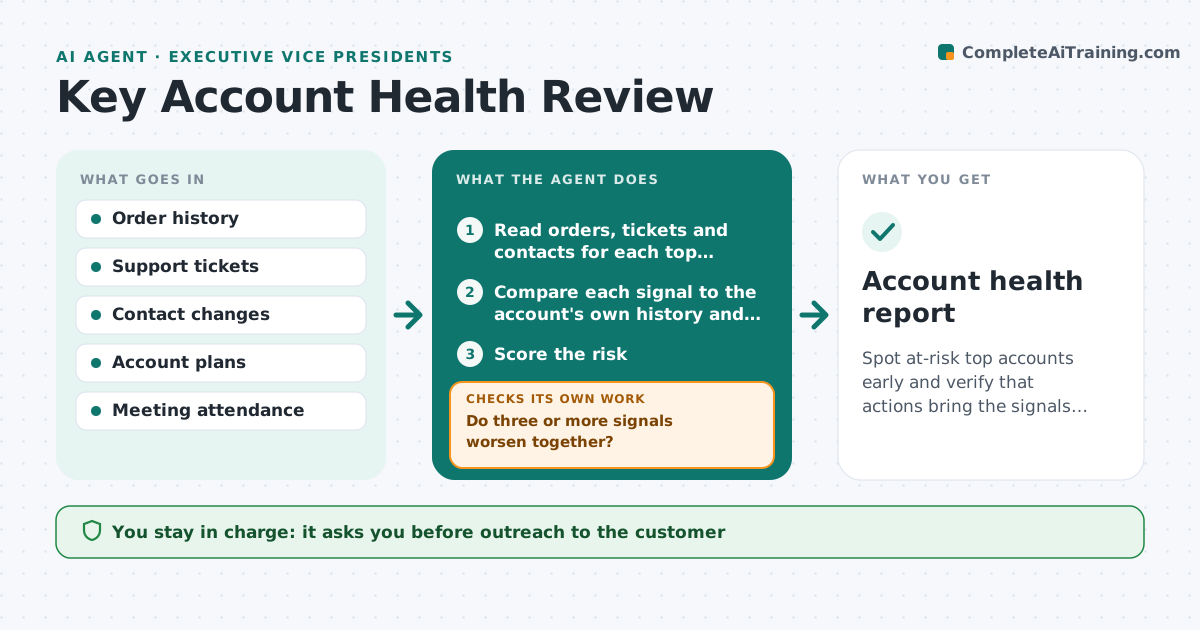
Spot at-risk top accounts early and verify that actions bring the signals back.
What it does
A top account rarely leaves without warning. Orders get smaller, a new buyer appears, complaints stay open and the customer stops attending reviews. Each sign sits in a different system. This agent reads orders, tickets and contacts monthly for each top account, scores the risk signals, and compares them with the account plan. For accounts at risk it drafts a review note with the evidence and suggested actions. After the owner acts, it checks that the signals improve. The executive approves outreach. Edge case: a drop in orders that matches a known seasonal pattern is not scored as a risk.
How it works
Follow the arrows from top to bottom. The orange dashed arrow is the loop: when a check fails, the agent goes back and tries again.
Read the steps as a list
- Monthly account review begins
- Read orders, tickets and contacts for each top account
- Compare each signal to the account's own history and season
- Score the risk
- Do three or more signals worsen together?If not: Mark the account as healthy and keep on the watch list. Back to step 3.
- Check the account plan for planned actions
- Draft a review note with evidence and suggested actions
- Executive approves outreachThe agent waits here for your OK.
- Recheck signals weekly after the action
- Did the signals improve within 6 weeks?If not: Escalate with a new proposal. Back to step 6.
- Account health report
How it decides
Scores each signal against the account's own history and flags accounts where three or more signals worsen together.
- Three or more worsening signals mean at risk
- Order drop under the seasonal norm is ignored
- A new buyer contact with no meeting in 60 days is a signal
- Open complaint over 30 days is a signal
Make it yours
Every agent is a starting point. You choose these settings for your own situation.
- Number of signals that flag an account (default 3)
- Accounts included
- Seasonality adjustment
- Recheck cadence
- Who receives notes
What keeps you in control
It always asks you first
- Outreach to the customer
- Any discount or offer
- Changes to the account plan
Hard limits
- Never contact the customer directly
- Never offer a discount
It stops when
- Done: signals back to normal
- Stop: account lost, record the reason
- Stop: owner takes over
Set it up
We guide you through the set-up, step by step
Members get the full set-up guide for this agent. No technical skills needed: you copy, paste and upload.
- One set of instructions to paste into your AI, with the clicks for ChatGPT, Claude, Microsoft 365 Copilot, Gemini and Grok
- The agent then walks you through connecting your own data, one source at a time
- A downloadable copy with the flow chart, the rules and the full guide