AI agent for quality control specialists
Lab Quality Control Trend Review Agent
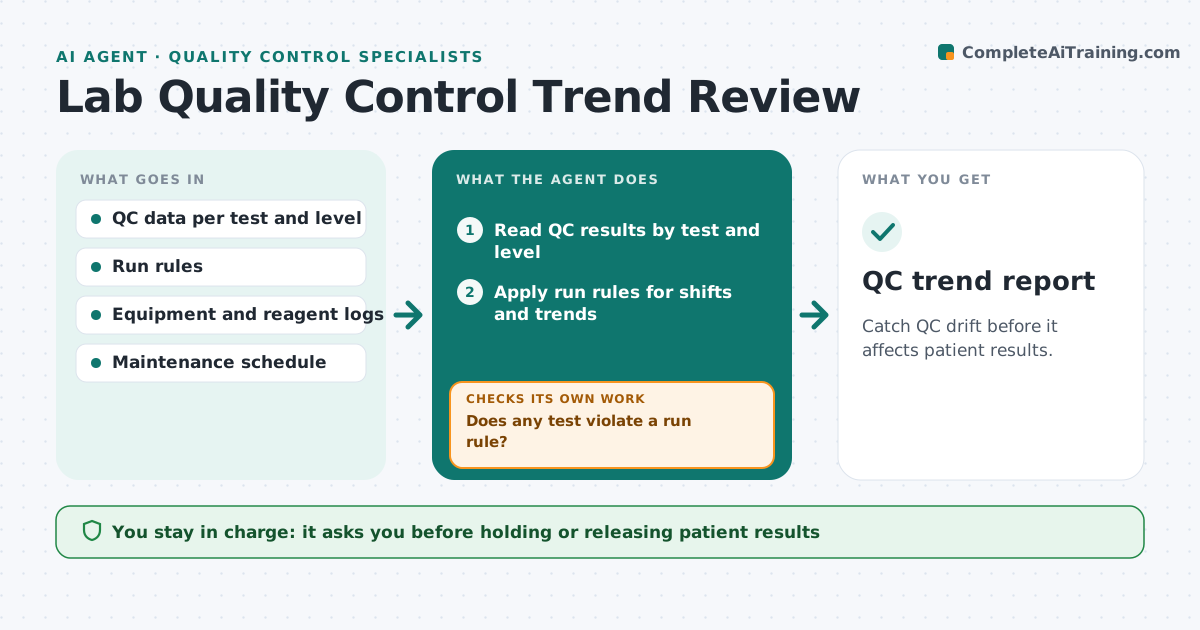
Catch QC drift before it affects patient results.
What it does
A lab runs control samples every day. Single points can pass while the trend drifts upward, then one day patient results are wrong. This agent reads QC data for each test and applies run rules, such as several points in a row on one side of the mean or a steady rise. It flags trends and shifts, and checks equipment maintenance and reagent logs for likely causes, such as a lamp near its end of life. It recommends action and checks the results after corrective action. If the trend continues, it raises the severity. The manager approves holding results or stopping a test. Edge case: a shift that begins on the day of a reagent change is linked to the lot change record.
How it works
Follow the arrows from top to bottom. The orange dashed arrow is the loop: when a check fails, the agent goes back and tries again.
Read the steps as a list
- New QC data is loaded
- Read QC results by test and level
- Apply run rules for shifts and trends
- Does any test violate a run rule?If not: Log as in control and continue. Back to step 3.
- Check equipment, calibration and reagent logs for causes
- Draft a recommendation with the likely cause
- Manager approves holding results or stopping the testThe agent waits here for your OK.
- Read QC after corrective action
- Is the test back in control for the required runs?If not: Raise severity and recommend a deeper investigation. Back to step 8.
- QC trend report
How it decides
Applies the lab's QC run rules to each point and series; a violation is a warning, two related violations are a hold recommendation.
- Rule violation is flagged the same day
- Two related violations lead to a hold recommendation
- A shift on the day of a reagent change links to the lot record
- Return to service needs three in-control runs
Make it yours
Every agent is a starting point. You choose these settings for your own situation.
- Run rules in use
- Runs needed to return to control (default 3)
- Tests covered
- Who receives alerts
- Data source
What keeps you in control
It always asks you first
- Holding or releasing patient results
- Stopping a test
- Any change in QC limits
Hard limits
- Never release or hold results on its own
- Never edit QC data
It stops when
- Done: trend resolved and documented
- Stop: instrument failure
- Stop: results already reported, trigger the lab's review process
Set it up
We guide you through the set-up, step by step
Members get the full set-up guide for this agent. No technical skills needed: you copy, paste and upload.
- One set of instructions to paste into your AI, with the clicks for ChatGPT, Claude, Microsoft 365 Copilot, Gemini and Grok
- The agent then walks you through connecting your own data, one source at a time
- A downloadable copy with the flow chart, the rules and the full guide