AI agent for online sellers
Late Shipment Exception Agent
Catch late and stuck orders early and keep buyers informed
What it does
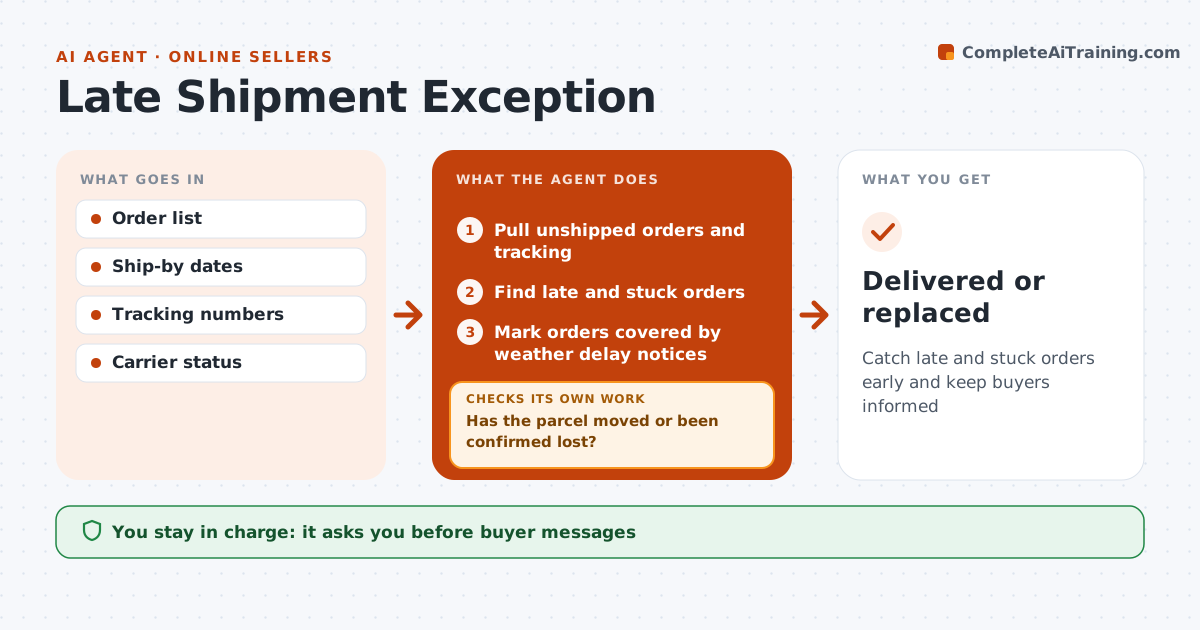
Late shipments count against seller performance and lead to refunds and bad reviews. Every day this agent pulls unshipped orders and tracking for shipped ones. For unshipped orders it compares the ship-by date with today and alerts the seller. For shipped orders it flags parcels with no scan for 3 days or past the delivery estimate. Orders under a marketplace weather delay notice are recorded so they do not count against the seller. It drafts buyer updates and opens carrier inquiries for stuck parcels. It then rechecks tracking daily until each parcel moves or the carrier confirms loss. At 7 days stuck it treats the parcel as likely lost and proposes a reshipment. The seller approves buyer messages and any reshipment. Edge case: weather-delay orders are marked so they are not counted as the seller's fault.
How it works
Follow the arrows from top to bottom. The orange dashed arrow is the loop: when a check fails, the agent goes back and tries again.
Read the steps as a list
- Daily shipment check
- Pull unshipped orders and tracking
- Find late and stuck orders
- Mark orders covered by weather delay notices
- Draft buyer updates and carrier inquiries
- Seller approves messagesThe agent waits here for your OK.
- Has the parcel moved or been confirmed lost?If not: keep checking daily and follow up with the carrier. Back to step 2.
- Seller approves any reshipment after 7 days stuckThe agent waits here for your OK.
- Delivered or replaced
How it decides
No scan for 3 days or past estimated delivery is stuck. Seven days stuck is treated as likely lost.
- No scan for 3 days is stuck
- Seven days stuck triggers reshipment proposal
- Weather notices are recorded
Make it yours
Every agent is a starting point. You choose these settings for your own situation.
- Stuck threshold
- Reship trigger
- Carriers covered
- Message tone
What keeps you in control
It always asks you first
- Buyer messages
- Reshipments
Hard limits
- Never reships without approval
- Never blames the carrier in buyer messages
It stops when
- Done: delivered
- Stop: buyer cancels
Set it up
We guide you through the set-up, step by step
Members get the full set-up guide for this agent. No technical skills needed: you copy, paste and upload.
- One set of instructions to paste into your AI, with the clicks for ChatGPT, Claude, Microsoft 365 Copilot, Gemini and Grok
- The agent then walks you through connecting your own data, one source at a time
- A downloadable copy with the flow chart, the rules and the full guide