AI agent for product marketing managers
Launch Results Measurement Agent
An honest launch report against the goals set before launch
What it does
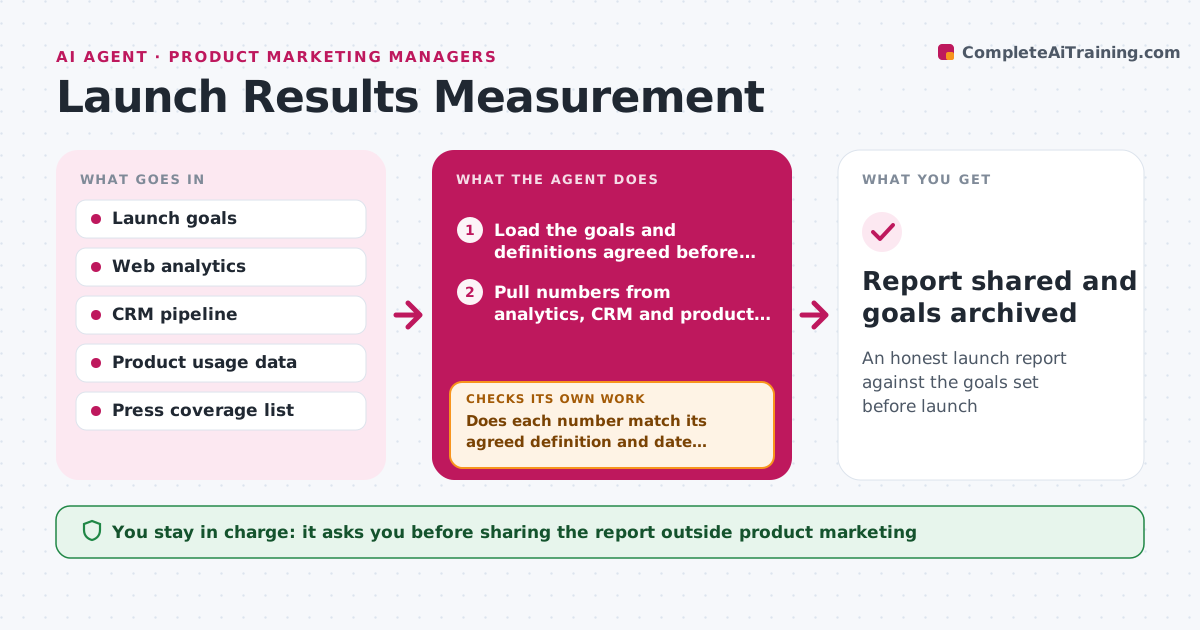
After a launch, product marketers often scramble to prove results with numbers pulled from different tools that do not agree. Before launch, this agent records the agreed goals, such as signups, pipeline, adoption and press mentions, and where each one will be measured. At 7, 30 and 90 days it pulls the numbers from analytics, the CRM and product data. It then checks each number against its agreed definition and date range. If a figure looks off, for example pipeline that counts deals opened before launch, it fixes the filter and pulls again. It compares actual with goal and drafts a report with what worked and what did not. The PMM reviews it and decides what goes to leadership. Edge case: if a goal has no reliable data source, the agent reports it as unmeasured rather than guessing a number.
How it works
Follow the arrows from top to bottom. The orange dashed arrow is the loop: when a check fails, the agent goes back and tries again.
Read the steps as a list
- Measurement date reached
- Load the goals and definitions agreed before launch
- Pull numbers from analytics, CRM and product data
- Does each number match its agreed definition and date range?If not: fix filters, exclude pre-launch records and pull again. Back to step 3.
- Compare actual with goal and note drivers
- Draft the results report
- PMM reviews before sharing with leadershipThe agent waits here for your OK.
- Report shared and goals archived
How it decides
It counts only results that started after launch and match the agreed definition for each goal.
- Exclude deals created before launch from launch pipeline
- Report missing data as unmeasured
- Show results at 7, 30 and 90 days side by side
Make it yours
Every agent is a starting point. You choose these settings for your own situation.
- Measurement days (default 7, 30, 90)
- Goals and their definitions
- Data sources
- Report format
What keeps you in control
It always asks you first
- Sharing the report outside product marketing
Hard limits
- Never changes CRM data
- Never estimates numbers it cannot source
It stops when
- Done: 90-day report shared
- Stop: goals were never agreed, ask PMM to set them
Set it up
We guide you through the set-up, step by step
Members get the full set-up guide for this agent. No technical skills needed: you copy, paste and upload.
- One set of instructions to paste into your AI, with the clicks for ChatGPT, Claude, Microsoft 365 Copilot, Gemini and Grok
- The agent then walks you through connecting your own data, one source at a time
- A downloadable copy with the flow chart, the rules and the full guide