AI agent for law students
Law Review Write-On Packet Agent
Get a write-on submission that follows every rule and is ready before the deadline.
What it does
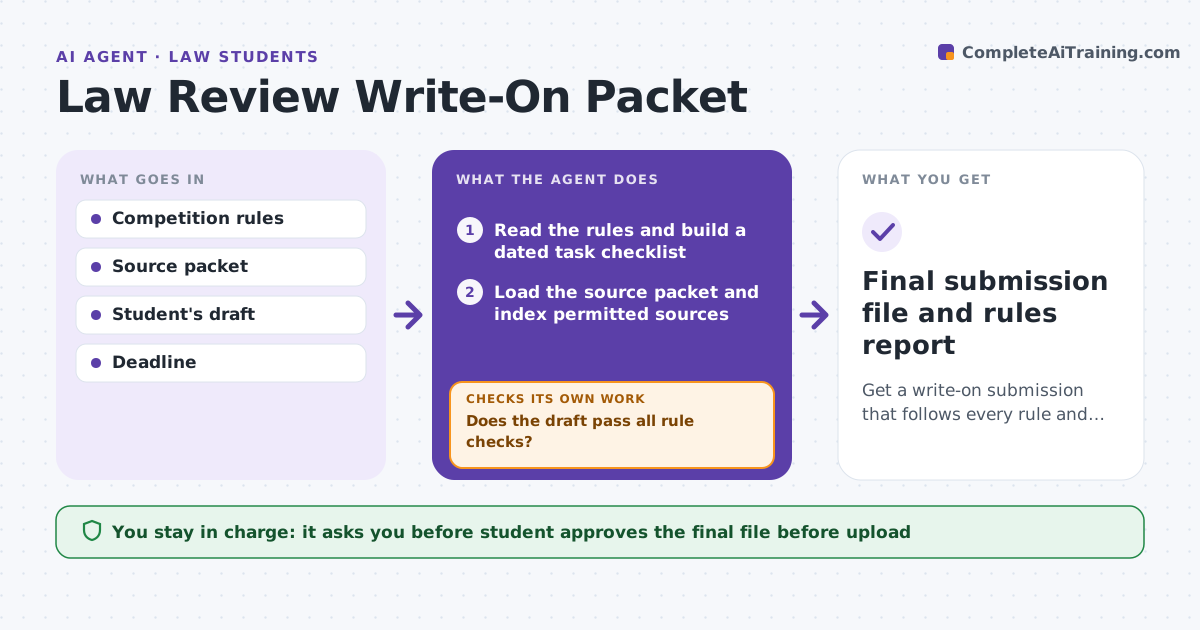
Write-on competitions have strict rules: closed source packets, word limits, citation formats and a short deadline, with heavy penalties for violations. The agent reads the competition rules and builds a task checklist with dates. As the student drafts, it tracks the draft against the word limit and required footnote sources, and checks each cite against the permitted packet. It reports violations and loops until the draft passes. It also compares remaining work with the time left and flags when the plan slips. The student approves the final file before upload. Edge case: a cite refers to a case not in the permitted packet, so the agent flags it and suggests a packet source for the same point.
How it works
Follow the arrows from top to bottom. The orange dashed arrow is the loop: when a check fails, the agent goes back and tries again.
Read the steps as a list
- Competition packet released
- Read the rules and build a dated task checklist
- Load the source packet and index permitted sources
- Check the draft for word count and format
- Verify each cite against the permitted packet
- Does the draft pass all rule checks?If not: List each violation with the rule and wait for the student's revision. Back to step 4.
- Compare remaining work with time left
- Is the remaining work achievable before the deadline?If not: Reduce the plan and flag the priority order. Back to step 4.
- Student approves the final fileThe agent waits here for your OK.
- Final submission file and rules report
How it decides
A draft passes only when it is within the word limit, every cite is in the packet and the format matches the rules. Violations are listed with the rule they break.
- Any cite outside the packet is a violation
- Word count over the limit blocks submission
- Run the full check on every saved draft
- Flag the plan when under 20 percent of time remains with over 30 percent of work left
Make it yours
Every agent is a starting point. You choose these settings for your own situation.
- Rules document used
- Word limit and counting method
- Check frequency
- Warning time before the deadline
What keeps you in control
It always asks you first
- Student approves the final file before upload
Hard limits
- Never writes or edits the student's competition text
- Never submits for the student
It stops when
- Done: draft passes all checks and is uploaded by the student
- Stop: deadline passes
Set it up
We guide you through the set-up, step by step
Members get the full set-up guide for this agent. No technical skills needed: you copy, paste and upload.
- One set of instructions to paste into your AI, with the clicks for ChatGPT, Claude, Microsoft 365 Copilot, Gemini and Grok
- The agent then walks you through connecting your own data, one source at a time
- A downloadable copy with the flow chart, the rules and the full guide