AI agent for crm managers
Lead Routing Dispute and Territory Check Agent
Assign each disputed lead to the right owner fast, with the reason documented
What it does
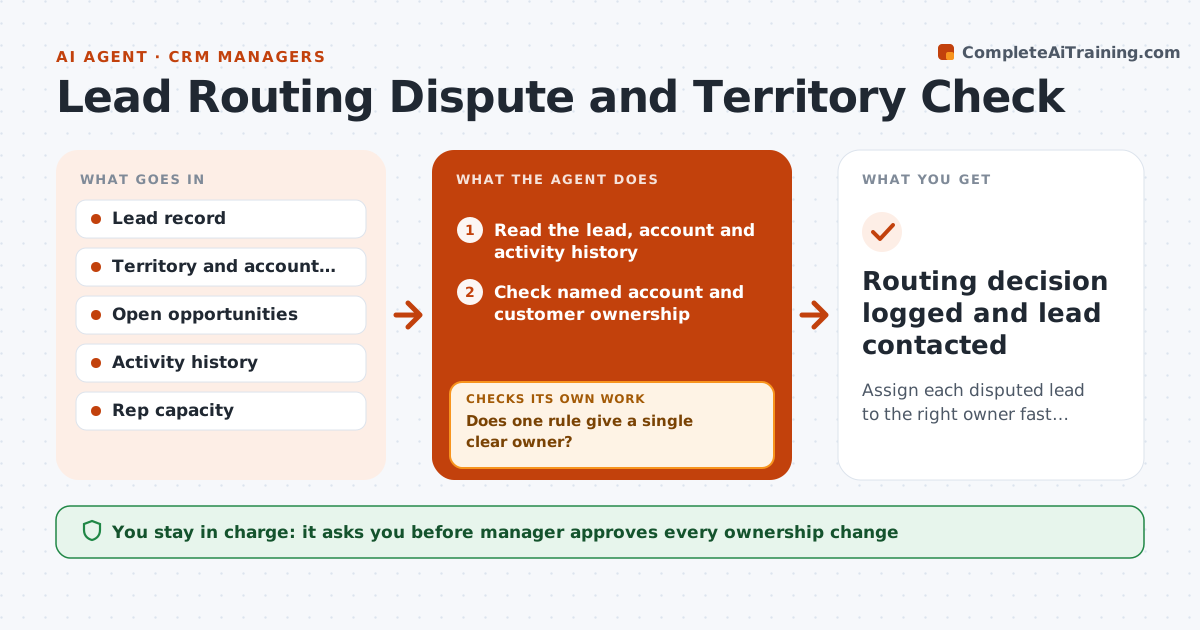
A lead from a large company lands with one rep, another says it belongs to him because of an open deal, and for three days nobody calls. This agent settles it with evidence. When a lead is flagged, it checks the territory rules, existing account ownership, open opportunities and recent activity, and proposes the correct owner with the reasoning. If rules conflict, it escalates with the evidence instead of choosing. While waiting it reminds the interim owner to make first contact so the lead does not cool. After the manager approves a change, it checks that the lead, contacts and tasks moved correctly. Edge case: the account was acquired by a company in another territory. The agent flags the ownership rule gap.
How it works
Follow the arrows from top to bottom. The orange dashed arrow is the loop: when a check fails, the agent goes back and tries again.
Read the steps as a list
- Lead flagged as disputed
- Read the lead, account and activity history
- Check named account and customer ownership
- Check open opportunities and territory rules
- Does one rule give a single clear owner?If not: Escalate with the evidence for each rule and name an interim owner. Back to step 3.
- Write the proposed owner and the reason
- Manager approves any ownership changeThe agent waits here for your OK.
- Update owner on the lead, contacts and open tasks
- Are lead, contacts and tasks all showing the new owner?If not: Fix the records that did not move and recheck. Back to step 8.
- Routing decision logged and lead contacted
How it decides
It follows the written order of rules: existing customer owner, open opportunity owner, named account, then territory. If two rules tie it escalates.
- Order of rules: customer owner, open opportunity, named account, territory
- A lead untouched for 24 hours gets a reminder to the interim owner
- Rule ties go to the manager
- Every change is logged with the rule used
Make it yours
Every agent is a starting point. You choose these settings for your own situation.
- Order of routing rules
- Reminder delay (default 24 hours)
- Who approves changes
- Rep capacity limits
- Logging fields
What keeps you in control
It always asks you first
- Manager approves every ownership change
Hard limits
- Never reassigns without approval
- Does not contact the lead itself
It stops when
- Done: lead assigned and contacted
- Stop: rules conflict and no owner can be decided, escalate with evidence
Set it up
We guide you through the set-up, step by step
Members get the full set-up guide for this agent. No technical skills needed: you copy, paste and upload.
- One set of instructions to paste into your AI, with the clicks for ChatGPT, Claude, Microsoft 365 Copilot, Gemini and Grok
- The agent then walks you through connecting your own data, one source at a time
- A downloadable copy with the flow chart, the rules and the full guide