AI agent for crm managers
Marketing Lead Data Repair Agent
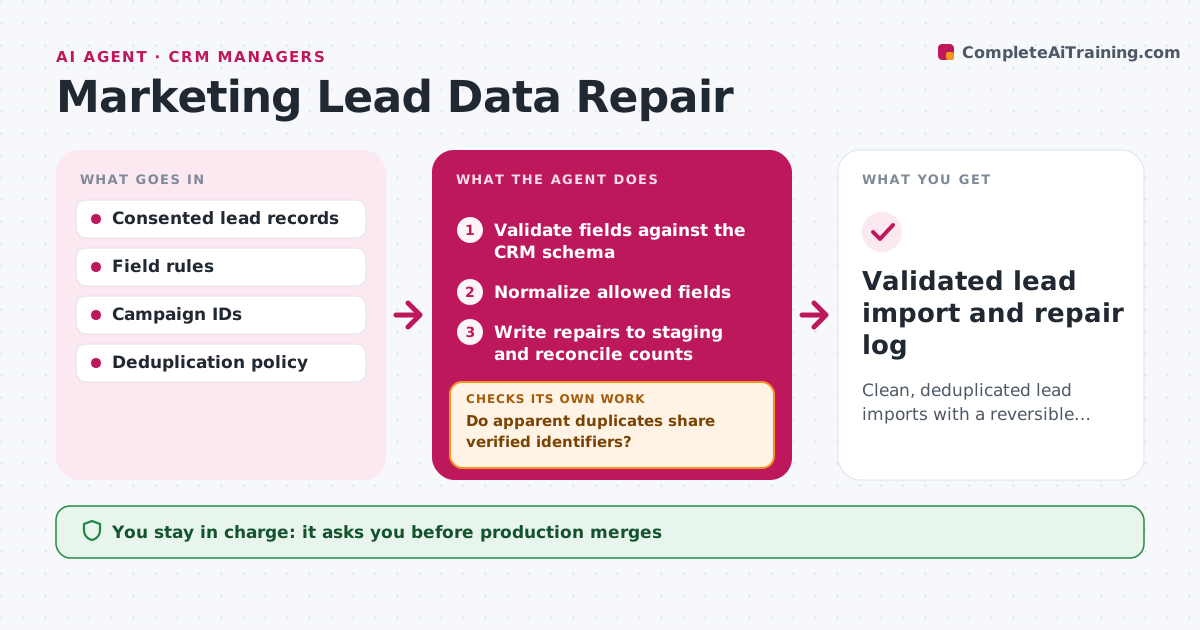
Clean, deduplicated lead imports with a reversible repair log.
What it does
Malformed lead data, such as bad emails, wrong campaign IDs and duplicates, ruins sales follow-up and reporting. Before an import, this agent checks every field against the CRM schema and fixes only the fields it is allowed to normalize, like casing, country codes and phone formats. It looks for records that seem to be the same person. It merges only when they share verified identifiers, and sends the rest to review. All repairs go to a staging list with an undo log, and record counts must match before and after. The CRM administrator approves the import and any merge. Edge case: two leads share a surname and company but have different verified emails, so they stay separate.
How it works
Follow the arrows from top to bottom. The orange dashed arrow is the loop: when a check fails, the agent goes back and tries again.
Read the steps as a list
- Lead file ready
- Validate fields against the CRM schema
- Normalize allowed fields
- Do apparent duplicates share verified identifiers?If not: keep separate and send to review. Back to step 3.
- Write repairs to staging and reconcile counts
- CRM administrator approves the import and mergesThe agent waits here for your OK.
- Validated lead import and repair log
How it decides
It repairs from schema rules and never merges records with conflicting verified identifiers.
- Merge only when records share a verified identifier.
- Record counts must reconcile exactly before import.
- Every repair is written to staging with an undo entry.
Make it yours
Every agent is a starting point. You choose these settings for your own situation.
- Fields the agent may normalize
- Which identifiers count as verified (default email and CRM ID)
- Count tolerance (default zero difference)
- Reviewer for ambiguous merges
What keeps you in control
It always asks you first
- Production merges
- Outreach
- Collecting new personal data
Hard limits
- Staging only.
It stops when
- Done: import ready.
Set it up
We guide you through the set-up, step by step
Members get the full set-up guide for this agent. No technical skills needed: you copy, paste and upload.
- One set of instructions to paste into your AI, with the clicks for ChatGPT, Claude, Microsoft 365 Copilot, Gemini and Grok
- The agent then walks you through connecting your own data, one source at a time
- A downloadable copy with the flow chart, the rules and the full guide