AI agent for training and development managers
Leadership Program Cohort Tracker Agent
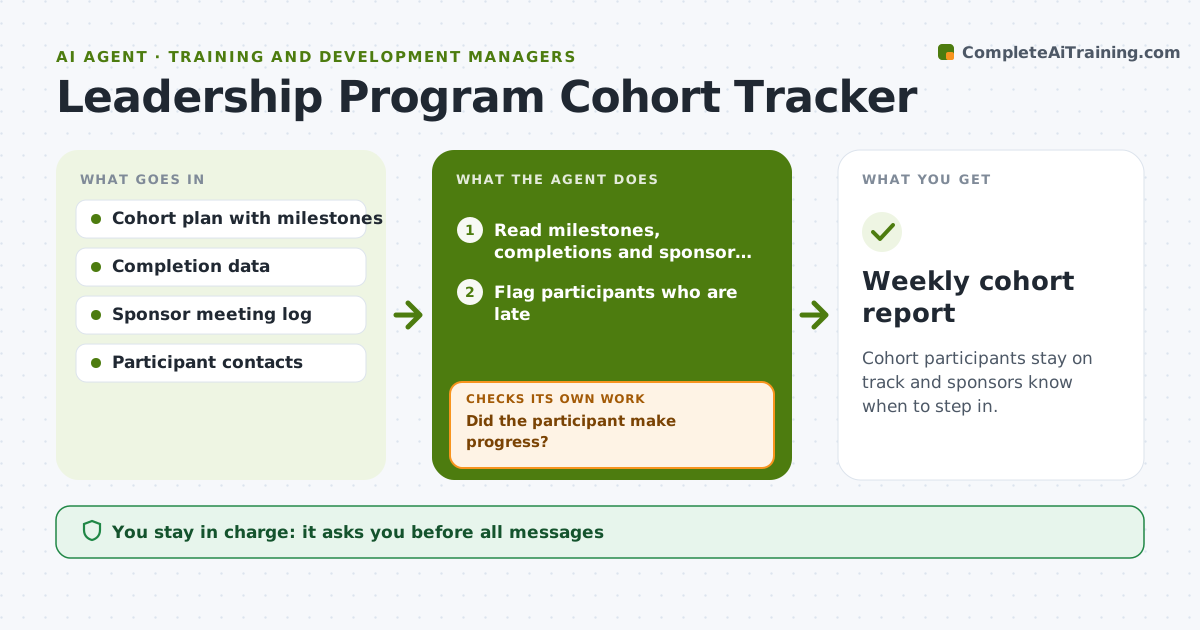
Cohort participants stay on track and sponsors know when to step in.
What it does
In a leadership program of 24 people, a few fall behind by month three and the sponsors lose track of who needs help. This agent tracks cohort milestones, completions and sponsor meetings. It flags lagging participants and drafts nudges to the participant and the sponsor. It checks whether the nudge led to progress and escalates if not. It adjusts the tone of each nudge to how long the participant has been late, starting with a friendly reminder and moving to a direct request for the sponsor to step in. Each week it gives the manager a short list of who is on track, who is late and who has been escalated. Edge case: a participant on a major project is flagged but given an extension option. The manager approves messages.
How it works
Follow the arrows from top to bottom. The orange dashed arrow is the loop: when a check fails, the agent goes back and tries again.
Read the steps as a list
- Weekly cohort check
- Read milestones, completions and sponsor meetings
- Flag participants who are late
- Draft nudges to participants and sponsors
- Manager approves messagesThe agent waits here for your OK.
- Send approved messages
- Check progress after 5 days
- Did the participant make progress?If not: draft an escalation to the sponsor and manager. Back to step 7.
- Update the cohort tracker
- Weekly cohort report
How it decides
It marks a participant as lagging when a milestone is late by a set number of days and chooses nudges by how long they have lagged.
- Lagging means a milestone late by 7 days.
- Nudge the participant first, then the sponsor.
- Escalate after 2 nudges with no progress.
- Offer an extension if the manager approves.
Make it yours
Every agent is a starting point. You choose these settings for your own situation.
- Late days limit
- Escalation steps
- Message tone
- Sponsor roles
- Report frequency
What keeps you in control
It always asks you first
- All messages
- Any extension or removal
Hard limits
- Do not message anyone without approval.
- Do not share one participant's status with another.
It stops when
- Done: all participants completed milestones or were handled
- Stop: a participant withdraws
Set it up
We guide you through the set-up, step by step
Members get the full set-up guide for this agent. No technical skills needed: you copy, paste and upload.
- One set of instructions to paste into your AI, with the clicks for ChatGPT, Claude, Microsoft 365 Copilot, Gemini and Grok
- The agent then walks you through connecting your own data, one source at a time
- A downloadable copy with the flow chart, the rules and the full guide