AI agent for teaching assistants
Learner Project Milestone Agent
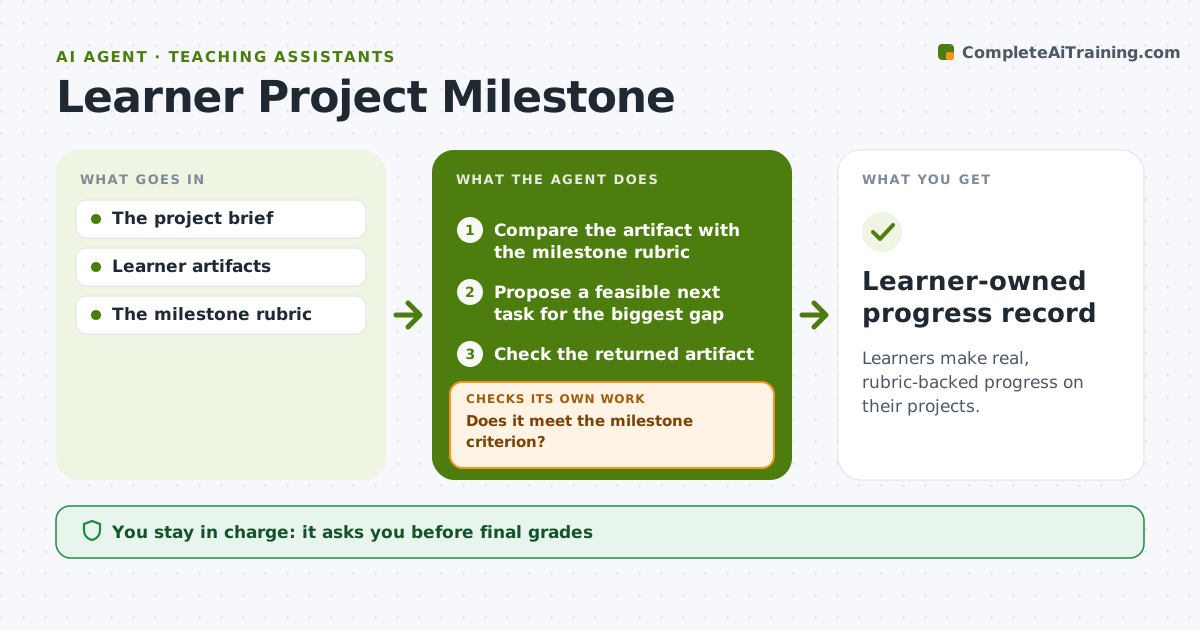
Learners make real, rubric-backed progress on their projects.
What it does
Learners in project-based courses often stall with vague next steps like 'keep working on it'. This agent compares each uploaded piece of work with the milestone rubric and finds the biggest gap. It proposes one feasible next learning task aimed at that gap, sized to the learner's available time. When the learner uploads new work, it checks it against the milestone criterion again. If the criterion is still not met, it refines the task and tries again. Activity alone, such as many edits or hours logged, never counts as progress. It records milestone progress in a record the learner owns, and the instructor can review it. Edge case: work that meets the criterion in an unexpected way is accepted.
How it works
Follow the arrows from top to bottom. The orange dashed arrow is the loop: when a check fails, the agent goes back and tries again.
Read the steps as a list
- Artifact uploaded
- Compare the artifact with the milestone rubric
- Propose a feasible next task for the biggest gap
- Check the returned artifact
- Does it meet the milestone criterion?If not: refine the task. Back to step 3.
- Record milestone progress
- Learner-owned progress record
How it decides
It picks the next step from the gap between the artifact and the criterion and refines the task when the result misses it.
- Next task: aimed at the biggest rubric gap.
- Progress: counted only when the milestone criterion is met, not for effort.
- Task size: fits the learner's stated available time.
- Refine: make the task narrower after each failed check.
Make it yours
Every agent is a starting point. You choose these settings for your own situation.
- Milestone rubric per project
- Task size limit (default 2 hours of work)
- Whether the instructor sees each step (default weekly summary only)
- Tone of task wording (default direct and encouraging)
- Number of refinements before the instructor is asked (default 3)
What keeps you in control
It always asks you first
- Final grades
- Doing assessed work for the learner
Hard limits
- Never completes assessed work for learners.
It stops when
- Done: milestone met.
Set it up
We guide you through the set-up, step by step
Members get the full set-up guide for this agent. No technical skills needed: you copy, paste and upload.
- One set of instructions to paste into your AI, with the clicks for ChatGPT, Claude, Microsoft 365 Copilot, Gemini and Grok
- The agent then walks you through connecting your own data, one source at a time
- A downloadable copy with the flow chart, the rules and the full guide