AI agent for compliance officers
Legal Document Anonymization Agent
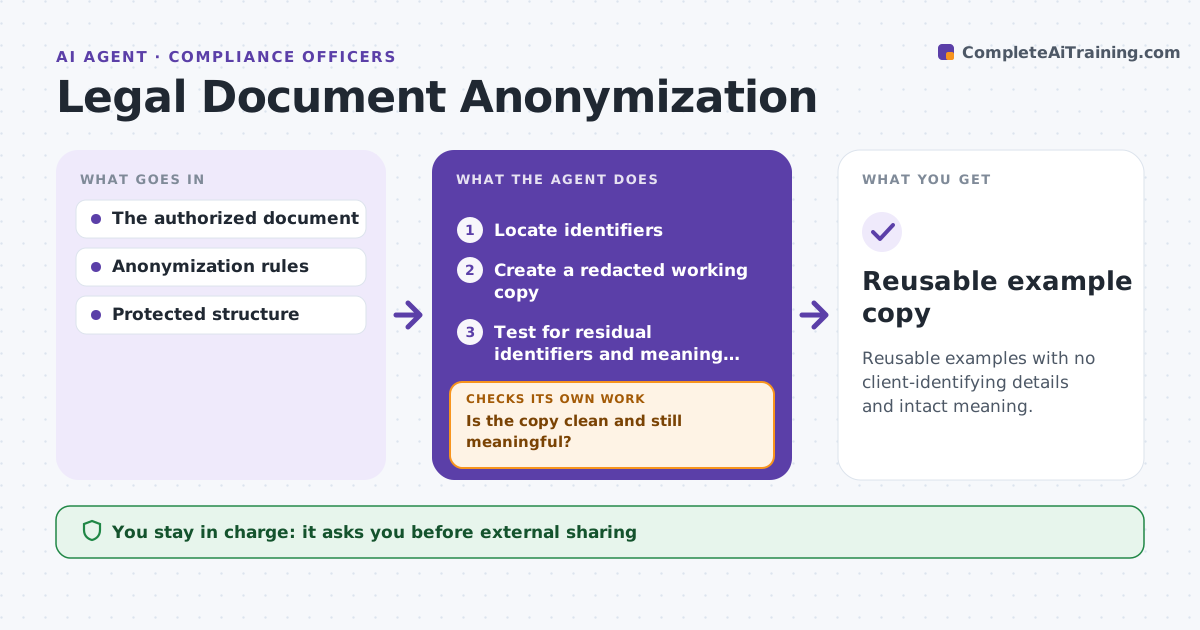
Reusable examples with no client-identifying details and intact meaning.
What it does
Reusable legal examples often keep client-identifying details, such as names, deal values or footers. When a document is nominated for the knowledge base, this agent locates identifiers and creates a redacted working copy. It substitutes consistent placeholders that keep relationships clear, such as Party A and Party B. It tests the copy for residual identifiers in headers, footers and metadata, and for meaning lost through the substitutions. If anything remains, it runs another pass or narrows the substitution. A confidentiality review happens before reuse. It never shares documents externally. Edge case: the client's name appears in an email address inside a footnote, which the second pass catches.
How it works
Follow the arrows from top to bottom. The orange dashed arrow is the loop: when a check fails, the agent goes back and tries again.
Read the steps as a list
- Document nominated
- Locate identifiers
- Create a redacted working copy
- Test for residual identifiers and meaning loss
- Is the copy clean and still meaningful?If not: run another pass or narrow the substitution. Back to step 3.
- Confidentiality reviewThe agent waits here for your OK.
- Reusable example copy
How it decides
It substitutes consistently and repeats until residual checks pass.
- Use consistent placeholders throughout.
- Run another pass on any residual identifier.
- Stop and ask if meaning cannot be kept.
Make it yours
Every agent is a starting point. You choose these settings for your own situation.
- Identifier types searched
- Placeholder style
- Number of passes allowed (default 3)
- Who does the confidentiality review
What keeps you in control
It always asks you first
- External sharing
- Final confidentiality review
Hard limits
- Never shared externally.
It stops when
- Done: clean.
Set it up
We guide you through the set-up, step by step
Members get the full set-up guide for this agent. No technical skills needed: you copy, paste and upload.
- One set of instructions to paste into your AI, with the clicks for ChatGPT, Claude, Microsoft 365 Copilot, Gemini and Grok
- The agent then walks you through connecting your own data, one source at a time
- A downloadable copy with the flow chart, the rules and the full guide