AI agent for community moderators
Legal Takedown Request Handling Agent
Every legal request tracked against its deadline with a complete case file, and every removal decided by a person
What it does
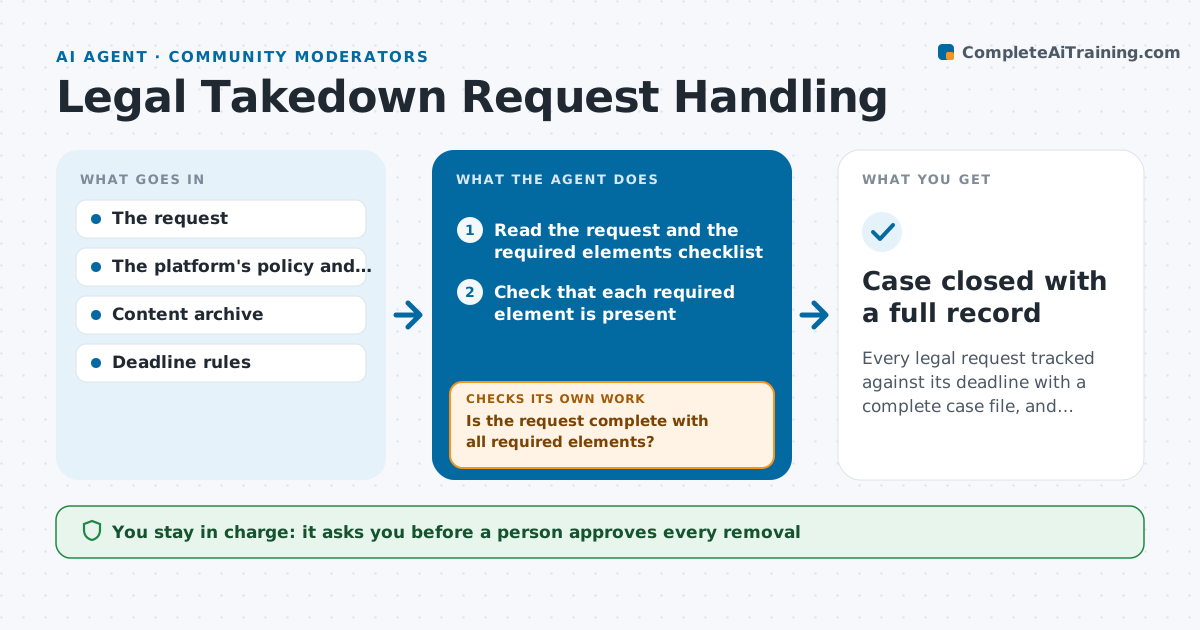
A copyright notice arrives on Friday afternoon with a 48 hour deadline, and the moderator has to find the content, check whether the notice has all required elements and decide what to do. This agent reads the request and checks it against the list of required elements, such as the claimant's identity, a description of the work, the location of the content, a statement of good faith and a signature. It finds the content on the platform and records its address and the author, then sets and tracks the deadline. Incomplete requests loop back to the sender with a list of what is missing, and the agent rechecks the reply. It prepares a case file for the decision. A person approves any removal and every reply. Edge case: a request that names a page that no longer exists is documented and closed with the sender's approval.
How it works
Follow the arrows from top to bottom. The orange dashed arrow is the loop: when a check fails, the agent goes back and tries again.
Read the steps as a list
- Takedown request arrives
- Read the request and the required elements checklist
- Check that each required element is present
- Is the request complete with all required elements?If not: Draft a message listing what is missing and recheck when the sender replies. Back to step 2.
- Locate the content named in the request and record its address and author
- Does the content match the description in the request?If not: Search again with the details in the request and ask the sender for a link. Back to step 4.
- Set the deadline and build the case file
- A person decides whether to remove the content and approves every replyThe agent waits here for your OK.
- Record the decision and send the approved notices
- Case closed with a full record
How it decides
It marks a request complete when every required element is present, and it computes the deadline from the arrival time and the policy rules.
- Compute the deadline from the arrival time and flag it at 50 percent and 90 percent of the time
- Do not remove anything without a person's decision
- Notify the content author as the policy requires
- Keep a copy of the content and all messages
Make it yours
Every agent is a starting point. You choose these settings for your own situation.
- Required elements checklist
- Deadline rules and reminders
- Notice templates
- Who decides on removals
- Case file storage
What keeps you in control
It always asks you first
- A person approves every removal
- A person approves every message to the claimant or the author
Hard limits
- Never remove content or reply on its own
- Never give legal advice, only compare against the checklist
It stops when
- Done: The request is decided, notices are sent and the case is recorded
- Stop: The request involves a legal question beyond the checklist, so the agent escalates it to the person in charge
Set it up
We guide you through the set-up, step by step
Members get the full set-up guide for this agent. No technical skills needed: you copy, paste and upload.
- One set of instructions to paste into your AI, with the clicks for ChatGPT, Claude, Microsoft 365 Copilot, Gemini and Grok
- The agent then walks you through connecting your own data, one source at a time
- A downloadable copy with the flow chart, the rules and the full guide