AI agent for translators
Legal Translation Number Consistency Agent
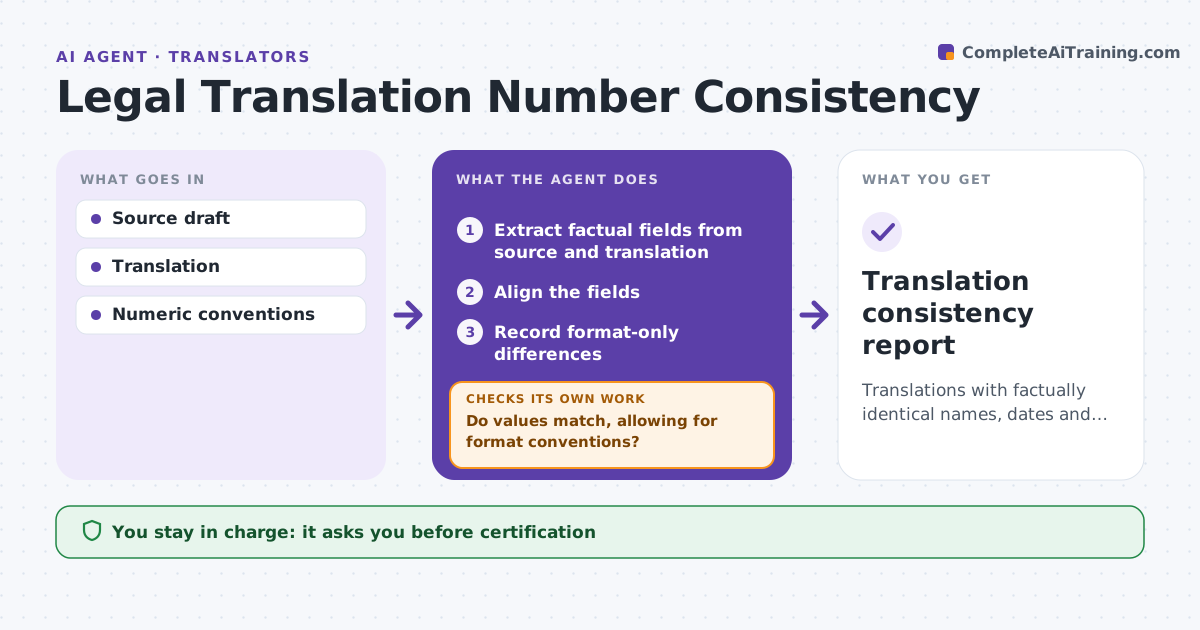
Translations with factually identical names, dates and amounts.
What it does
Translated legal drafts sometimes change names, dates or amounts by mistake. When a translation is delivered, this agent extracts the factual fields from both the source and the translation, such as party names, dates, amounts and references. It aligns them and separates format conventions, like a comma as decimal separator, from real value changes. Real changes get a correction note. Ambiguous dates, such as 03/04 that could be March 4 or April 3, get a clarification question instead of a guess. It rechecks after corrections. The language reviewer approves. The agent never certifies translations. Edge case: an amount reads 1.500,00 in the translation, which is the same as 1,500.00, so it passes as a format difference.
How it works
Follow the arrows from top to bottom. The orange dashed arrow is the loop: when a check fails, the agent goes back and tries again.
Read the steps as a list
- Translation delivered
- Extract factual fields from source and translation
- Align the fields
- Do values match, allowing for format conventions?If not: prepare a correction note or a clarification question. Back to step 3.
- Record format-only differences
- Prepare the consistency report
- Language reviewer approvesThe agent waits here for your OK.
- Translation consistency report
How it decides
It checks every factual field and flags real changes.
- Separate format differences from value changes.
- Ambiguous dates: ask, never guess.
- Recheck every corrected field.
Make it yours
Every agent is a starting point. You choose these settings for your own situation.
- Field types compared
- Format conventions per language
- Who receives correction notes (default translator)
- Who approves (default language reviewer)
What keeps you in control
It always asks you first
- Certification
- Publication
Hard limits
- No certification.
It stops when
- Done: all fields checked.
Set it up
We guide you through the set-up, step by step
Members get the full set-up guide for this agent. No technical skills needed: you copy, paste and upload.
- One set of instructions to paste into your AI, with the clicks for ChatGPT, Claude, Microsoft 365 Copilot, Gemini and Grok
- The agent then walks you through connecting your own data, one source at a time
- A downloadable copy with the flow chart, the rules and the full guide