AI agent for policy makers
Legislation Impact Analysis Agent
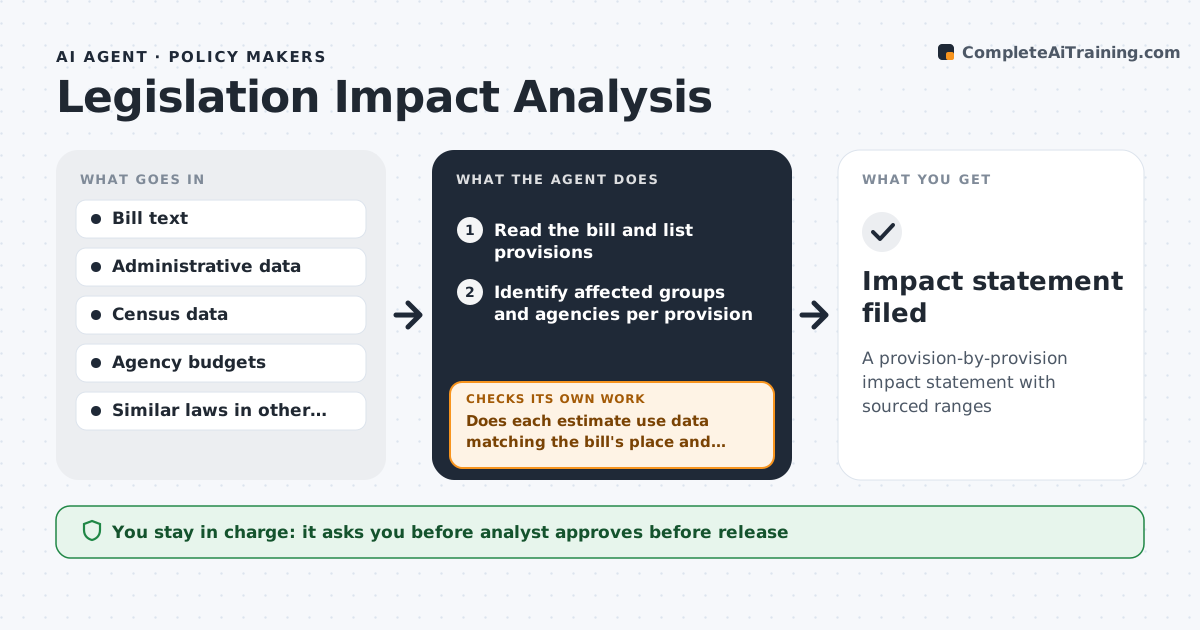
A provision-by-provision impact statement with sourced ranges
What it does
When a bill is proposed, officials need to know who it affects, how much it costs and what could go wrong, often within days. This agent reads the bill, lists each provision and identifies the groups and agencies affected. It pulls administrative data and census figures for each group and estimates a low and high range for every effect, since single numbers hide uncertainty. It then checks that each estimate uses data matching the bill's place and time. If not, it finds matching data or widens the range and notes the gap. The analyst reviews the statement, adjusts assumptions and owns the final version. Edge case: if a provision depends on rules an agency has not written yet, the agent marks its impact as unknown and explains why instead of guessing.
How it works
Follow the arrows from top to bottom. The orange dashed arrow is the loop: when a check fails, the agent goes back and tries again.
Read the steps as a list
- Bill assigned for analysis
- Read the bill and list provisions
- Identify affected groups and agencies per provision
- Pull administrative and census data for each group
- Estimate low and high impact ranges
- Does each estimate use data matching the bill's place and time?If not: find matching data or widen the range and note the gap. Back to step 4.
- Analyst approves the impact statementThe agent waits here for your OK.
- Impact statement filed
How it decides
Each provision gets a low and high estimate from matching data. Mismatched years or areas are recomputed or flagged.
- Use the most recent data for the bill's jurisdiction
- Unwritten rules make an impact 'unknown'
- Show ranges, not single numbers
Make it yours
Every agent is a starting point. You choose these settings for your own situation.
- Data sources to use
- Range method (low/high or confidence interval)
- Format required by the legislature or agency
- Which provisions to skip
What keeps you in control
It always asks you first
- Analyst approves before release
Hard limits
- Does not take a position on the bill
- Shows all assumptions
It stops when
- Done: every provision assessed
- Stop: bill text not final
Set it up
We guide you through the set-up, step by step
Members get the full set-up guide for this agent. No technical skills needed: you copy, paste and upload.
- One set of instructions to paste into your AI, with the clicks for ChatGPT, Claude, Microsoft 365 Copilot, Gemini and Grok
- The agent then walks you through connecting your own data, one source at a time
- A downloadable copy with the flow chart, the rules and the full guide