AI agent for librarians
Library Subject Guide Refresh Agent
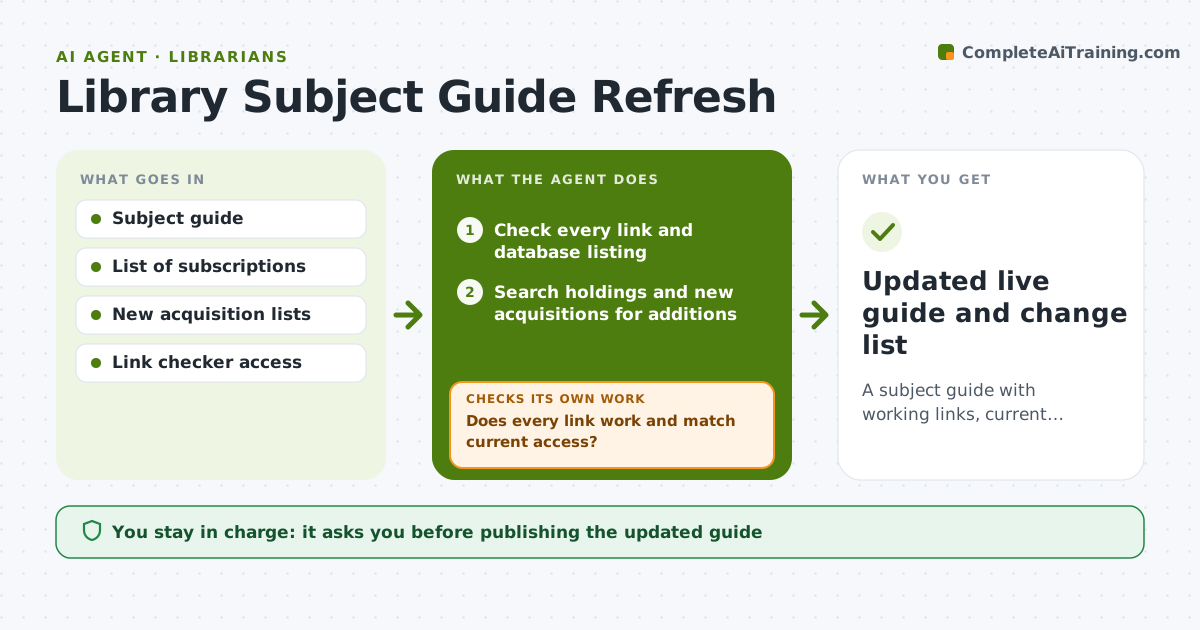
A subject guide with working links, current resources and new additions.
What it does
Click any subject guide and you may find dead links, a database you no longer subscribe to and nothing published in the last two years. This agent checks each link and database listed in a guide, verifies access from on and off campus where possible, and finds replacements for dead items. It reviews new acquisitions and open resources for additions. After updating a draft, it rechecks every link on the new version. Edge case: a database now requires a different login, so the agent updates the access note. The librarian approves before the guide goes live.
How it works
Follow the arrows from top to bottom. The orange dashed arrow is the loop: when a check fails, the agent goes back and tries again.
Read the steps as a list
- Guide due for refresh
- Check every link and database listing
- Does every link work and match current access?If not: mark failures and search for a replacement. Back to step 2.
- Search holdings and new acquisitions for additions
- Draft the updated guide with changes marked
- Recheck every link on the draft
- Are all links on the draft working?If not: fix or remove the failing ones. Back to step 5.
- Librarian approves the draftThe agent waits here for your OK.
- Updated live guide and change list
How it decides
It replaces a dead item with the closest equivalent from current holdings and drops items the library no longer licenses.
- Remove any resource the library no longer licenses.
- Prefer replacements from current holdings over free web sources.
- Add new acquisitions that match the guide's subject headings.
- Note access method for each database.
Make it yours
Every agent is a starting point. You choose these settings for your own situation.
- Guides to refresh
- Refresh frequency
- Subject headings
- Source preferences
- Link test method
What keeps you in control
It always asks you first
- Publishing the updated guide
- Any removal of core resources
Hard limits
- Do not publish the guide itself.
- Do not add resources the library cannot access.
It stops when
- Done: all links work and the librarian approved
- Stop: the guide platform cannot be reached, so the agent reports the issue
Set it up
We guide you through the set-up, step by step
Members get the full set-up guide for this agent. No technical skills needed: you copy, paste and upload.
- One set of instructions to paste into your AI, with the clicks for ChatGPT, Claude, Microsoft 365 Copilot, Gemini and Grok
- The agent then walks you through connecting your own data, one source at a time
- A downloadable copy with the flow chart, the rules and the full guide