AI agent for facilities managers
Life Safety and Preventive Maintenance Compliance Agent
Keep every fire and life-safety check on every property current and fixed when it fails
What it does
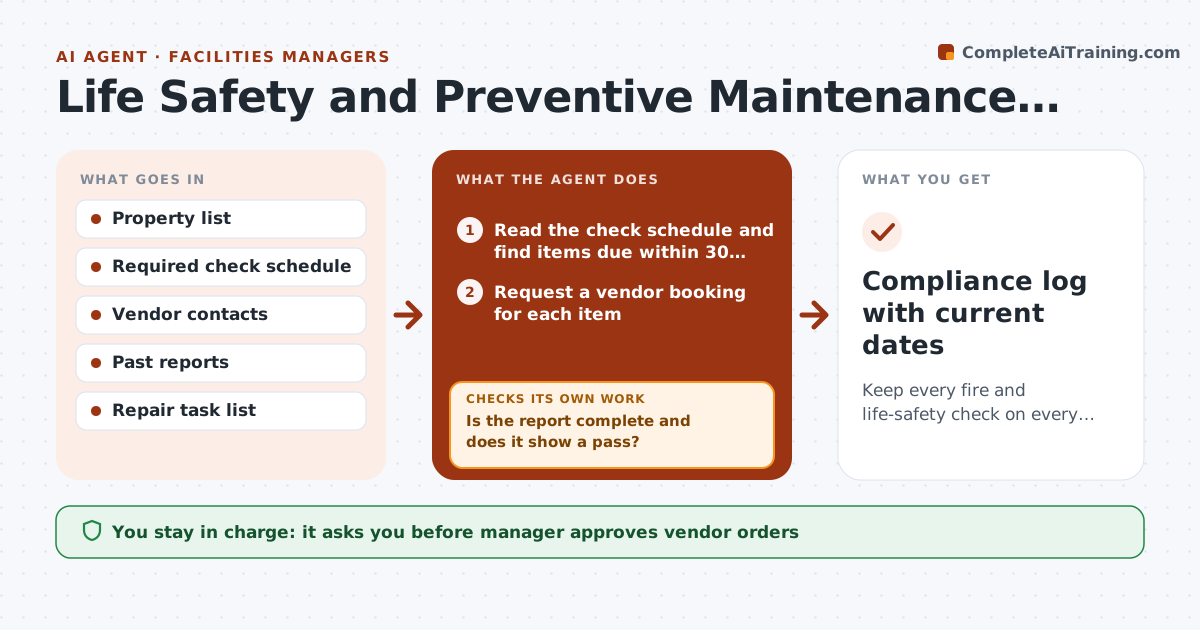
Detector tests, extinguisher tags and boiler inspections slip because they live in many calendars. The agent keeps a list of every required check for each property with its due date. As dates approach it requests quotes or schedules the vendor, and then collects the report when the work is done. It reads each report for failures, such as a dead detector or an expired tag, and opens a repair task. It reminds the manager of overdue items and repeats until they are done. After a repair it checks that the vendor retested and the report shows a pass. The manager approves vendor orders. Edge case: a boiler passes but its certificate expires in 10 days, so the agent opens a renewal.
How it works
Follow the arrows from top to bottom. The orange dashed arrow is the loop: when a check fails, the agent goes back and tries again.
Read the steps as a list
- Daily schedule scan
- Read the check schedule and find items due within 30 days
- Request a vendor booking for each item
- Manager approves vendor orders and costThe agent waits here for your OK.
- Collect vendor reports when received
- Is the report complete and does it show a pass?If not: Request the missing report or open a repair task and rebook after the repair. Back to step 2.
- Open repair tasks for each failure
- Remind owners of overdue items every 3 days
- Did the retest pass after repair?If not: Escalate to the manager and reorder the repair. Back to step 7.
- Compliance log with current dates
How it decides
Due dates come from the required schedule; a report with any failure opens a repair task that stays open until a retest passes.
- Book a check when it is 30 days from due
- Open a repair task for every failed item
- Escalate any item 7 days overdue
- Treat a missing report as not done
Make it yours
Every agent is a starting point. You choose these settings for your own situation.
- Lead time before due date (default 30 days)
- Escalation threshold (default 7 days overdue)
- Property and check list
- Spending limit for auto-booking (default none)
What keeps you in control
It always asks you first
- Manager approves vendor orders
- Manager approves any repair costing over the spending limit
Hard limits
- Never close an item without a passing report
- Never skip a legally required check
It stops when
- Done: every check is current and every failure retested
- Stop: a vendor cannot be reached and the manager must find another
Set it up
We guide you through the set-up, step by step
Members get the full set-up guide for this agent. No technical skills needed: you copy, paste and upload.
- One set of instructions to paste into your AI, with the clicks for ChatGPT, Claude, Microsoft 365 Copilot, Gemini and Grok
- The agent then walks you through connecting your own data, one source at a time
- A downloadable copy with the flow chart, the rules and the full guide