AI agent for electricians
Lighting and Controls Upgrade Proposal Agent
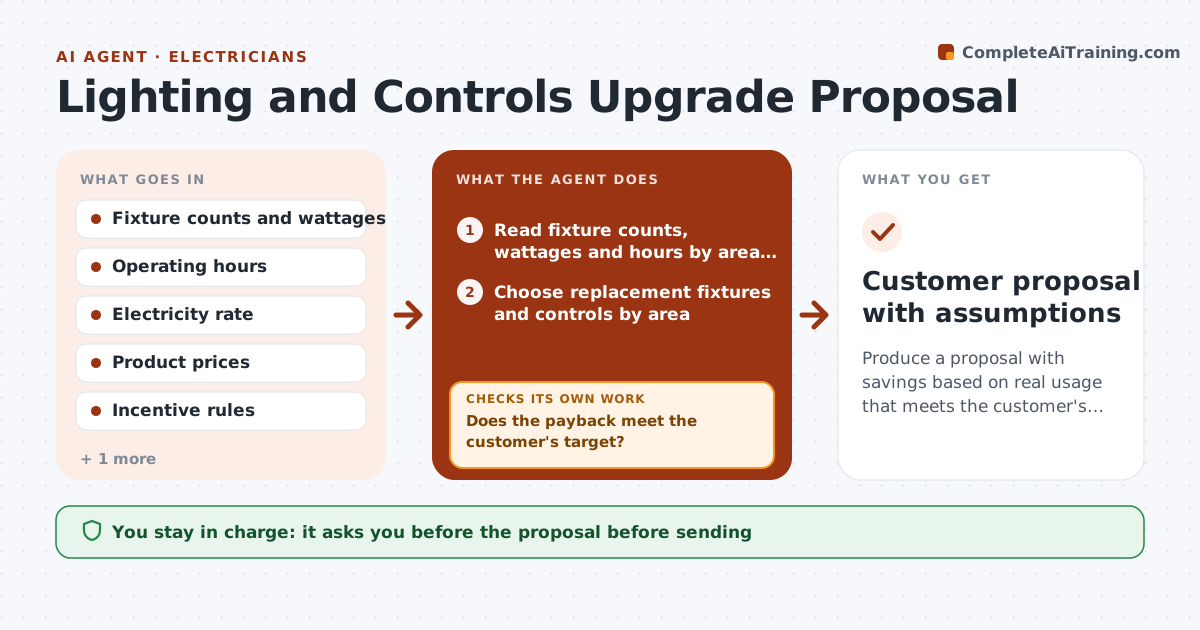
Produce a proposal with savings based on real usage that meets the customer's payback goal.
What it does
A retrofit proposal that promises savings without usage data does not win trust. This agent collects the fixture counts, wattages and operating hours for each area and calculates current and proposed energy use and cost. It checks for utility incentives and adds them. It then tests the payback against the one the customer wants. If the payback is too long, it changes the options, such as adding controls only in the highest-use areas, and recalculates. It shows all assumptions in a plain summary. You approve the proposal before it goes to the customer. Edge case: a warehouse runs 24 hours but one wing is empty at night, and the agent proposes occupancy sensors for that wing only.
How it works
Follow the arrows from top to bottom. The orange dashed arrow is the loop: when a check fails, the agent goes back and tries again.
Read the steps as a list
- Site survey is complete
- Read fixture counts, wattages and hours by area and calculate current energy use and cost
- Choose replacement fixtures and controls by area
- Calculate new energy use, cost and installed price
- Look up utility incentives and add them
- Does the payback meet the customer's target?If not: Show the payback by area and the longest payback items. Back to step 4.
- Adjust the options, for example controls only in high-use areas
- Recalculate savings and payback
- Is the payback now at or below the target?If not: Try another combination or tell the customer what the target requires. Back to step 7.
- Electrician approves the proposalThe agent waits here for your OK.
- Customer proposal with assumptions
How it decides
It uses actual hours from the customer where possible. It picks the options with the best payback until the target is met.
- Use measured hours over estimates (default)
- Include incentives only if confirmed eligible
- Show savings as a range of plus or minus 10%
- Do not claim savings the calculation does not show
Make it yours
Every agent is a starting point. You choose these settings for your own situation.
- Payback target
- Electricity rate
- Operating hours source
- Incentive programs
- Savings range (default plus or minus 10%)
What keeps you in control
It always asks you first
- The proposal before sending
Hard limits
- Never guarantees savings
- Shows all assumptions
- Never sends to the customer without approval
It stops when
- Done: proposal with payback at or below target
- Stop: target cannot be met; electrician explains options to the customer
Set it up
We guide you through the set-up, step by step
Members get the full set-up guide for this agent. No technical skills needed: you copy, paste and upload.
- One set of instructions to paste into your AI, with the clicks for ChatGPT, Claude, Microsoft 365 Copilot, Gemini and Grok
- The agent then walks you through connecting your own data, one source at a time
- A downloadable copy with the flow chart, the rules and the full guide