AI agent for customs brokers
Liquidation and Protest Deadline Agent
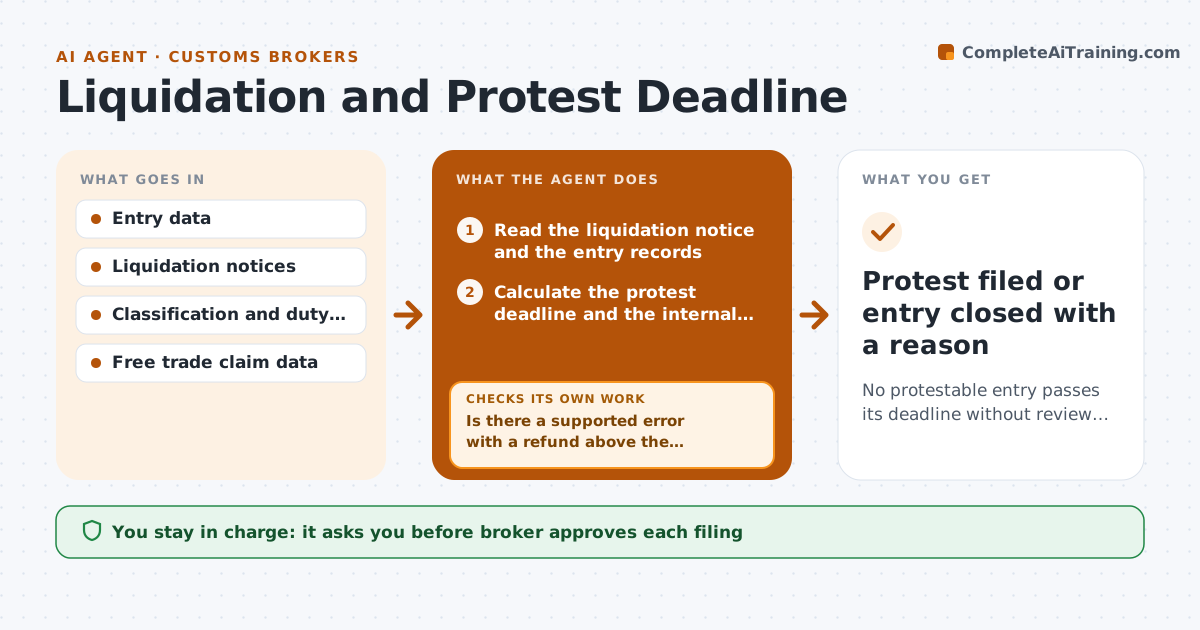
No protestable entry passes its deadline without review and a decision by the broker.
What it does
An entry liquidates in March with an error that cost the importer 11,000 dollars, and nobody sees it before the 180 days run out. This agent tracks the liquidation date of every entry and counts down the protest window. It reviews liquidated entries for errors or refund chances, such as wrong classification, missed free trade claims or a rate that should have been lower. For each candidate, it builds a protest file with the evidence and estimates the refund. It checks the file for completeness against what is needed to file. The broker approves filing. Edge case: a protest window closes on a weekend, so the agent plans around the earlier business day.
How it works
Follow the arrows from top to bottom. The orange dashed arrow is the loop: when a check fails, the agent goes back and tries again.
Read the steps as a list
- Entry liquidates or the daily check runs
- Read the liquidation notice and the entry records
- Calculate the protest deadline and the internal target date
- Review the entry for errors and refund opportunities
- Is there a supported error with a refund above the threshold?If not: check classification, free trade claims and valuation again, then close with a note. Back to step 3.
- Build the protest file with evidence
- Does the file hold all evidence and the right forms?If not: request missing records and refill the file. Back to step 5.
- Estimate the refund and compare it with the effort
- Broker approves filingThe agent waits here for your OK.
- Track the protest to the response
- Protest filed or entry closed with a reason
How it decides
It reviews each liquidated entry for errors and pursues those where the refund exceeds the broker's threshold and evidence supports the claim.
- Set the internal target 15 days before the deadline.
- Pursue refunds above the broker's minimum, default 250 dollars.
- Check free trade claims on every liquidated entry.
- Escalate a candidate with under 30 days left.
Make it yours
Every agent is a starting point. You choose these settings for your own situation.
- Internal target before the deadline (default 15 days)
- Refund threshold (default 250 dollars)
- Review checks
- Alert recipients
What keeps you in control
It always asks you first
- Broker approves each filing
Hard limits
- Never file a protest without approval
- Show the rule and the numbers for the refund
It stops when
- Done: protest filed or entry closed.
- Stop: deadline passed.
Set it up
We guide you through the set-up, step by step
Members get the full set-up guide for this agent. No technical skills needed: you copy, paste and upload.
- One set of instructions to paste into your AI, with the clicks for ChatGPT, Claude, Microsoft 365 Copilot, Gemini and Grok
- The agent then walks you through connecting your own data, one source at a time
- A downloadable copy with the flow chart, the rules and the full guide