AI agent for elearning developers
Localization Review Agent
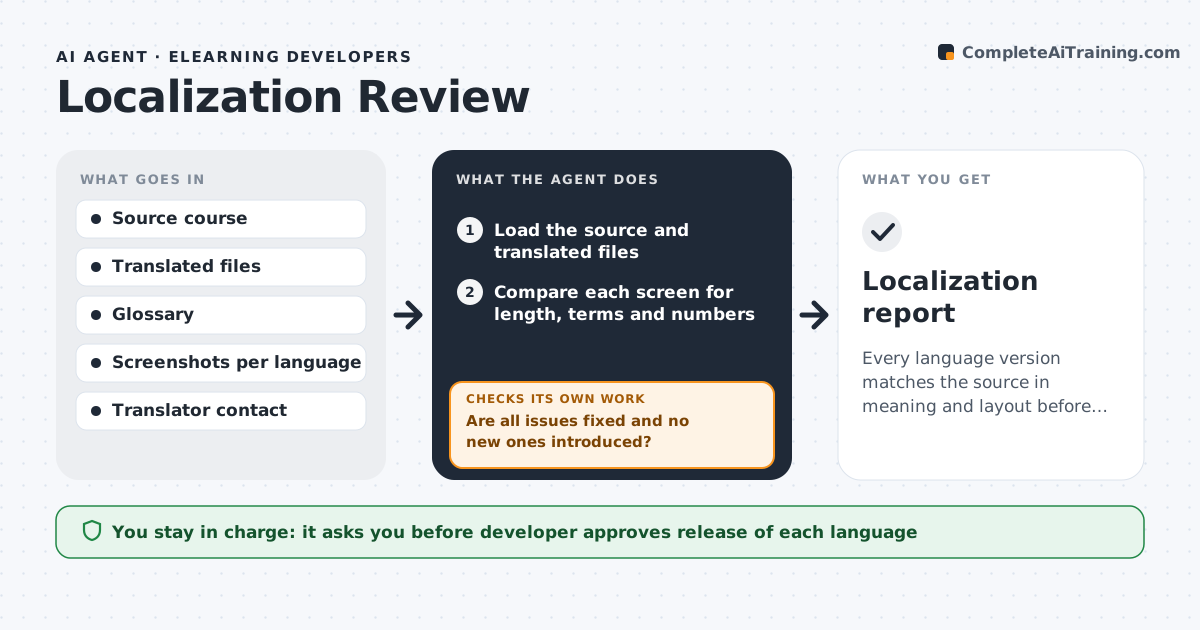
Every language version matches the source in meaning and layout before release.
What it does
Translations often arrive with text that overflows its box, untranslated terms, a changed number or a meaning that has drifted. The agent compares the source course with each translation screen by screen. It checks length against the space, matches key terms to the glossary, finds untranslated strings and mismatched numbers, and reviews screenshots in each language for layout problems. It sends a list of issues to the translator with the screen and the problem. After the translator returns fixes, it rechecks the same screens and anything the fix touched. The developer approves release of each language. Edge case: a right-to-left language needs the whole layout checked, not just the text.
How it works
Follow the arrows from top to bottom. The orange dashed arrow is the loop: when a check fails, the agent goes back and tries again.
Read the steps as a list
- Translation delivered
- Load the source and translated files
- Compare each screen for length, terms and numbers
- Capture screenshots in each language
- List overflow, untranslated and mismatched items
- Send the issue list to the translator
- Are all issues fixed and no new ones introduced?If not: Send the remaining issues back to the translator and recheck the touched screens. Back to step 3.
- Developer approves release of each languageThe agent waits here for your OK.
- Publish the language version
- Localization report
How it decides
It compares each screen with the source on length, terms, numbers and layout and sends the issues to the translator.
- Text longer than 130% of the source is flagged for layout
- Glossary terms must match exactly
- Numbers and dates must match the source
- Right-to-left languages need a layout pass
Make it yours
Every agent is a starting point. You choose these settings for your own situation.
- Languages and glossaries
- Length limit (default 130%)
- Screens to sample
- Translator contact
- Release checklist
What keeps you in control
It always asks you first
- Developer approves release of each language
- Developer approves any change to the source text
Hard limits
- Never publish a language without approval
- Never change translated text itself, only flag it
- Never skip the glossary check
It stops when
- Done: all languages pass and are approved
- Stop: the translator cannot resolve a meaning conflict
Set it up
We guide you through the set-up, step by step
Members get the full set-up guide for this agent. No technical skills needed: you copy, paste and upload.
- One set of instructions to paste into your AI, with the clicks for ChatGPT, Claude, Microsoft 365 Copilot, Gemini and Grok
- The agent then walks you through connecting your own data, one source at a time
- A downloadable copy with the flow chart, the rules and the full guide