AI agent for safety engineers
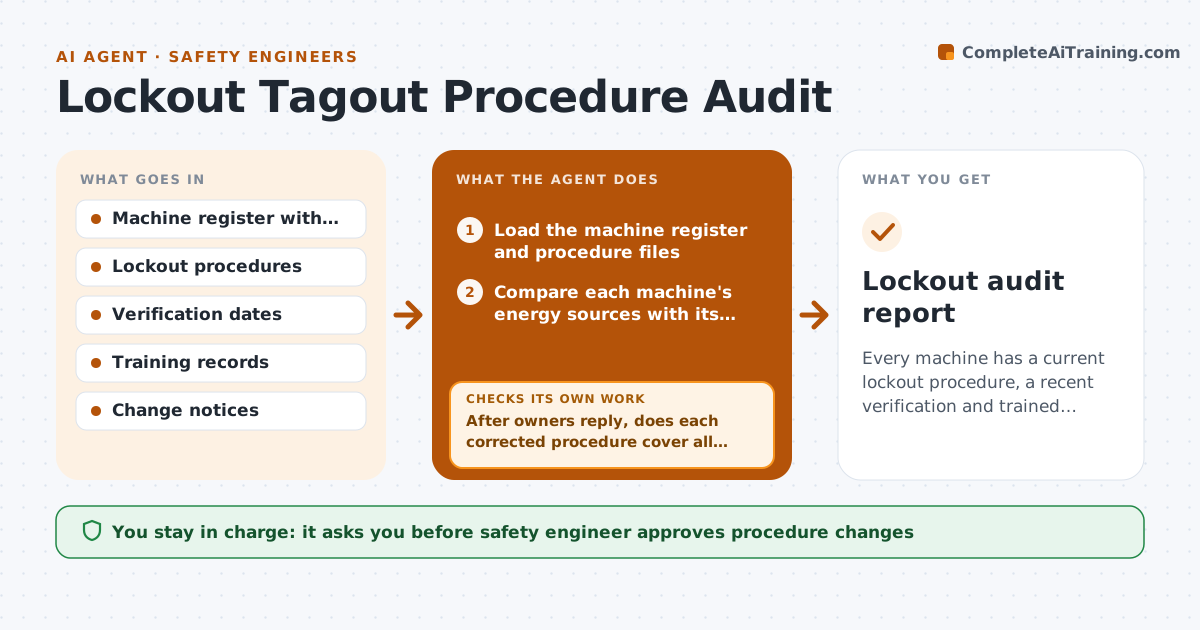
Lockout Tagout Procedure Audit Agent
Every machine has a current lockout procedure, a recent verification and trained authorized employees.
What it does
A conveyor gets rerouted and its lockout procedure still shows the old panel. This agent audits every machine each month. It lists each machine with its energy sources, such as electrical, pneumatic and gravity, and compares them with the written lockout procedure and the date of the last field verification. It flags missing steps, photos older than 12 months, and authorized employees whose training has expired. It checks the training records and, where it finds gaps, asks the owner for the corrections and rechecks. The safety engineer approves procedure changes and decides if any machine must be taken out of service. Edge case: a machine added last week with no procedure at all goes to the top of the list.
How it works
Follow the arrows from top to bottom. The orange dashed arrow is the loop: when a check fails, the agent goes back and tries again.
Read the steps as a list
- Monthly audit or equipment change notice
- Load the machine register and procedure files
- Compare each machine's energy sources with its procedure
- Check verification date and photo age
- Match authorized employees to training records
- Rate each gap by severity
- Draft the correction request for each machine owner
- Safety engineer approves requests and procedure changesThe agent waits here for your OK.
- After owners reply, does each corrected procedure cover all energy sources?If not: Return the machine to the owner with the missing items listed. Back to step 3.
- Lockout audit report
How it decides
It rates each machine by gap severity: no procedure is critical, missing energy source is high, old photos or expired training is medium.
- No procedure or unlisted energy source is critical
- Verification older than 12 months is high
- Expired training for an authorized employee is high
- Photo older than 12 months is medium
Make it yours
Every agent is a starting point. You choose these settings for your own situation.
- Verification interval (default 12 months)
- Photo age limit
- Severity ratings
- Who gets each machine's request
What keeps you in control
It always asks you first
- Safety engineer approves procedure changes
- Safety engineer decides on removing a machine from service
Hard limits
- Never rewrite or approve a procedure itself
- Never mark a machine safe without a field verification record
It stops when
- Done: all critical and high gaps closed or scheduled
- Stop: machine register is out of date
Set it up
We guide you through the set-up, step by step
Members get the full set-up guide for this agent. No technical skills needed: you copy, paste and upload.
- One set of instructions to paste into your AI, with the clicks for ChatGPT, Claude, Microsoft 365 Copilot, Gemini and Grok
- The agent then walks you through connecting your own data, one source at a time
- A downloadable copy with the flow chart, the rules and the full guide