AI agent for channel partner managers
Market Development Fund Claim Verification Agent
Funds paid only for proven, approved activities
What it does
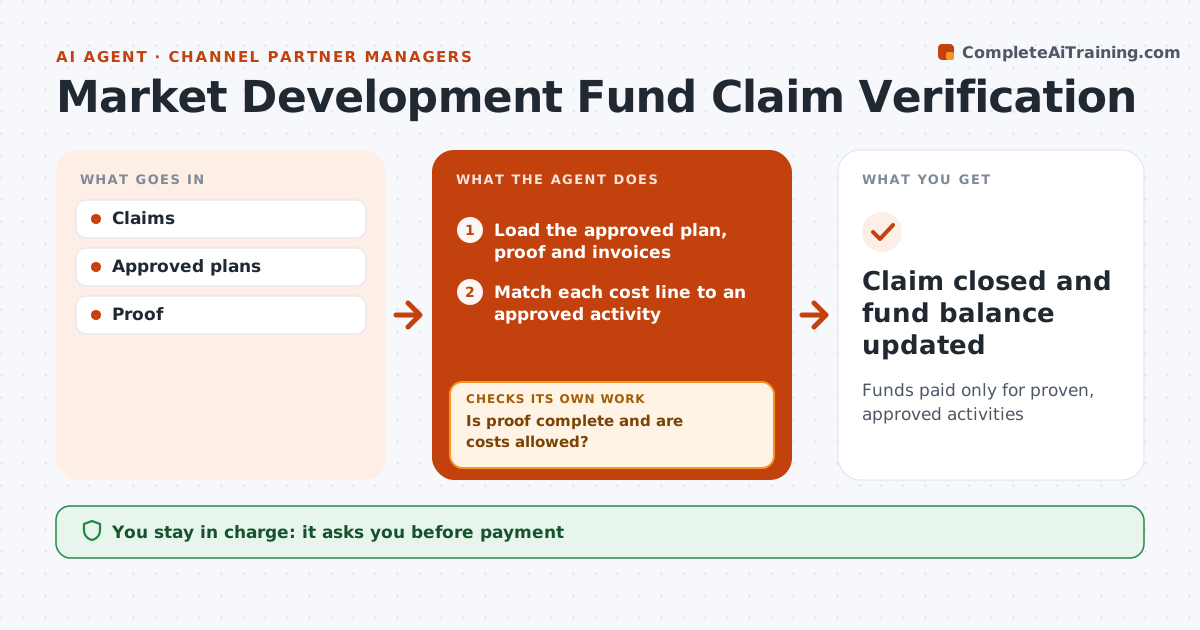
Partners claim marketing development funds for events and campaigns, and paying without checking wastes budget. When a claim comes in, this agent loads the approved marketing plan, the proof of performance and the invoices. It matches each cost line to an approved activity and checks that proof is complete and costs are allowed. If proof is missing, such as event photos or a lead list, it drafts a request to the partner and checks again once it arrives. It calculates leads and pipeline linked to the activity from the CRM. It then checks that the claim fits within the partner's remaining fund balance. The partner manager approves every payment, and the agent never releases money itself. Afterward it closes the claim and updates the balance. Edge case: when a claim includes costs above the approved amount, the agent recommends paying only the approved part and explains the difference.
How it works
Follow the arrows from top to bottom. The orange dashed arrow is the loop: when a check fails, the agent goes back and tries again.
Read the steps as a list
- Fund claim submitted
- Load the approved plan, proof and invoices
- Match each cost line to an approved activity
- Is proof complete and are costs allowed?If not: list missing proof or disallowed lines and request them from the partner. Back to step 2.
- Calculate leads and pipeline from the CRM
- Is the claim within the remaining fund balance?If not: cap the payment and note the shortfall. Back to step 3.
- Partner manager approves paymentThe agent waits here for your OK.
- Claim closed and fund balance updated
How it decides
It matches claims to plans and proof.
- Above approved amount not paid
- Proof required
- Leads linked to CRM
Make it yours
Every agent is a starting point. You choose these settings for your own situation.
- Proof rules
- Allowed costs
- Deadlines
- Approval levels
What keeps you in control
It always asks you first
- Payment
Hard limits
- Never pays
- Rules equal for all
It stops when
- Done: paid
- Stop: claim withdrawn
Set it up
We guide you through the set-up, step by step
Members get the full set-up guide for this agent. No technical skills needed: you copy, paste and upload.
- One set of instructions to paste into your AI, with the clicks for ChatGPT, Claude, Microsoft 365 Copilot, Gemini and Grok
- The agent then walks you through connecting your own data, one source at a time
- A downloadable copy with the flow chart, the rules and the full guide