AI agent for vice president of marketings
Marketing Channel Budget Reallocation Agent
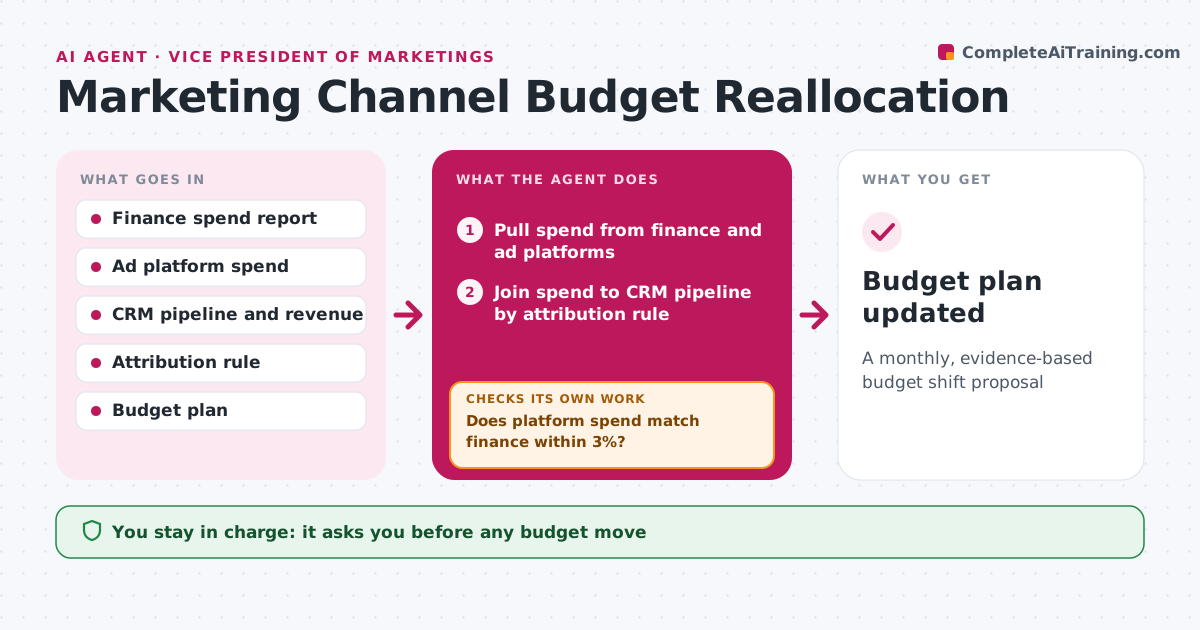
A monthly, evidence-based budget shift proposal
What it does
Marketing leaders need to move budget toward what works, but spend and results live in different systems and rarely agree. After finance closes the month, this agent pulls spend for paid search, paid social, events, content, partners and email from both finance and the ad platforms. It first checks that the two match within 3%. If not, it looks for missing invoices or credits and reconciles before going on. It then joins spend to CRM pipeline using the agreed attribution rule and calculates cost per qualified lead and pipeline per dollar. It proposes moving a limited share of budget from weak to strong channels, while keeping minimums for brand channels. The VP approves any move. Edge case: a channel with a long sales cycle is judged on leading signals, not closed revenue.
How it works
Follow the arrows from top to bottom. The orange dashed arrow is the loop: when a check fails, the agent goes back and tries again.
Read the steps as a list
- Finance month close done
- Pull spend from finance and ad platforms
- Does platform spend match finance within 3%?If not: find missing invoices or credits and reconcile. Back to step 2.
- Join spend to CRM pipeline by attribution rule
- Calculate cost per qualified lead and pipeline per dollar
- Draft reallocation within limits and minimums
- VP approves budget movesThe agent waits here for your OK.
- Budget plan updated
How it decides
It proposes moving at most a set share of budget toward channels with the best pipeline per dollar, respecting channel minimums.
- Move at most 15% of total budget per month
- Keep minimums for brand channels
- Judge long-cycle channels on leading signals
Make it yours
Every agent is a starting point. You choose these settings for your own situation.
- Maximum monthly shift (default 15%)
- Channel minimums
- Attribution rule
- Reconciliation tolerance
What keeps you in control
It always asks you first
- Any budget move
- Sharing with finance
Hard limits
- Never changes budgets in ad platforms
- Never edits CRM data
It stops when
- Done: proposal approved or rejected
- Stop: attribution data incomplete, report gaps
Set it up
We guide you through the set-up, step by step
Members get the full set-up guide for this agent. No technical skills needed: you copy, paste and upload.
- One set of instructions to paste into your AI, with the clicks for ChatGPT, Claude, Microsoft 365 Copilot, Gemini and Grok
- The agent then walks you through connecting your own data, one source at a time
- A downloadable copy with the flow chart, the rules and the full guide