AI agent for online sellers
Marketplace Policy Change Watch Agent
Match marketplace policy updates to every listing, flag products at risk and track fixes
What it does
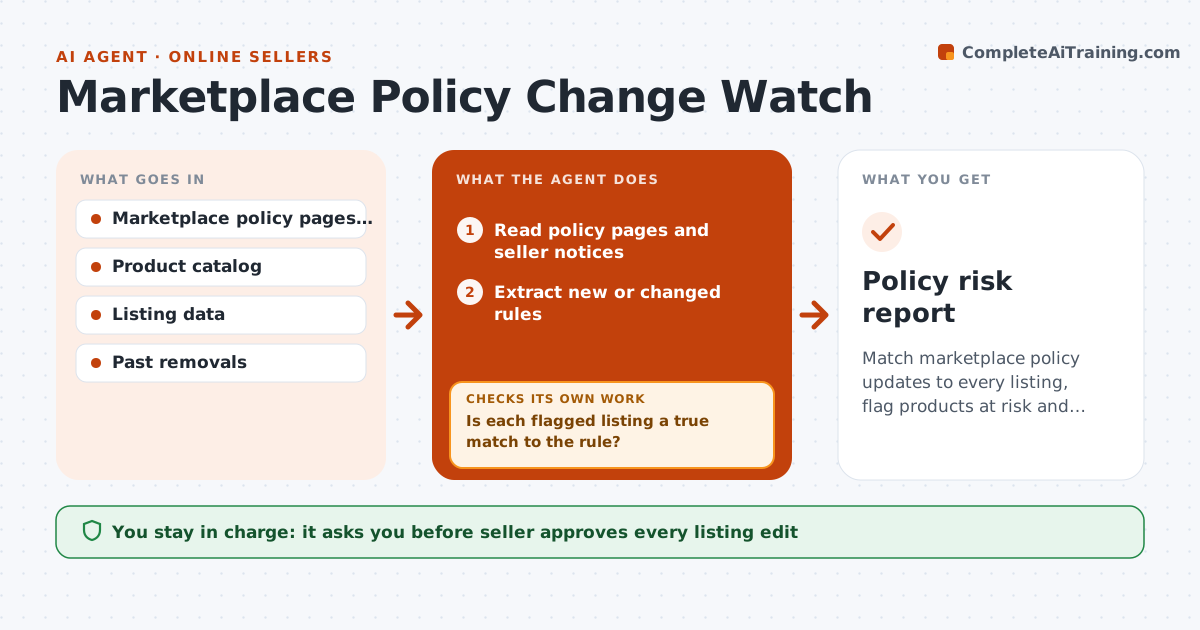
Policy changes are found when listings are removed. Each day the agent reads policy updates and seller notices for each marketplace and extracts what changed, such as new restricted words, image rules or category claims. It searches the catalog and listings for matches, and flags products at risk with the reason. It proposes edits, such as removing a claim or changing an image. After the seller approves, it checks that each edit appears in the live listing and passes the new rule. The seller approves changes. Edge case: a new rule bans the word "cure" in titles, and the agent finds it in 14 listings.
How it works
Follow the arrows from top to bottom. The orange dashed arrow is the loop: when a check fails, the agent goes back and tries again.
Read the steps as a list
- Daily policy scan
- Read policy pages and seller notices
- Extract new or changed rules
- Search listings and product data for matches
- Is each flagged listing a true match to the rule?If not: Read the listing details and clear false matches. Back to step 3.
- Propose edits for each flagged listing
- Seller approves the editsThe agent waits here for your OK.
- Check that live listings show the edits
- Do the listings pass the rule now?If not: Return to the failed edits and revise. Back to step 5.
- Policy risk report
How it decides
Each policy change is matched to specific listing fields; a product is cleared only after the listing is edited and rechecked.
- Flag exact and close variants of banned terms
- Check images against image rules
- Rank risk by sales volume
- Recheck after each edit
Make it yours
Every agent is a starting point. You choose these settings for your own situation.
- Marketplaces monitored
- Check frequency
- Risk ranking
- Listing fields checked
What keeps you in control
It always asks you first
- Seller approves every listing edit
- Seller approves removing a product
Hard limits
- Never edit a live listing without approval
- Never guess at a policy
It stops when
- Done: all flagged listings pass the new rule
- Stop: the policy text is unclear
Set it up
We guide you through the set-up, step by step
Members get the full set-up guide for this agent. No technical skills needed: you copy, paste and upload.
- One set of instructions to paste into your AI, with the clicks for ChatGPT, Claude, Microsoft 365 Copilot, Gemini and Grok
- The agent then walks you through connecting your own data, one source at a time
- A downloadable copy with the flow chart, the rules and the full guide