AI agent for construction estimators
Material Price Update Agent
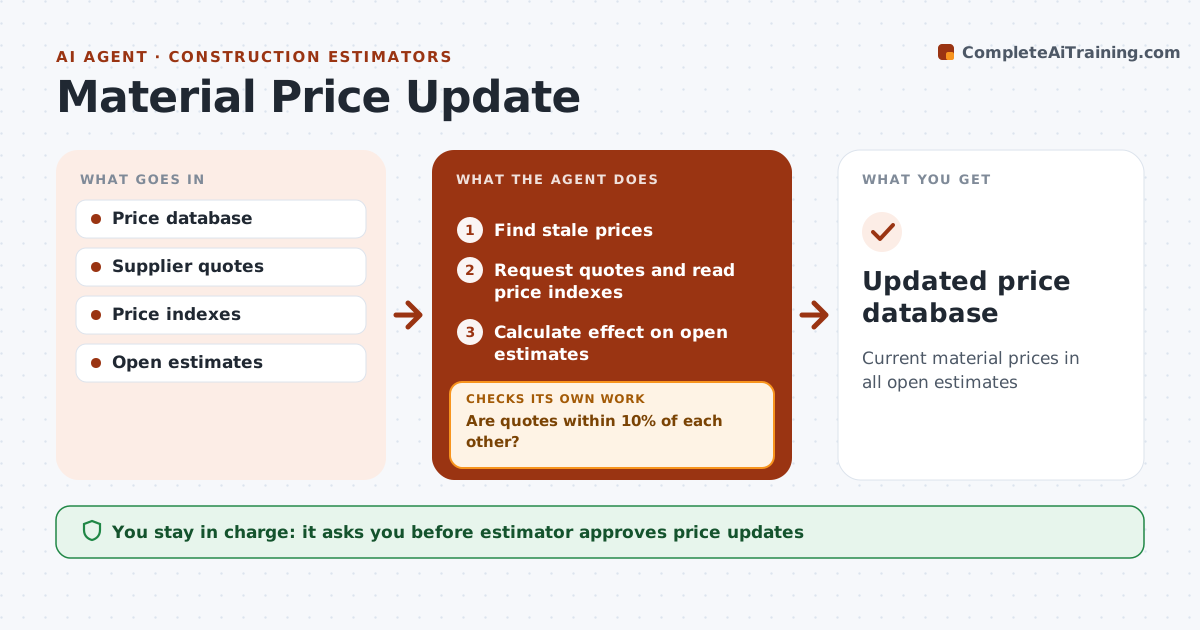
Current material prices in all open estimates
What it does
Material prices change monthly, and estimates built on old prices lose money. This agent checks the firm's price database for items older than set limits, refreshing volatile items such as steel or copper every 30 days. It drafts quote requests to suppliers, which the estimator sends, or reads published price indexes. When quotes come back, it checks they are within 10 percent of each other. If they are not, it asks for a third quote before using any of them, so one odd quote does not move every estimate. It updates prices only after the estimator approves. It also checks open estimates that use the updated items and shows how much each would change. Edge case: for long bids that include volatile items, it suggests adding an escalation clause so the firm is not locked into today's price.
How it works
Follow the arrows from top to bottom. The orange dashed arrow is the loop: when a check fails, the agent goes back and tries again.
Read the steps as a list
- Weekly check
- Find stale prices
- Request quotes and read price indexes
- Are quotes within 10% of each other?If not: request another quote. Back to step 3.
- Calculate effect on open estimates
- Estimator approves updatesThe agent waits here for your OK.
- Updated price database
How it decides
Prices older than 30 days for volatile items or 90 days for others are refreshed.
- Volatile items refreshed every 30 days
- Quotes over 10% apart get a third
- Long bids get escalation suggestion
Make it yours
Every agent is a starting point. You choose these settings for your own situation.
- Staleness limits
- Volatile items
- Suppliers
- Quote spread limit
What keeps you in control
It always asks you first
- Estimator approves price updates
- Estimator sends quote requests
Hard limits
- Never changes submitted bids
- Never orders materials
It stops when
- Done: prices updated
- Stop: suppliers unavailable
Set it up
We guide you through the set-up, step by step
Members get the full set-up guide for this agent. No technical skills needed: you copy, paste and upload.
- One set of instructions to paste into your AI, with the clicks for ChatGPT, Claude, Microsoft 365 Copilot, Gemini and Grok
- The agent then walks you through connecting your own data, one source at a time
- A downloadable copy with the flow chart, the rules and the full guide