
AI agent for media relations specialists
Media Coverage Attribution Agent
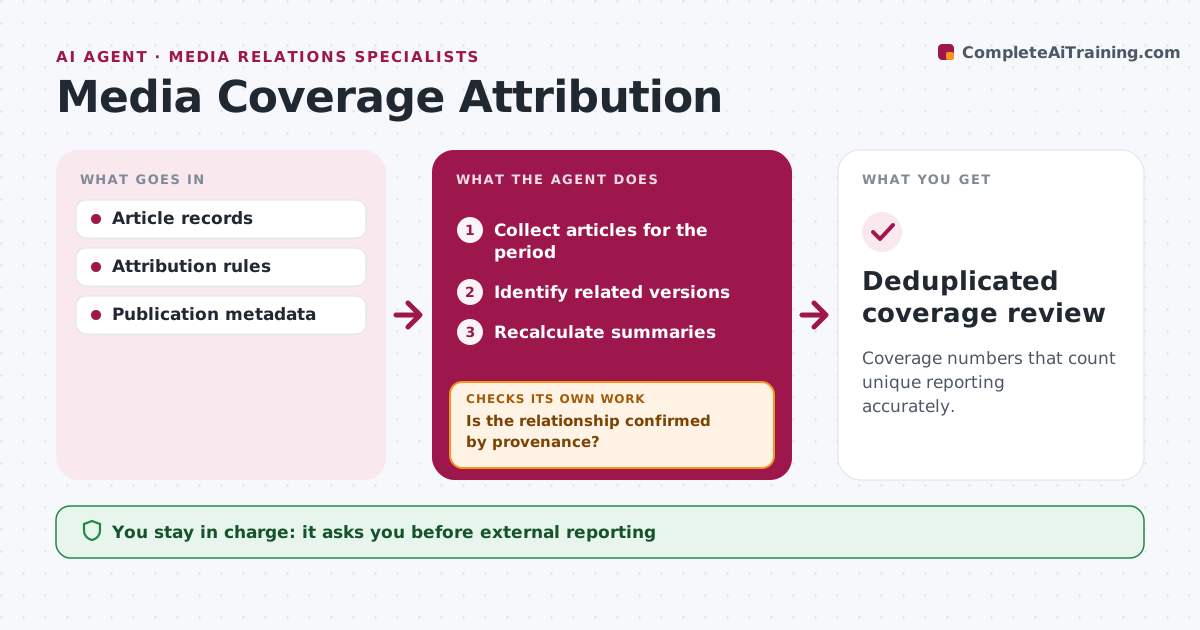
Coverage numbers that count unique reporting accurately.
What it does
Coverage reports often count the same story many times when regional sites republish a wire article. For each monthly report, this agent finds related versions of articles. It checks provenance, such as bylines, wire tags and publication metadata, to tell syndicated copies apart from independent reporting. Confirmed syndication counts once plus a syndication note. Relationships it cannot confirm are labeled uncertain instead of merged. It then recalculates the summary numbers and checks that totals add up. The analyst approves the report. Edge case: metadata links four regional articles to one wire story, so they count as one story with syndication.
How it works
Follow the arrows from top to bottom. The orange dashed arrow is the loop: when a check fails, the agent goes back and tries again.
Read the steps as a list
- Monthly coverage report cycle
- Collect articles for the period
- Identify related versions
- Is the relationship confirmed by provenance?If not: label it uncertain. Back to step 3.
- Recalculate summaries
- Do totals reconcile with the article list?If not: recount the affected groups. Back to step 5.
- Analyst approves the reportThe agent waits here for your OK.
- Deduplicated coverage review
How it decides
It uses provenance metadata and keeps uncertain links labeled.
- Syndicated copies count once, with a syndication note.
- Uncertain relationships stay labeled, not merged.
- Totals must reconcile before approval.
Make it yours
Every agent is a starting point. You choose these settings for your own situation.
- Provenance signals to trust (wire tags, bylines, canonical links)
- How uncertain links are shown
- Report period (default monthly)
- Who approves the report
What keeps you in control
It always asks you first
- External reporting
- Reputational claims
Hard limits
- No inflated claims.
It stops when
- Done: summary recalculated.
Set it up
We guide you through the set-up, step by step
Members get the full set-up guide for this agent. No technical skills needed: you copy, paste and upload.
- One set of instructions to paste into your AI, with the clicks for ChatGPT, Claude, Microsoft 365 Copilot, Gemini and Grok
- The agent then walks you through connecting your own data, one source at a time
- A downloadable copy with the flow chart, the rules and the full guide



