AI agent for pharmaceutical sales representatives
Medical Congress Intelligence Agent
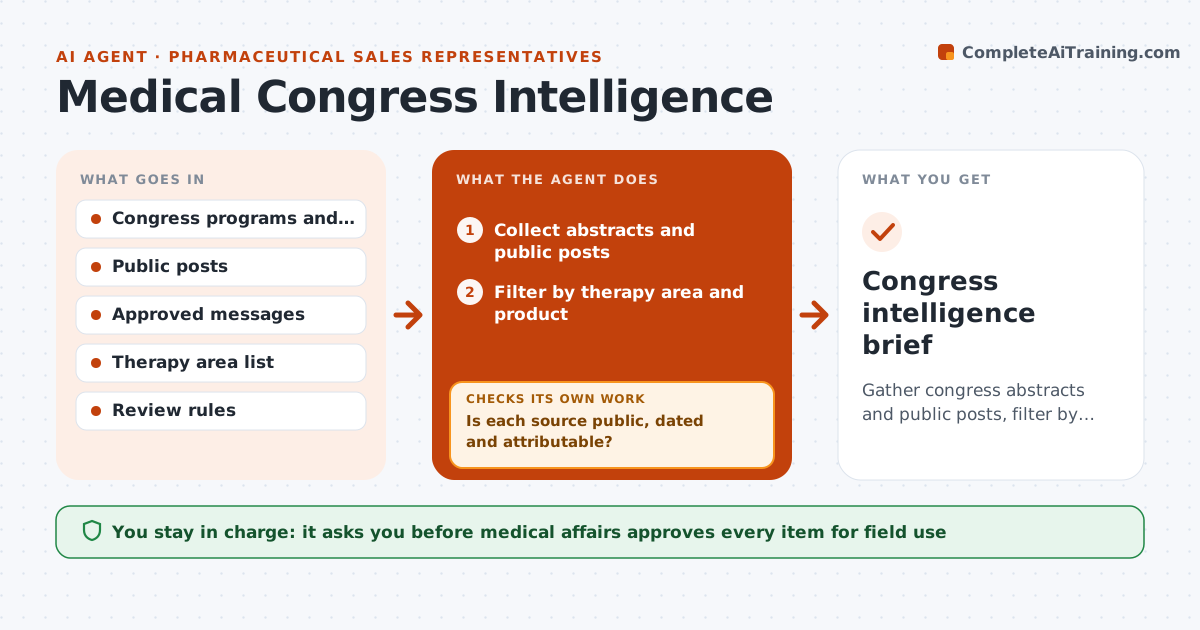
Gather congress abstracts and public posts, filter by therapy area, compare with approved messages and route items for medical review
What it does
Congress data and competitor news reach field teams too late or in raw form. During a congress, the agent collects published abstracts and public posts and filters them by therapy area. It compares each item with the company's approved messages and flags those that support, conflict with or add to them. It checks each source for type and date and marks the reliability. It routes items to medical review with a short summary. Medical affairs decides what the reps may use. Edge case: an abstract reports a competitor result with a small sample, and the agent labels it as preliminary.
How it works
Follow the arrows from top to bottom. The orange dashed arrow is the loop: when a check fails, the agent goes back and tries again.
Read the steps as a list
- Congress begins
- Collect abstracts and public posts
- Filter by therapy area and product
- Is each source public, dated and attributable?If not: Drop or mark unverified items. Back to step 2.
- Compare items with approved messages
- Write a short neutral summary of each relevant item
- Medical affairs reviews each summaryThe agent waits here for your OK.
- Update the item list with medical decisions
- Does each released item have an approval on record?If not: Remove it from the field brief and request review. Back to step 7.
- Build the field brief with approved items only
- Congress intelligence brief
How it decides
Items are filtered by therapy area and source type; nothing reaches reps until medical affairs approves it.
- Include only public sources
- Flag preliminary data and small samples
- Never mix approved and unapproved items
- Keep summaries neutral
Make it yours
Every agent is a starting point. You choose these settings for your own situation.
- Therapy areas
- Source types
- Review turnaround
- Brief format
What keeps you in control
It always asks you first
- Medical affairs approves every item for field use
- Medical affairs approves any comparison with a competitor
Hard limits
- Never send unapproved items to reps
- Never present data as a claim
It stops when
- Done: approved brief delivered
- Stop: a source cannot be verified
Set it up
We guide you through the set-up, step by step
Members get the full set-up guide for this agent. No technical skills needed: you copy, paste and upload.
- One set of instructions to paste into your AI, with the clicks for ChatGPT, Claude, Microsoft 365 Copilot, Gemini and Grok
- The agent then walks you through connecting your own data, one source at a time
- A downloadable copy with the flow chart, the rules and the full guide