AI agent for community managers
Member Spotlight Pipeline Agent
Publish a fair, consented member spotlight every month without a last-minute rush.
What it does
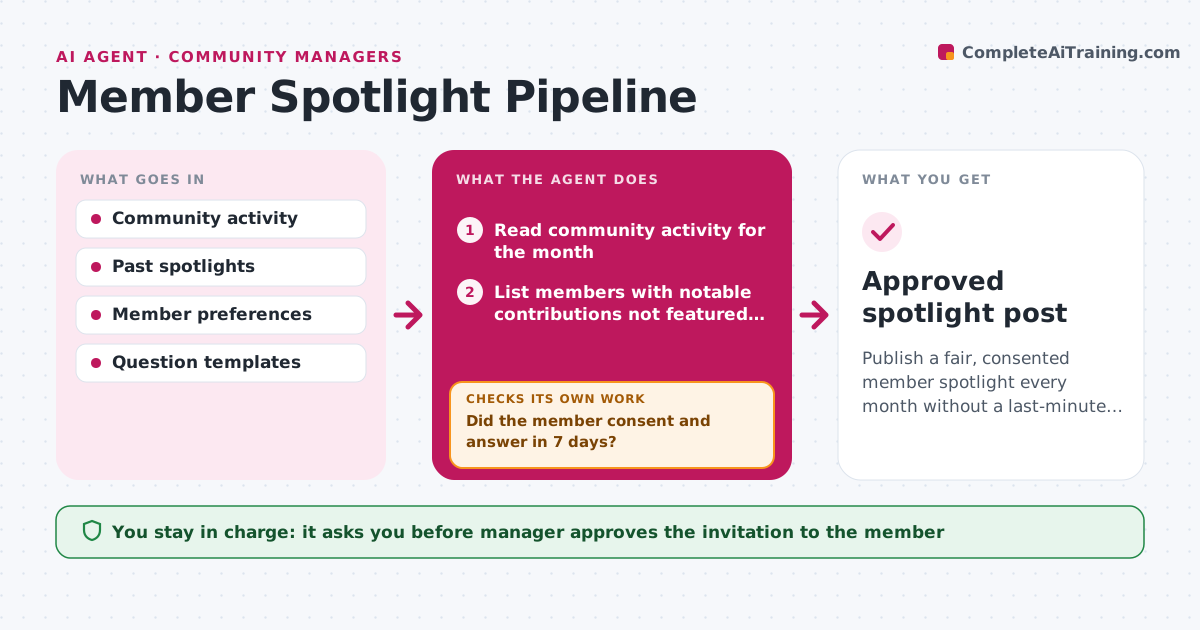
Spotlight posts get written in a rush at month-end, and the same visible members keep getting featured. Each month this agent lists members with notable contributions, such as helpful answers, projects shared and events led. It checks they have not been featured recently and drafts a few questions to ask each one. It sends the questions only after the manager approves, collects the answers and assembles the spotlight. Members must consent. If a member does not reply or declines, it moves to the next candidate. It checks the finished post for accuracy against what the member said. The manager approves publication.
How it works
Follow the arrows from top to bottom. The orange dashed arrow is the loop: when a check fails, the agent goes back and tries again.
Read the steps as a list
- Spotlight cycle begins
- Read community activity for the month
- List members with notable contributions not featured in the last 6 months
- Draft questions for the top candidate
- Manager approves the invitation and questionsThe agent waits here for your OK.
- Send and track the reply
- Did the member consent and answer in 7 days?If not: move to the next candidate and repeat. Back to step 4.
- Assemble the spotlight from the answers
- Does every statement match the member's own words and the record?If not: correct the text and recheck. Back to step 8.
- Manager approves publicationThe agent waits here for your OK.
- Approved spotlight post
How it decides
It ranks candidates on contribution and time since last feature, and keeps only those who consent.
- Skip members featured in the last 6 months
- Give weight to members who help others, not only post often
- Wait 7 days for a reply
- Send the final text to the member before publishing
Make it yours
Every agent is a starting point. You choose these settings for your own situation.
- Gap between features (default 6 months)
- Questions asked
- Reply wait (default 7 days)
- Post length and format
What keeps you in control
It always asks you first
- Manager approves the invitation to the member
- Manager approves publication
- Member confirms consent and the final text
Hard limits
- Never publishes a spotlight or contacts a member without approval
- Does not use any private messages as material
It stops when
- Done: spotlight published by a person
- Stop: no candidates consent this month
Set it up
We guide you through the set-up, step by step
Members get the full set-up guide for this agent. No technical skills needed: you copy, paste and upload.
- One set of instructions to paste into your AI, with the clicks for ChatGPT, Claude, Microsoft 365 Copilot, Gemini and Grok
- The agent then walks you through connecting your own data, one source at a time
- A downloadable copy with the flow chart, the rules and the full guide