AI agent for compensation analysts
Merit Cycle Planning Agent
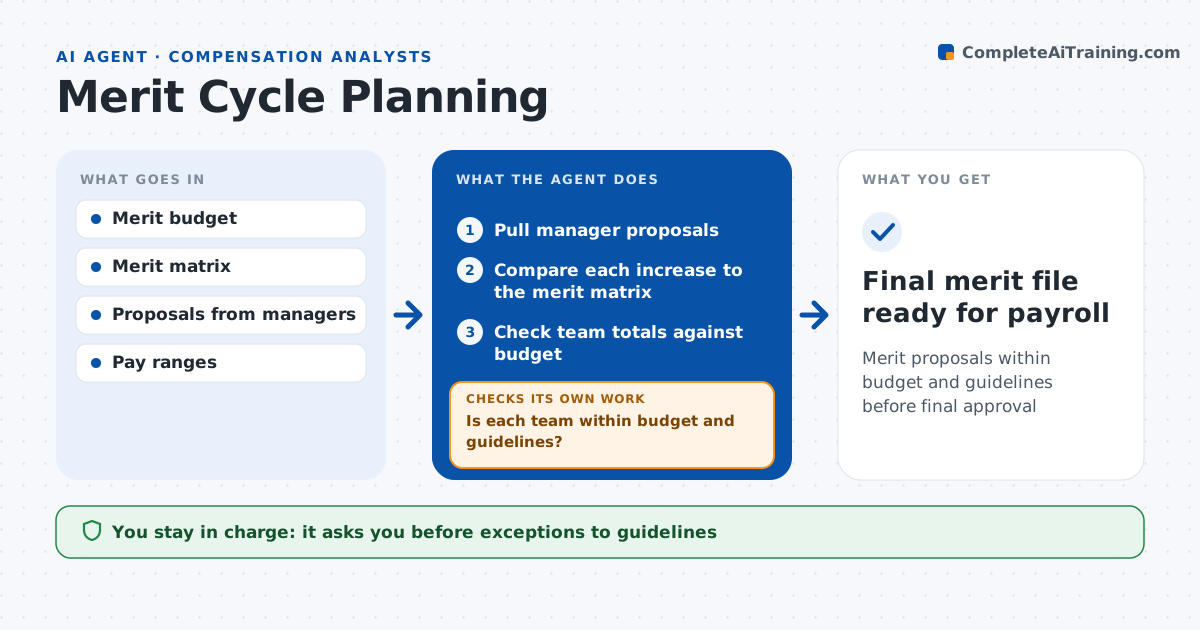
Merit proposals within budget and guidelines before final approval
What it does
Merit cycles go over budget or out of policy when proposals are checked only at the end. During the cycle, this agent checks every manager's proposals as they come in. It compares each increase to the merit matrix by performance and position in range, checks the team total against the budget, and flags increases that push pay over range maximum. It drafts a note to each manager listing what is outside guidelines and why, and suggests a lump sum where pay would exceed the maximum. When managers revise, it rechecks. It rolls up totals for HR leaders by department. The analyst approves exceptions and the final file to payroll. Edge case: a manager gives a 0% increase to a top performer, so the agent flags it as a likely error.
How it works
Follow the arrows from top to bottom. The orange dashed arrow is the loop: when a check fails, the agent goes back and tries again.
Read the steps as a list
- Merit planning window opens
- Pull manager proposals
- Compare each increase to the merit matrix
- Check team totals against budget
- Is each team within budget and guidelines?If not: send the manager a list of issues and recheck the revision. Back to step 3.
- Analyst approves exceptions and final fileThe agent waits here for your OK.
- Final merit file ready for payroll
How it decides
It compares each increase to the matrix band and the team total to the budget, and flags any outlier.
- Increase outside matrix band by over 1 point: needs reason
- Team over budget by over 0.2%: return to manager
- Pay over range maximum: suggest lump sum instead
Make it yours
Every agent is a starting point. You choose these settings for your own situation.
- Merit matrix
- Budget tolerance
- Range maximum policy
- Daily report time
What keeps you in control
It always asks you first
- Exceptions to guidelines
- Final merit file
Hard limits
- Never changes proposals itself
- Never sends files to payroll without approval
It stops when
- Done: all teams approved
- Stop: budget not set
Set it up
We guide you through the set-up, step by step
Members get the full set-up guide for this agent. No technical skills needed: you copy, paste and upload.
- One set of instructions to paste into your AI, with the clicks for ChatGPT, Claude, Microsoft 365 Copilot, Gemini and Grok
- The agent then walks you through connecting your own data, one source at a time
- A downloadable copy with the flow chart, the rules and the full guide